MDM + Jira Service Management: The complete integration guide
Learn how to integrate Intune, Jamf, and Iru with Jira Service Management to centralize device data, automate compliance, and resolve tickets faster.

Colin Reed
IT Expert and Content Writer
Last Updated

Managing a modern IT fleet often feels like trying to assemble a puzzle while someone is constantly adding new pieces. You have devices coming in, employees moving roles, and security policies changing every week.
You can think of your IT infrastructure as a massive library where the books are constantly moving. Every laptop, phone, and tablet is a volume that needs to be tracked. If your library catalog (Jira Service Management) doesn't talk to your security sensors (MDM), you are essentially running through the aisles blindfolded every time a support ticket comes in.
Integrating your Mobile Device Management (MDM) platform with Jira Service Management (JSM) is the only way to create a live, accurate inventory that actually helps you solve problems. Without this connection, your team wastes time chasing serial numbers and specs that should be right in front of them.
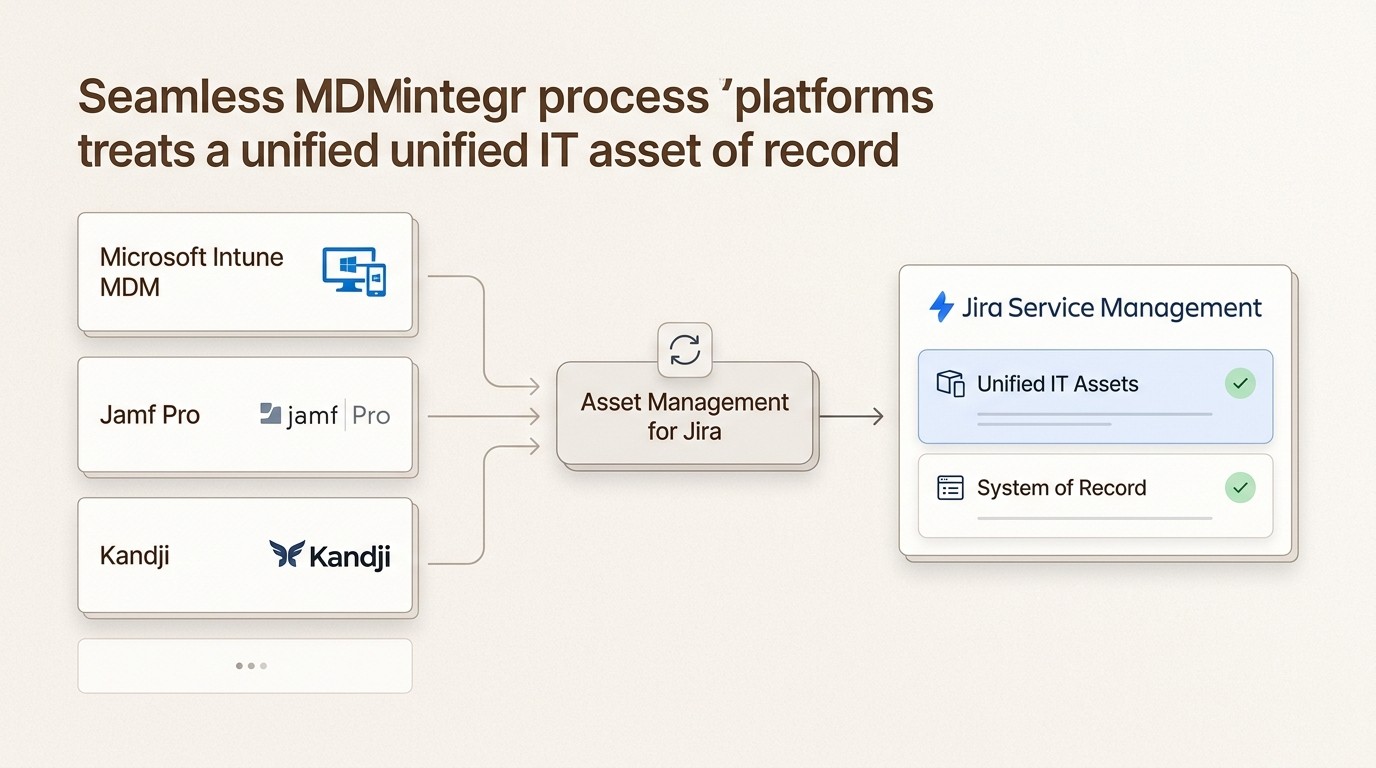
We built Asset Management for Jira (AMFJ) to solve this specific frustration. It acts as the "simply powerful" bridge that pulls your live device data into Jira so you can stop switching tabs and start resolving issues.
Why MDM and Jira Service Management belong together
Most IT teams manage their assets in a silo. You have your MDM console for security and your Jira instance for support. The problem is that these two worlds rarely share data effectively. When they are disconnected, you end up with "data decay" where your asset spreadsheets are outdated the moment you hit save.
The ROI of bridging this gap is massive. Research shows that teams with integrated asset data resolve tickets 34% faster and reduce the time spent gathering basic device information by 96%. For a typical 500-employee company, that translates to roughly $143,000 in annual labor savings.
Having your MDM data inside Jira allows for what we call the "HR + IT + Device" trifecta. By connecting your user directory (like Entra ID) with your device management (Intune, Jamf, or Kandji), you create a single source of truth. This means that when an employee joins or leaves, every piece of hardware and every software license is tracked automatically through the entire lifecycle.
The three integration paths: Intune, Jamf, and Kandji
Choosing an MDM is a strategic decision that dictates how you will manage your fleet for years. Whether you use Microsoft Intune, Jamf Pro, or Kandji (now Iru), the goal for your Jira integration remains the same: context.
Microsoft Intune: The unified management standard
Microsoft Intune is the default choice for organizations that are already deeply embedded in the Microsoft 365 ecosystem. It provides a unified console to manage Windows, macOS, iOS, Android, and even Linux devices.
The biggest advantage of Intune is its native integration with Entra ID and Conditional Access. You can set a policy that says "No Mac can access Outlook unless it has FileVault enabled," and Intune will enforce it. For Jira users, Intune integration means seeing these compliance signals directly on the support ticket.
However, Intune has a known "polling gap." Unlike Apple-first tools that maintain a persistent connection, Intune often relies on check-in intervals that can take hours. If a user fixes an issue, it might not reflect in Jira for some time. Despite this, for shops looking to consolidate costs, it is hard to beat.
Jamf Pro: The gold standard for Apple fleets
If your fleet is primarily made of Macs and iPads, Jamf Pro is usually the top contender. It has been the industry standard for two decades because of its sheer depth.
Jamf relies on "Extension Attributes" and "Smart Groups" to manage devices. This allows you to write custom scripts to track almost anything from the specific version of a hidden config file to the exact cycle count of a MacBook battery. When you integrate Jamf with Jira, this level of detail is passed through to your support agents, giving them "superpowers" for troubleshooting.
The trade-off is complexity. Jamf requires a dedicated Mac administrator to get the most out of it. It is a powerful tool, but it isn't "set it and forget it." For large enterprises with 500 or more Apple devices, the complexity is worth the control you get in return.
Kandji (Iru): The modern automation choice
Kandji (recently rebranded as Iru) takes a different approach. While Jamf focuses on scripting, Iru focuses on "Blueprints." You define the state you want a device to be in, and the platform uses AI-driven remediation to keep it that way.
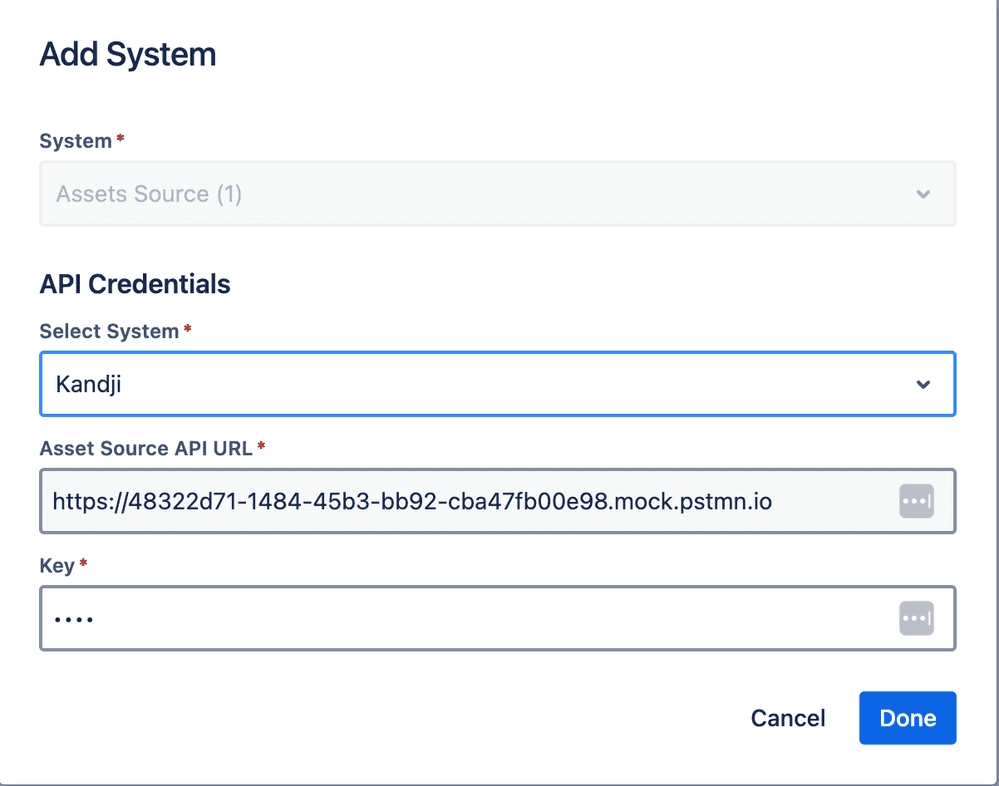
Iru is particularly popular with fast-growing companies that need to pass audits like SOC 2 or ISO 27001 quickly. It includes one-click compliance templates that secure your fleet in minutes. The integration with Jira is equally streamlined, focusing on making data actionable without requiring complex mapping.
Following their rebrand to Iru, they have expanded into a unified platform that covers identity, endpoint management, and security. If you want to collapse your stack and manage Apple and Windows from a single agent with minimal overhead, this is a strong path.
How to choose the right MDM for your Jira environment
Choosing between these three tools often comes down to what we call the "Administrator Test." You need to look at your team's capacity before you look at the tool's features.
The Scripting Test: Do you have a full-time Mac admin who loves writing Bash and Python scripts? If yes, Jamf Pro will let them build a custom environment that no other tool can match.
The Automation Test: Do you have a lean IT team that needs the tool to do the heavy lifting? In this case, Kandji (Iru) is the better choice. Its Blueprint model is designed for speed and simplicity.
The Consolidation Test: Is your primary goal to have "one pane of glass" for Windows and Mac while keeping costs low? If you already have Microsoft 365, Intune is the logical starting point.
You should also consider your IT inventory management needs. Some organizations start with a basic tool like Apple Business Essentials, but they quickly outgrow it once they need to track third-party app patching or custom security policies. When you reach that ceiling, moving to a pro-grade MDM and choosing the right Jira plugin becomes a priority.
Beyond data sync: Turning MDM data into ITSM outcomes
The real magic happens after the data is synced. An integration isn't just about seeing a serial number in Jira; it's about what you can do with that information.
Contextual Support
Imagine a technician receives a ticket saying "My laptop is slow." In a traditional setup, they spend 45 minutes asking for the model, checking the RAM, and looking up the warranty. With a native Jira integration, they see instantly that the user is on a 2019 MacBook with only 8GB of RAM and a battery with 1,200 cycles. The resolution path (replacement) is clear in seconds.
Automated Compliance
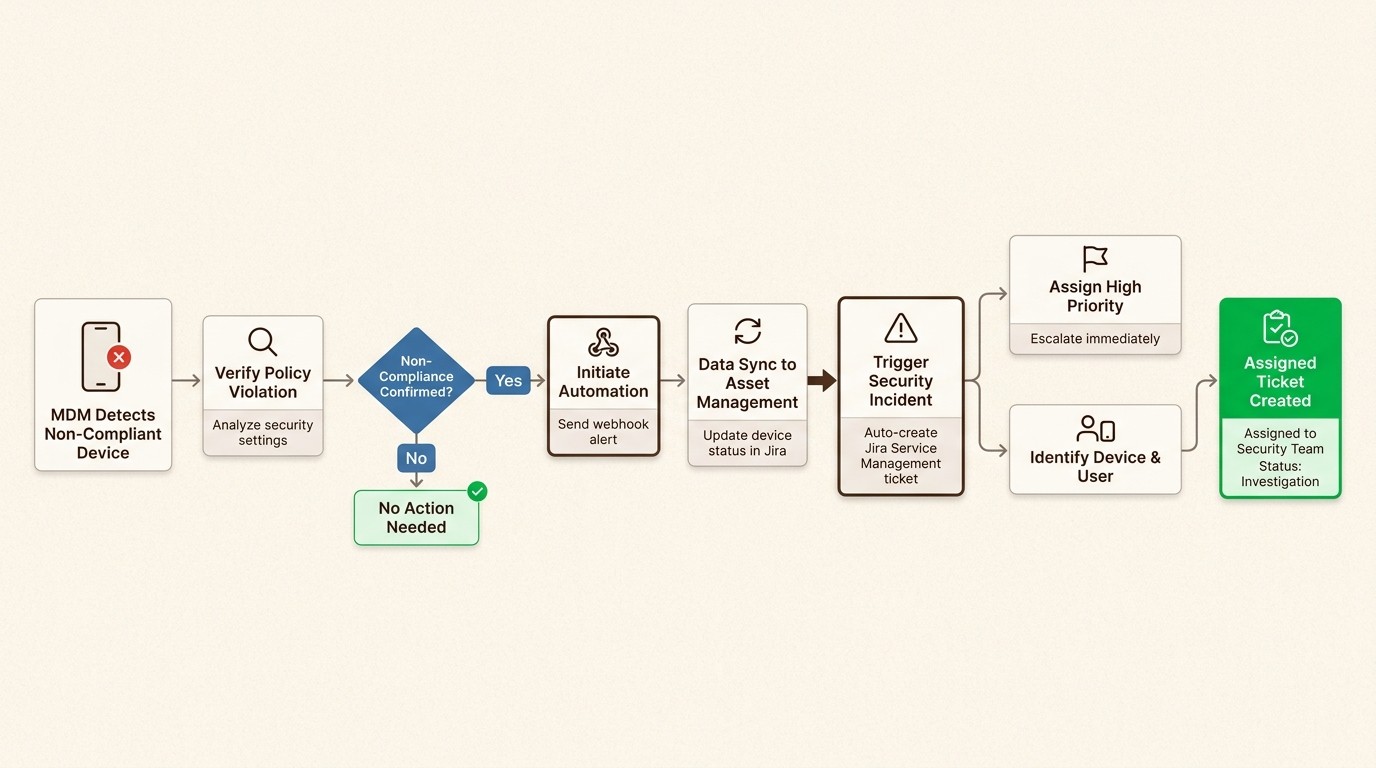
You can set up automation rules in Jira that trigger whenever a device falls out of compliance. If an MDM sync reveals that a laptop has disabled its disk encryption, Jira can automatically create a high-priority security incident and assign it to the security team. This turns your CMDB from a passive list into an active security tool.
Seamless Offboarding
Recovering equipment from departing employees is a major cost drain. Teams lose thousands of dollars every year in unreturned laptops. By integrating your MDM, you can automate your offboarding checklist. Jira can track exactly what was assigned to the user and confirm when it has been wiped and returned.
License Optimization
Many MDMs can report on the last time a specific piece of software was opened. By pulling this data into Jira, you can identify "SaaS sprawl." If you have 50 Adobe licenses but only 30 are being used, you can optimize your subscriptions and save thousands on your next renewal.
Comparing MDM costs and integration complexity
Budget is always a factor, but you have to look at the total cost of ownership, not just the monthly per-user fee.
MDM Platform | Estimated Monthly Cost | Integration Complexity | Best For |
|---|---|---|---|
Microsoft Intune | $8.00/user (Plan 1) | Medium | Mixed fleets & M365 shops |
Jamf Pro | ~$12.50/device | High | Large Apple fleets |
Kandji (Iru) | Custom (Quote) | Low | Fast growth & Automation |
One thing to keep in mind is the complexity of the Jira side of the integration. Atlassian's native "Assets" feature (formerly Insight) is powerful but requires a JSM Premium or Enterprise license. It also involves a steep learning curve for object mapping.
This is why many teams prefer Asset Management for Jira (AMFJ). It lives natively inside Jira, works with any license tier, and allows you to connect to Intune, Jamf, or Kandji in minutes rather than weeks.
Start automating your MDM + Jira Service Management integration today
The silos between your device data and your support tickets are costing you time and money. Every minute an agent spends hunting for a serial number is a minute they aren't solving a user's problem.
By bringing your MDM data into Jira Service Management, you eliminate context switching and create a single source of truth for your entire IT estate. Whether you choose the unified management of Intune, the deep Apple control of Jamf, or the AI-driven automation of Iru, the key is to make that data accessible where your team already works.
We invite you to see how simple this can be. You can connect your fleet and start seeing live device data in Jira today.
Start a free trial of Asset Management for Jira and turn your MDM data into actionable ITSM outcomes.
Frequently Asked Questions
How does MDM + Jira Service Management integration reduce support ticket volume?
The integration allows for self-service options and faster troubleshooting. When agents have immediate access to device history and specs, they can identify root causes like 'end-of-life hardware' without multiple back-and-forth interactions, which speeds up resolution and prevents follow-up tickets.
Is a JSM Premium license required for MDM + Jira Service Management integration?
If you use the native Atlassian 'Assets' feature, yes, you need a Premium or Enterprise license. However, if you use a native app like Asset Management for Jira (AMFJ), you can integrate your MDM data on any Jira license tier, including Standard.
Can I sync multiple MDMs into a single Jira instance?
Yes. Many organizations use a 'best of breed' approach, managing Macs in Jamf and Windows in Intune. A proper MDM + Jira Service Management integration can pull data from both sources into a single unified CMDB so you have a complete view of your entire fleet.
How does MDM + Jira Service Management integration help with SOC 2 compliance?
SOC 2 requires you to prove that all devices accessing company data are encrypted and managed. By syncing your MDM compliance signals into Jira, you create an automated audit trail that shows the real-time security posture of every asset in your fleet.
Does the integration support real-time data updates?
The speed of updates depends on the MDM's polling frequency. While tools like Jamf and Kandji are near-instant, Intune has check-in intervals. However, a good MDM + Jira Service Management integration ensures that Jira is updated as soon as the MDM records a change.
Can I track software licenses through the MDM + Jira Service Management integration?
Yes. Most MDMs report on installed applications. When this data is pulled into Jira, you can cross-reference installations with your purchase records to identify unused licenses and reduce software overspending.



