IT Asset Lifecycle Management: The Complete Guide for 2026
In this guide, we will break down the fundamental stages of managing your technology resources, explain why visibility is your most important asset, and show you how to move your lifecycle tracking out of spreadsheets and into where your team already works.

Colin Reed
IT Expert and Content Writer
Last Updated

Effective IT asset lifecycle management is the backbone of modern IT operations. Most organizations treat IT equipment like a one-time purchase, but the reality is that the purchase price is just the tip of the iceberg. From the moment you plan a new laptop fleet to the day those devices are securely wiped and recycled, every stage of the journey impacts your bottom line and your security posture.
What is IT asset lifecycle management?
IT Asset Lifecycle Management (ITALM) is the strategic process of managing an organization's technology resources, including hardware, software, and cloud assets, from initial planning through to final disposal. The goal is to maximize value, ensure security, and minimize the total cost of ownership (TCO) throughout the asset's useful life. For a broader look at how this fits into your overall strategy, see our comprehensive guide to Jira asset management.
We found that many organizations struggle with "asset sprawl" because they lack a single source of truth. When your procurement data lives in an ERP, your maintenance logs in a spreadsheet, and your support history in Jira, you lose the ability to make informed decisions. Proper IT Asset Lifecycle Management connects these silos, giving you a 360-degree view of every device you own.
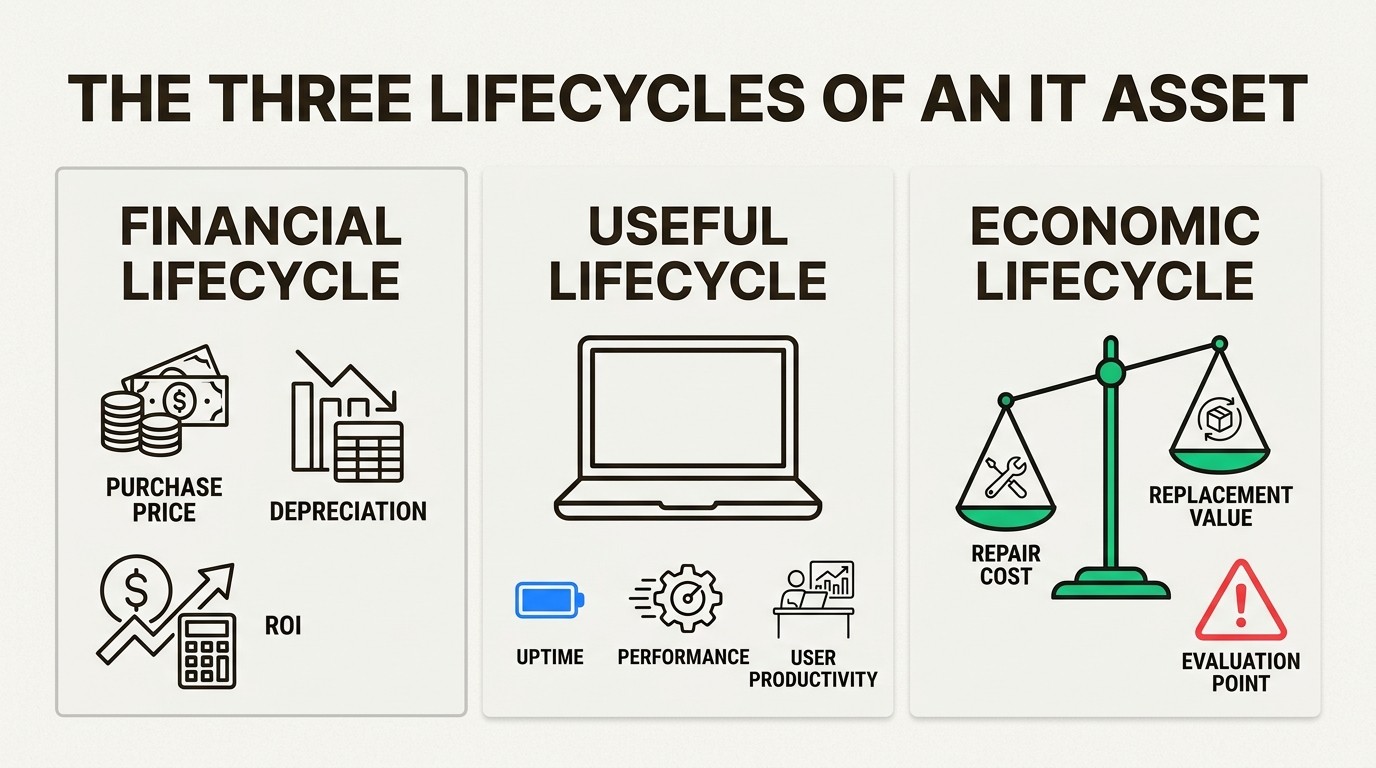
This process generally falls into three distinct lifecycles:
Financial Lifecycle: Tracking purchase costs, depreciation, and ROI.
Useful Lifecycle: Monitoring the period during which the asset provides value and remains operational.
Economic Lifecycle: Identifying the point where maintenance costs outweigh the value of keeping the asset in service.
By mastering all three, IT teams can move from reactive fire-fighting to proactive stewardship.
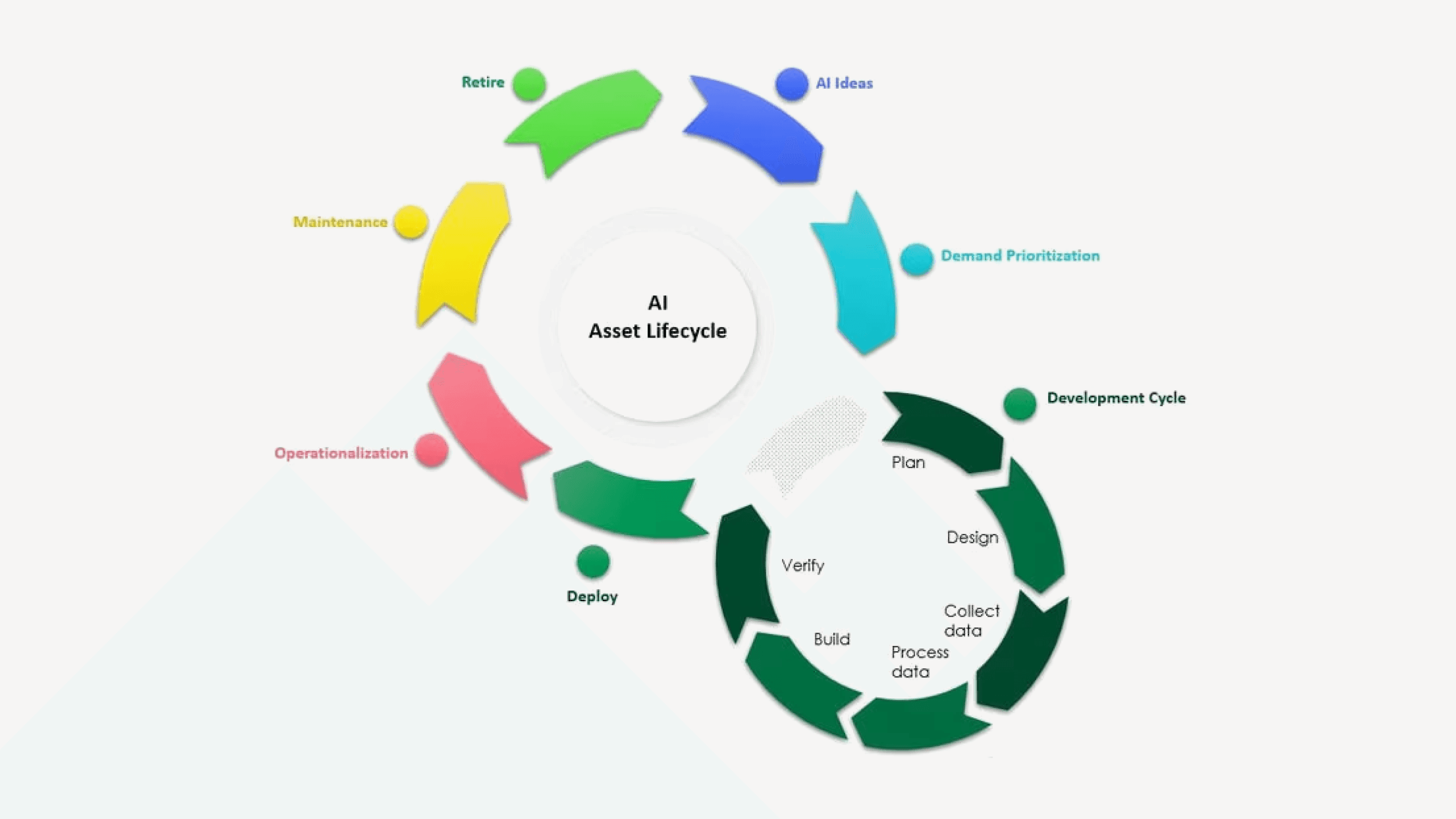
The 5 stages of the IT asset management lifecycle
Understanding the individual stages of the IT asset management lifecycle allows teams to identify bottlenecks and automate repetitive tasks. Here is how the process works from start to finish.
1. Planning and procurement
The lifecycle begins long before a device arrives at your office. Planning involves assessing business needs, forecasting growth, and setting budgets to avoid impulse purchases. This stage is critical because acquisition cost is typically only 20-30% of total lifetime spend for industrial and IT equipment. The remaining 70-80% is locked into operation and maintenance. For more on building a robust tracking foundation, read our comprehensive guide to IT asset inventory management.
A thorough needs assessment helps prevent "shadow IT," which occurs when employees make unauthorized technology purchases. For a deeper look at managing your subscription-based resources, see our practical guide to SaaS license management.
During procurement, we recommend evaluating vendors based on more than just the lowest price. Consider:
Warranty terms and support response times.
Compatibility with your existing MDM (Mobile Device Management) stack.
The vendor's ability to provide automated data feeds into your asset system.
2. Deployment and configuration
Once acquired, assets must be integrated into your environment. This includes physical tagging, software installation, and user provisioning. Proper deployment ensures that employees have the tools they need to be productive from day one.
Automated enrollment tools like Microsoft Intune have transformed this stage for mobile and laptop fleets. Instead of manually imaging every machine, IT teams can use zero-touch enrollment to ship devices directly to users. To understand how to leverage this for your team, read our overview on everything you need to know about Microsoft Intune Plan 1.
Key tasks in this phase include:
Recording serial numbers and asset tags in your central database.
Assigning the asset to a specific user and location.
Applying security protocols and mandatory software updates.
3. Operation and maintenance
This is the longest phase, representing the period where the asset provides value. It's also where most organizations lose visibility. According to research cited by InvGate, 82% of companies have experienced unplanned downtime in the last three years.
Regular maintenance can significantly extend asset lifespan and reduce emergency repair costs. This includes:
Proactive Patching: Ensuring OS and third-party apps are current.
Performance Monitoring: Identifying devices that are running slow before the user files a ticket.
Warranty Tracking: Ensuring you don't pay for repairs that are covered by the manufacturer.
4. Retirement and decommissioning
At some point, performance dips or maintenance costs become too high. An asset reaching its end-of-life poses a security risk if it lacks the latest patches. This is when the IT asset lifecycle management process triggers retirement.
Decommissioning involves more than just putting a laptop in a drawer. You must:
Archiving data and revoke user access permissions.
Reallocate any remaining software licenses to other users.
Document the condition of the asset upon return.
For teams managing remote employee departures, we have created an IT asset recovery offboarding checklist to ensure no hardware is left behind.
5. Secure disposal (ITAD)
The final stage is IT Asset Disposition (ITAD). This focuses on certified data destruction and environmentally responsible recycling. Improperly discarded devices are a major source of data breaches.
Secure disposal ensures compliance with regulations like GDPR and HIPAA through secure data wiping. Most organizations partner with a certified ITAD provider who can issue certificates of destruction.
Key benefits of a structured ITAM lifecycle
Implementing a formal strategy for IT asset lifecycle management delivers measurable results across your entire organization. Here is what you can expect:
Cost Efficiency: By eliminating redundant purchases and optimizing your maintenance schedule, a typical 500-employee company can save up to $250,000 annually.
Risk Mitigation: Proactive tracking and automated reminders can reduce lost equipment by up to 60%. When everyone knows which device they are responsible for, accountability increases.
Compliance and Audit Readiness: Having a complete audit trail of every asset change makes compliance reporting effortless. We have seen teams reduce their audit preparation time by 90% by having audit-ready documentation at their fingertips.
Faster Support Resolution: When your support team has instant access to device history and specs, they can resolve issues 34% faster.
Best practices for managing your IT assets in Jira
Most IT teams already live inside Jira for support tickets. Moving your IT asset lifecycle management into Jira is the most effective way to eliminate context switching and ensure your data stays current.
Native integration over external silos
We built Asset Management for Jira to be a truly native solution. This means your asset data isn't just "linked" from an external tool; it lives inside Jira. You can use asset fields in your JQL filters, gadgets, and automation rules.
When a user submits a ticket, our tool automatically links their assigned assets to the request. This gives your technicians immediate context, reducing information-gathering time by 96%.
Leveraging JQL for lifecycle reporting
One of the biggest advantages of a native Jira tool is the power of reporting. You can use Jira Query Language (JQL) to generate real-time reports on:
Assets approaching their warranty expiration date.
Devices that haven't been "seen" by Intune in more than 30 days.
Software licenses that are over-allocated.
For more tips on building these views, check out our straightforward guide to asset management reporting.
Automating lifecycle transitions
You can use Jira automation to handle the transitions between lifecycle stages. For example, when an "Onboarding" ticket is closed, the system can automatically change the asset status from "In Storage" to "Assigned" and trigger an email to the new user.
Feature | Benefit in Jira |
|---|---|
Bulk Importing | Quickly move from spreadsheets to Jira with automatic mapping |
QR Code Scanning | Lookup asset details on your mobile device during physical audits |
Intune Sync | Keep your Jira inventory current with automated daily device sync |
License Tracking | Monitor software compliance alongside your hardware |
Optimizing costs with the 75% repair-replace rule
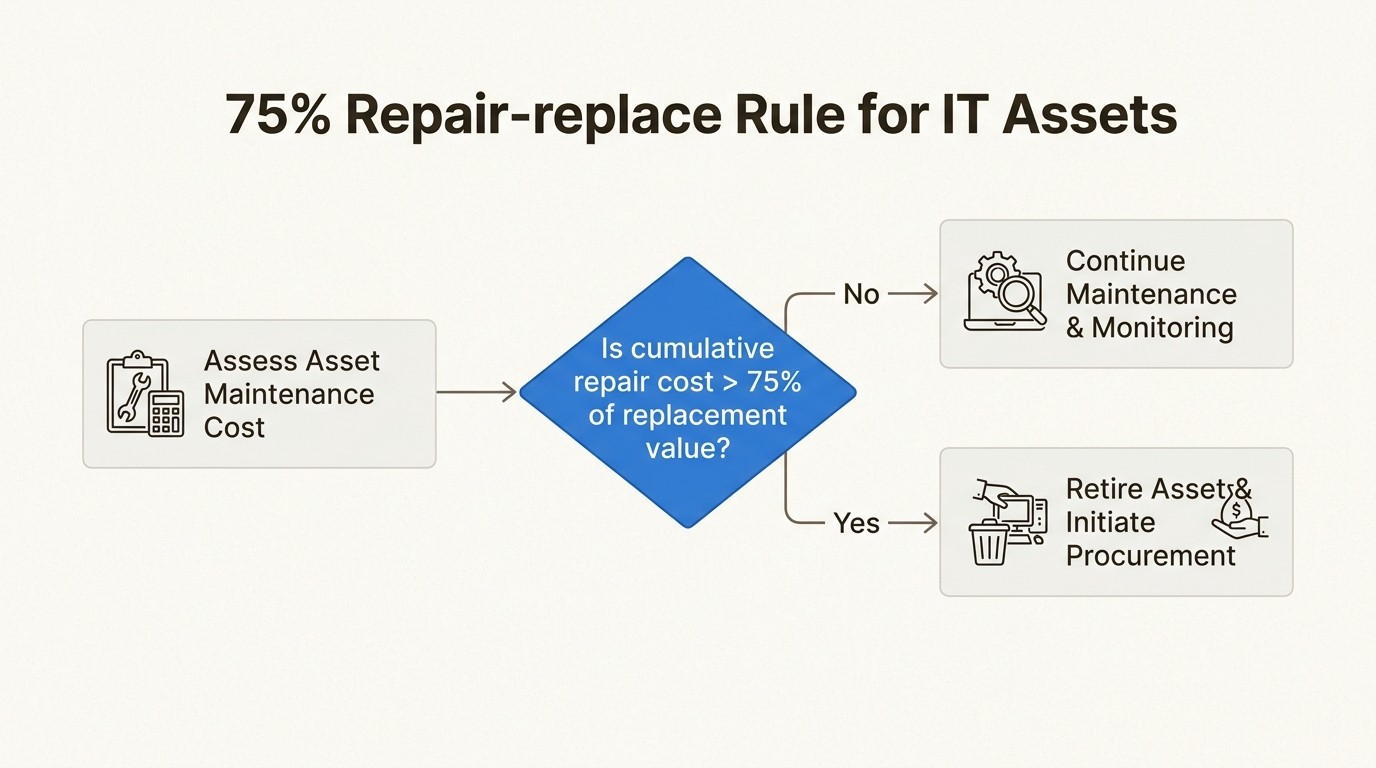
A critical data-driven decision in any IT asset lifecycle management strategy is knowing when to stop repairing a device and start replacing it. Many teams fall into the trap of "sunk cost" thinking, where they continue to fix aging laptops because they have already invested so much in them.
We recommend following the 75% Rule. When the cumulative maintenance spend on an asset reaches 75% of its current replacement value, replacement is almost always more cost-effective.
Beyond the raw repair costs, you should also monitor:
Mean Time Between Failures (MTBF): If the time between tickets for a specific device is shortening, it's a sign of degraded performance.
Energy Consumption: Aging hardware often uses 10-30% more energy than new models, which adds up at scale.
User Productivity: The cost of an employee sitting idle for two hours while a technician fixes a four-year-old laptop often exceeds the cost of a monthly lease for a new machine.
Start mastering your IT asset lifecycle today
Implementing a full lifecycle strategy doesn't have to be complex. The key is to start where you already work. By moving your IT asset lifecycle management into Jira, you gain the visibility needed to cut costs, reduce risks, and keep your team productive.
Our solution is designed to be "simply powerful," allowing you to get up and running in minutes rather than months. We offer a transparent pricing model that scales with your team, including a free 30-day trial with no credit card required.
Explore our features today and see how we can help you turn your IT assets from a cost center into a strategic advantage.
Frequently Asked Questions
What are the main benefits of IT asset lifecycle management for SMBs?
The primary benefits of IT asset lifecycle management include significant cost savings by eliminating redundant purchases, reduced security risks through better device tracking, and improved operational efficiency by providing support teams with instant device context.
How does IT asset lifecycle management help with software audits?
Effective IT asset lifecycle management maintains an audit-ready trail of every software license, installation, and user assignment. This documentation can reduce the risk of audit penalties by up to 94% by proving compliance in minutes rather than weeks.
Can we automate IT asset lifecycle management within Jira?
Yes, using a native tool like Asset Management for Jira allows you to use Jira automation to trigger status changes, alerts for warranty expirations, and offboarding workflows, making IT asset lifecycle management a seamless part of your existing ticketing process.
When should I replace a device according to IT asset lifecycle management best practices?
Best practices in IT asset lifecycle management suggest using the 75% rule: if the total cost of repairs exceeds 75% of the replacement value, it's time to retire the asset. You should also consider declining performance trends and rising energy use.
Is IT asset lifecycle management expensive to implement?
Not necessarily. While enterprise systems can be complex, a native Jira solution for IT asset lifecycle management often pays for itself within 2-4 months through recovered 'ghost' assets and reduced maintenance labor.
What role does Intune play in IT asset lifecycle management?
Microsoft Intune provides the technical layer for the deployment and maintenance stages of IT asset lifecycle management, allowing for zero-touch provisioning and automated security patching that syncs directly with your inventory.