Microsoft Intune Pricing: A No-Nonsense Breakdown for 2026
Considering Microsoft Intune? We break down the real costs behind the official pricing. Explore the plans, add-ons, and how to maximize your ROI in 2026.

Colin Reed
IT Expert and Content Writer
Last Updated
This post is a straightforward look at Microsoft Intune pricing. We're going to go beyond the marketing materials to show you what you get, what it will actually cost, and how to make sure you're getting your money's worth. Picking a Mobile Device Management (MDM) solution is a major decision, and understanding the price tag is the first step. A recent Forrester study highlights the potential for a great return on investment, but only if you know what you're spending from the start.
What is Microsoft Intune?
Simply put, Microsoft Intune is a cloud-based endpoint management solution that helps manage user access and simplify app and device management across your company. Think of it as the command center for every laptop, phone, and tablet that connects to your company's data.
It's designed to tackle the main challenges of a modern workplace: keeping company data safe on both corporate-owned and personal (BYOD) devices, enforcing security rules from anywhere, and deploying apps without having to physically touch a machine. It's a big piece of a Zero Trust security model, where you verify everything and assume a breach could happen rather than just trusting devices by default.
Intune is deeply integrated into the Microsoft 365 ecosystem, working closely with tools like Microsoft Entra ID (formerly Azure Active Directory). It's Microsoft's solution for managing a workforce that's split between the office and home. It supports a whole range of operating systems, including Windows, macOS, iOS/iPadOS, Android, and even Linux Ubuntu Desktop, so it can handle a mixed bag of devices.
Official Microsoft Intune pricing plans
Microsoft has a tiered subscription model that looks simple at first glance, but the real value is hidden in the details. The trick is to understand what's included in each plan versus what you'll have to purchase as an add-on.
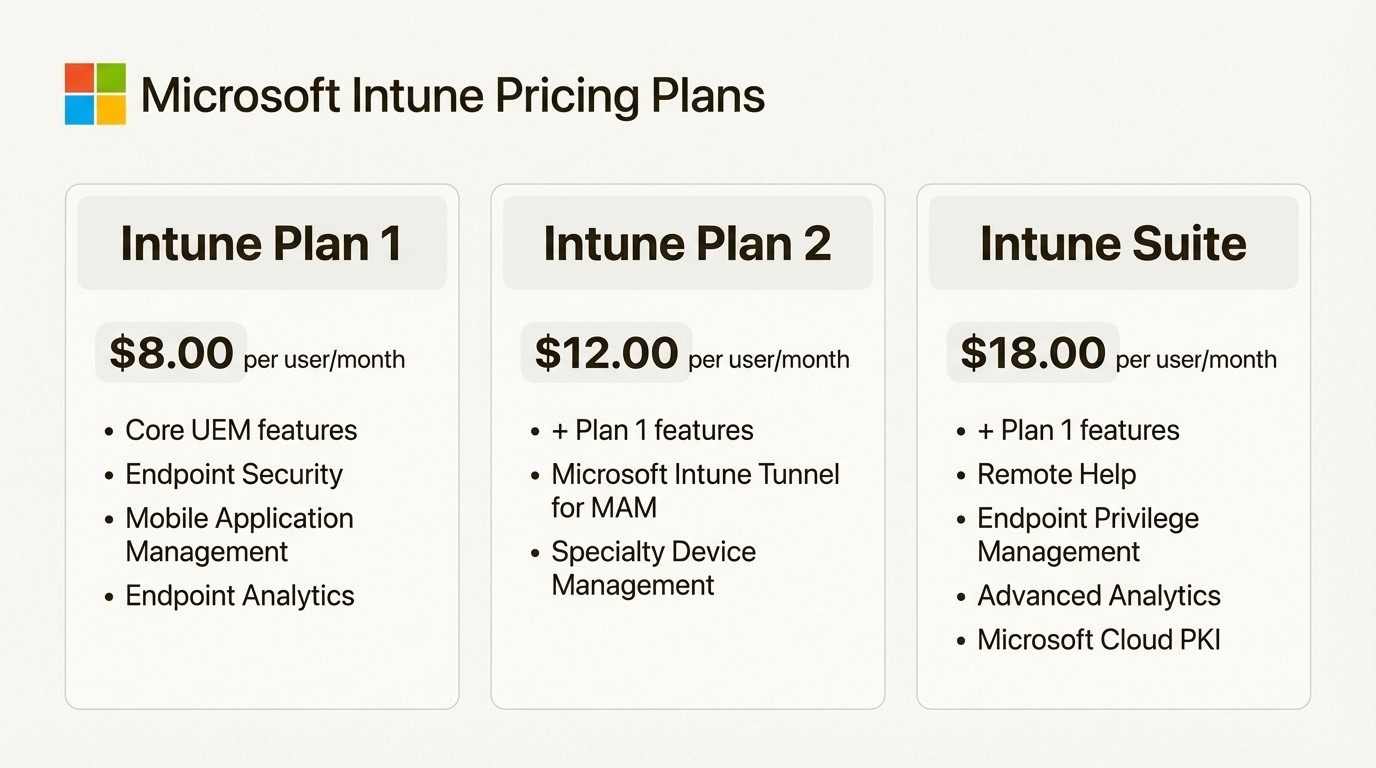
Let's break down the three main options based on the official pricing page.
Microsoft Intune Plan 1
Cost: $8.00 per user/month.
Who it's for: Companies that need the core features of a unified endpoint management (UEM) solution. This is your starting point.
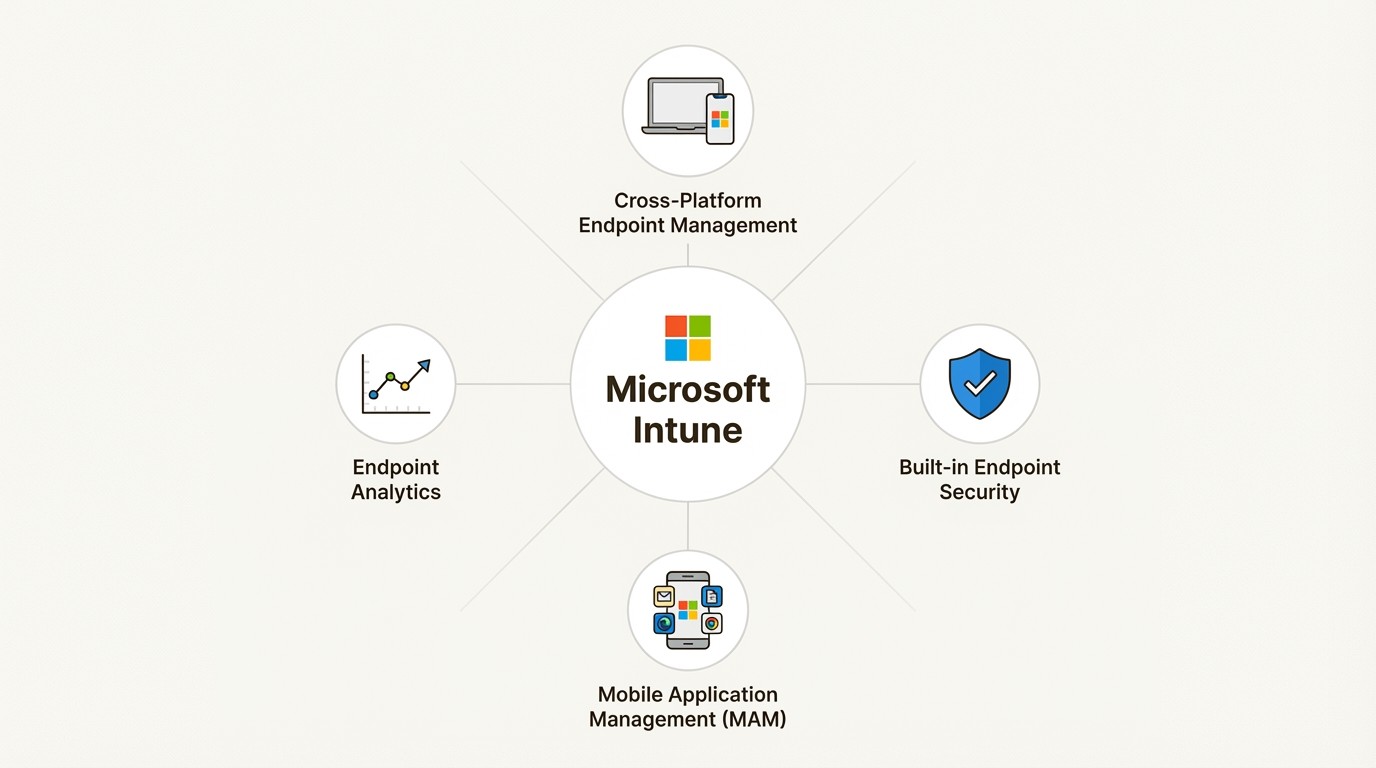
Key Features: This plan covers the basics: cross-platform endpoint management, built-in endpoint security, mobile application management (MAM) to protect data inside apps, and endpoint analytics to see how devices are performing.
Important Note: Here's the key detail. This plan is already part of many popular Microsoft 365 subscriptions, like Business Premium, E3, and E5. If you're already using Microsoft 365, you might already be paying for this, which makes it a really attractive and affordable base.
Microsoft Intune Plan 2
Cost: An extra $4.00 per user/month on top of Plan 1.
Who it's for: Teams with special devices or security needs that go beyond the standard features.
Key Features: So what does the extra four bucks get you? This plan adds advanced tools like Microsoft Intune Tunnel for MAM, which is basically a light VPN for personal devices that aren't fully managed. It also adds management for specialty devices, like VR headsets or shared conference room gear. It's the upgrade you need for those edge cases.
Microsoft Intune Suite
Cost: An extra $10.00 per user/month on top of Plan 1, making the total around $18 per user/month.
Who it's for: Large companies that are all-in on the Microsoft security stack and need its most advanced capabilities.
Key Features: This is the premium bundle. It includes powerful tools like Remote Help, Endpoint Privilege Management, Advanced Endpoint Analytics, Enterprise App Management, and Microsoft Cloud PKI. This suite is where Microsoft puts its best endpoint tools, but it comes with a hefty price increase.
Here's a quick summary of how the plans stack up.
Plan | Base Cost (per user/month) | Total Cost (per user/month) | Best For |
|---|---|---|---|
Intune Plan 1 | $8.00 | $8.00 | Core endpoint management, often bundled in M365 licenses. |
Intune Plan 2 | $8.00 (Plan 1) + $4.00 | $12.00 | Organizations with specialty devices or needing mobile VPN. |
Intune Suite | $8.00 (Plan 1) + $10.00 | $18.00 | Enterprises needing advanced security and analytics. |
Hidden costs and limitations of the Microsoft Intune pricing model
The official license price is just the beginning. The real total cost of ownership shows up when you consider ecosystem dependencies, how complex it is to run, and what's not included out of the box.
Ecosystem dependency
Intune isn't a standalone tool. To get its best features, you have to lean heavily on other Microsoft services. For instance, key functions like conditional access policies and co-management auto-enrollment require certain Microsoft Entra ID licenses.
This isn't automatically a bad thing, but it is a strategic choice. When you commit to Intune, you're often committing more deeply to the whole Microsoft stack. That can be a smart move, but it can also make it harder to change direction later on and lead to vendor lock-in.
The add-on pricing model
While the Intune Suite bundles many advanced features together, Microsoft also sells several of them as individual add-ons. This can make budgeting more complex, especially if you only need one or two of the features from the full suite.
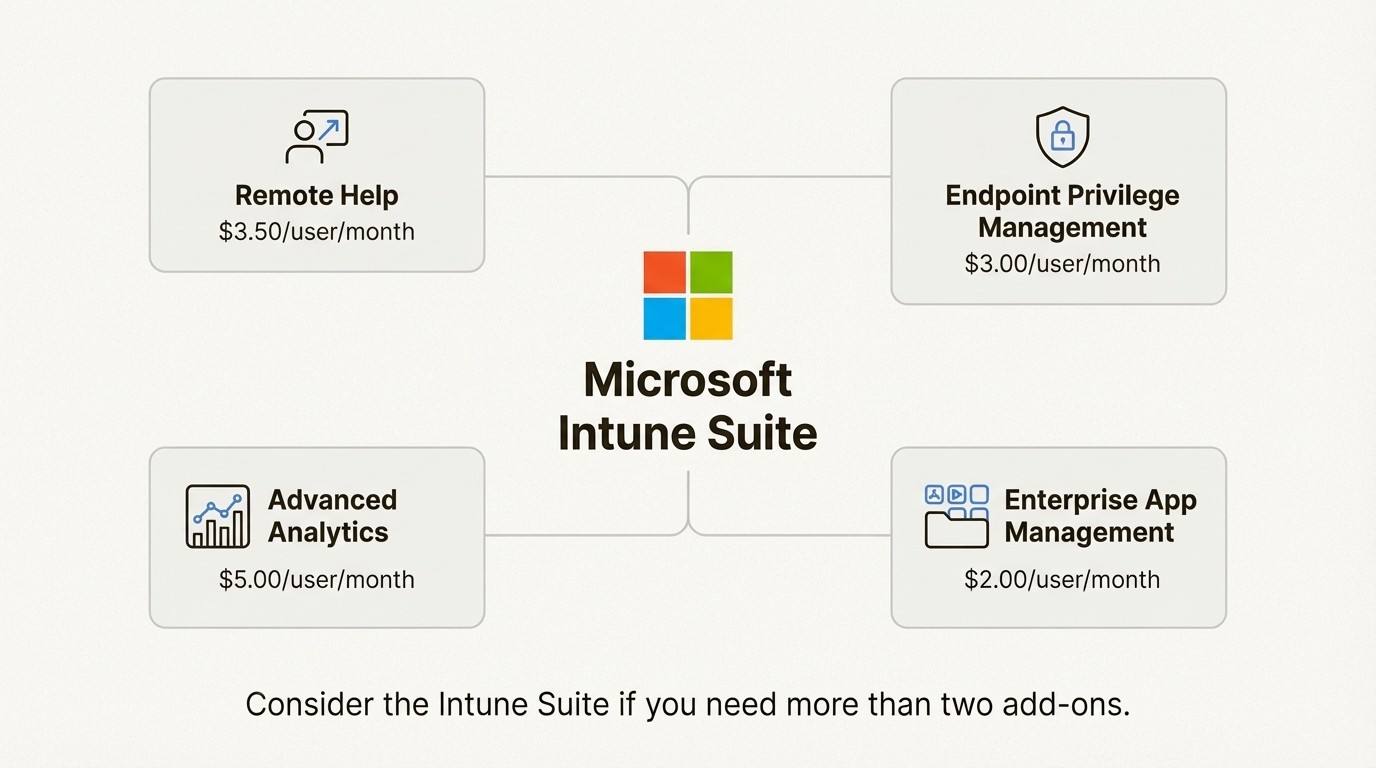
Here are a few examples with their standalone pricing:
Remote Help: $3.50/user/month
Endpoint Privilege Management: $3.00/user/month
Advanced Analytics: $5.00/user/month
Enterprise App Management: $2.00/user/month
This à la carte approach means costs can add up quickly. If your team needs more than two of these, the Intune Suite usually becomes the cheaper option. This is a common bundling strategy.
Setup and management complexity
Intune is a powerful tool, and with that power comes complexity. People in the industry often point to the complex initial setup, especially if you're mixing it with existing systems or managing a lot of non-Windows devices.
This isn't just about license fees; it's about the hidden cost of your team's time. Getting the most from Intune's advanced features often takes special skills and training. You have to account for the hours needed for implementation, training, and day-to-day administration to keep the platform running smoothly.
Getting value from Microsoft Intune: Connecting device data to your service desk
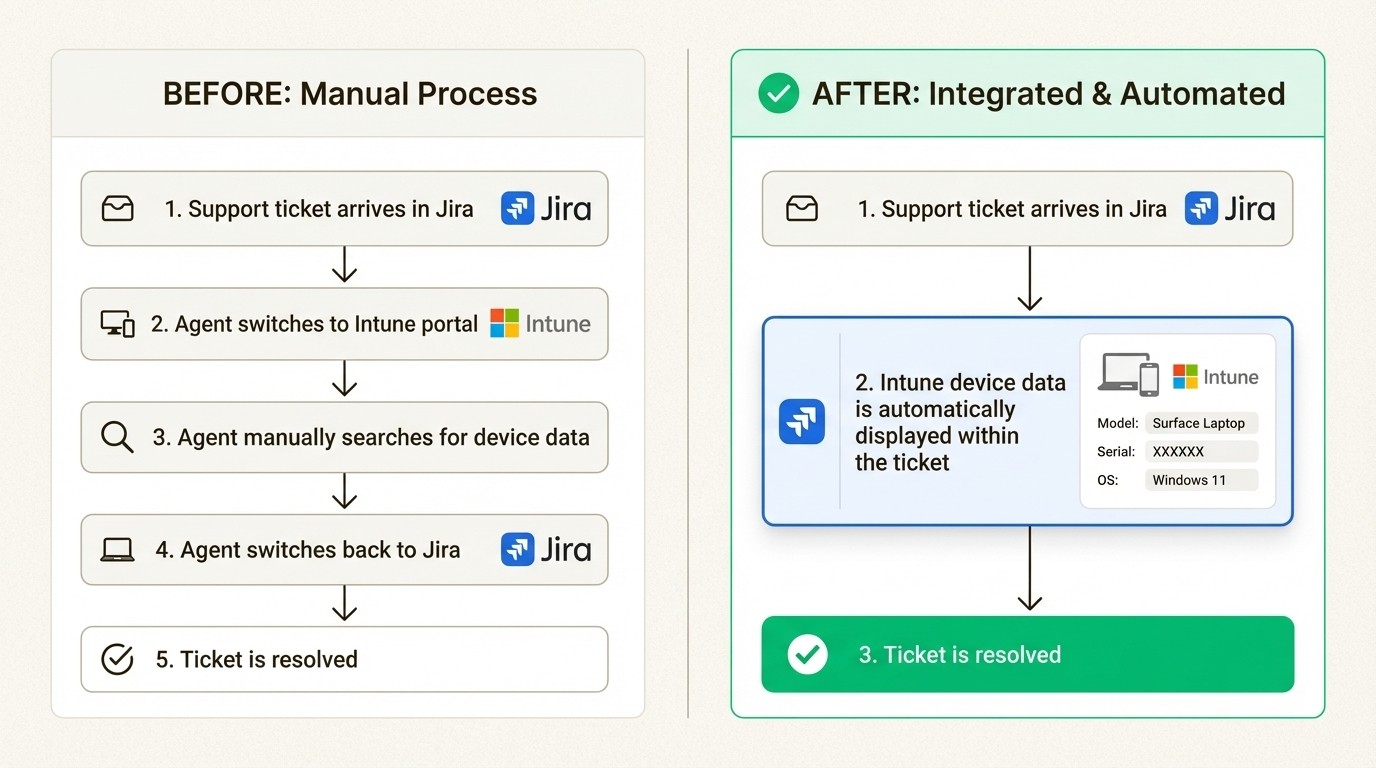
Let's get practical. Intune is great for managing devices, but it also creates a new silo of really useful data. The problem is your IT support team spends their day in their service desk—which for many is Jira—not the Intune admin center.
When a support ticket comes in, what usually happens? Your agent has to stop, switch from Jira to Intune, and manually search for the user's device information. This constant app-switching can reduce productivity. This manual lookup can take up to 45 minutes per ticket.
Bridging the gap with native Jira integration
This approach helps maximize the return on an Intune investment. The key is making its data useful right where your team works. An app like Asset Management for Jira was built to solve this exact problem.
The direct integration with Microsoft Intune automatically syncs important device data—like model, serial number, OS version, and assigned user—and attaches it right to the Jira ticket. As one IT Director said, "If you are looking for an asset management system that not only integrates into Jira, but also integrates into Microsoft Intune then look no further."
The benefit is that your support agent gets a full picture of the user's hardware without ever leaving Jira. This integration can speed up ticket resolution by 34%. This can lead to a significant improvement in team efficiency.
Creating a single source of truth in Jira
This is about more than saving a few clicks; it's about building a single, unified record for every asset. The integration enriches the raw device data from Intune with context from Jira—ticket history, maintenance logs, warranty info, and more.
This allows teams to spot trends that were previously difficult to see. You might see that "this specific laptop model has had 5 support tickets in the last 6 months" and make a data-driven choice to replace it instead of pouring more time into repairs. This is how you shift from reactive support to proactive asset management, which helps IT managers and CIOs optimize costs and reduce risk.
For a visual breakdown of the different plans and how they compare, the video below offers a helpful overview of the licensing options available and what to consider when choosing the right tier for your organization.
This video offers a helpful overview of the Microsoft Intune licensing options available.
Is Microsoft Intune pricing worth it?
Microsoft Intune is a solid, enterprise-level UEM solution, but its pricing is far from simple. The real cost includes dependencies on the wider Microsoft ecosystem and the operational effort needed to manage it well.
It's most valuable for organizations already deep into Microsoft 365, especially those with E3, E5, or Business Premium licenses that already include Intune Plan 1. For them, it's a natural and powerful addition.
In the end, whether Intune is worth the price comes down to how well you can weave its data into your daily work. A tool is only as good as its adoption, and making its data easily accessible to your frontline teams is how you unlock its true potential.
To truly get the value out of your Intune data and streamline your support operations, you need to bring that information into Jira. See how Asset Management for Jira syncs with Intune to give your team the context they need to resolve tickets 34% faster. Start a free 30-day trial.
Frequently Asked Questions
What is included in the basic Microsoft Intune pricing for Plan 1?
The basic Microsoft Intune pricing for Plan 1 is $8.00 per user/month. It covers core endpoint management for various platforms (Windows, macOS, iOS, Android), built-in security features, mobile app management, and endpoint analytics. It's often [already included in Microsoft 365](https://learn.microsoft.com/en-us/answers/questions/1292023/microsoft-365-and-microsoft-intune-subscription-fe) Business Premium, E3, and E5 licenses.
How do add-ons affect the overall Microsoft Intune pricing?
Add-ons can significantly increase the total cost. While the Intune Suite bundles many advanced features for an extra $10/user/month, you can also buy them individually. For example, Remote Help costs $3.50 and Endpoint Privilege Management is $3.00. If you need several of these, the Suite is usually the better deal, but it's important to budget for these extras.
Is there a per-device option for Microsoft Intune pricing?
Yes, but the primary model is per-user. A single user license covers up to 15 devices. Microsoft does offer [device-only licenses](https://learn.microsoft.com/en-us/answers/questions/1387877/microsoft-intune-plan-1-device-vs-microsoft-intune), which are useful for shared assets like kiosks or conference room devices, but they come with some functional limitations compared to the user-based licenses.
Does the Microsoft Intune pricing require other Microsoft subscriptions to be fully effective?
To a large extent, yes. To use some of Intune's most powerful features, like conditional access policies, you'll need a Microsoft Entra ID P1 or P2 license. This dependency means the true cost involves being more deeply integrated into the Microsoft ecosystem.
How can I justify the Microsoft Intune pricing to my management?
The best way to justify the cost is by showing a clear return on investment (ROI). While Intune manages devices, its real value is unlocked when you integrate that device data into your daily IT workflows, like your Jira service desk. By connecting Intune to Jira with an app like Asset Management for Jira, you can speed up ticket resolution times and move from reactive fixes to proactive asset management, which saves time and money.
What's the main difference in the Microsoft Intune pricing between Plan 1 and Plan 2?
Plan 1 is the foundation for core endpoint management. Plan 2 is an add-on that costs an extra $4.00 per user/month and is for more specialized needs. It adds features like Microsoft Intune Tunnel (a light VPN for personal devices) and management for specialty devices like VR headsets. You'd only need Plan 2 for those specific use cases.



