Everything You Need to Know About Microsoft Intune Plan 1
Complete guide to Microsoft Intune Plan 1. Learn what's included, pricing, user vs device licensing, and how to connect Intune data to Jira

Colin Reed
IT Expert and Content Writer
Last Updated
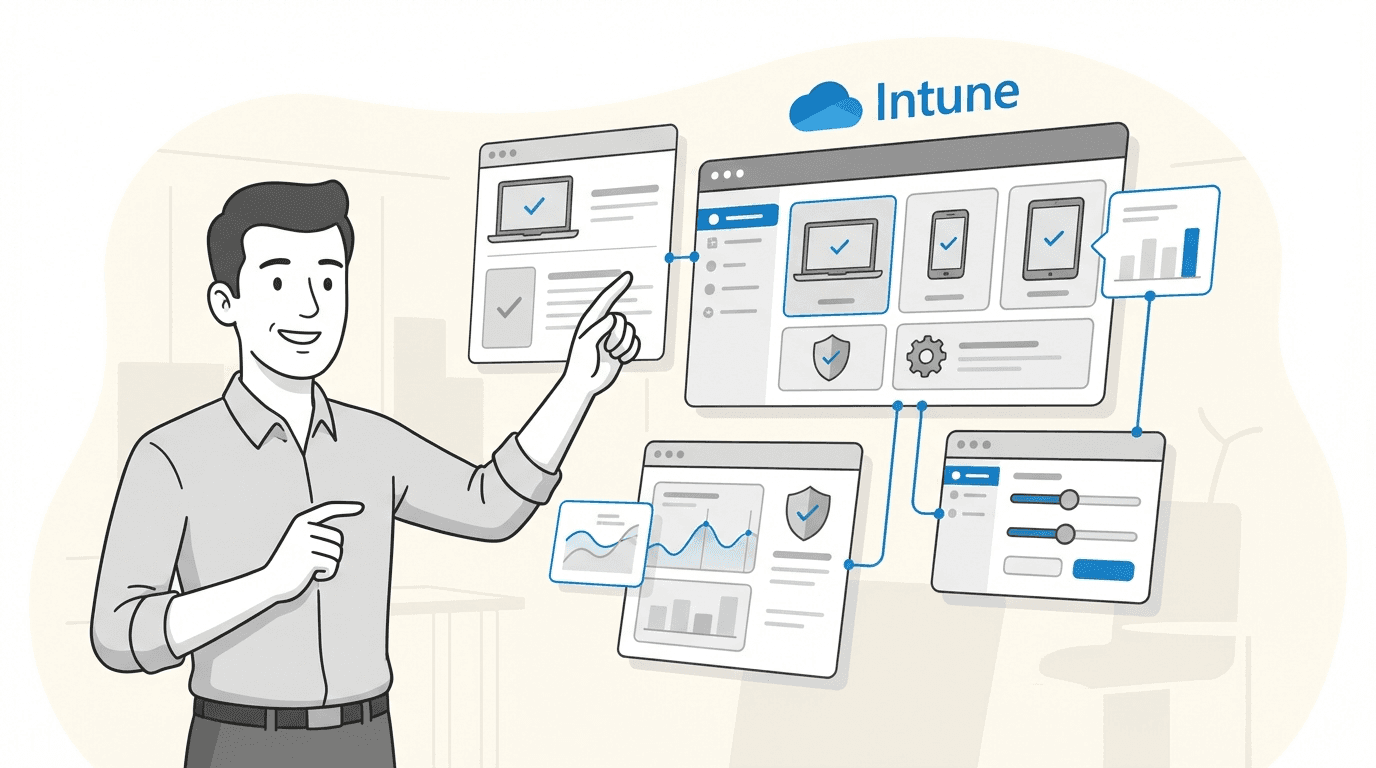
If you're an IT pro, you know the drill: juggling a dozen tools just to keep the lights on. One of the big ones for managing company devices is Microsoft Intune. It's a beast for endpoint management, but figuring out Microsoft's licensing? That can feel like trying to assemble furniture with instructions written in another language.
You’ve probably come across Microsoft Intune Plan 1 and wondered, "Okay, what's really in the box? Is this what we need, or am I going to hit a paywall?"
You're in the right place. We're going to break down exactly what you get with Microsoft Intune Plan 1, what its licensing options mean, and which features you'll have to pay extra for. Additionally, we'll explore how to connect this device data from Intune with your support team's workflow in Jira.
What is Microsoft Intune?
Before we get into the different plans, let's make sure we're on the same page. In a nutshell, Microsoft Intune is a cloud tool that lets IT admins look after all the devices that access your company’s resources. As Microsoft likes to say, it helps you strengthen device security and make hybrid work actually work. This covers everything from company-owned laptops and phones to the personal devices employees use for work (the whole BYOD scene).
What does that mean in practice? Well, with Intune, you can:
Manage devices: Set up security policies, tweak settings, and make sure every device is compliant with company rules, whether it’s running Windows, macOS, iOS, or Android.
Manage apps: Push out new apps, update existing ones, and remove them when needed. You can also protect company data inside those apps.
Manage user access: Control who gets to see company data and resources, ensuring only the right people on secure devices can get in.
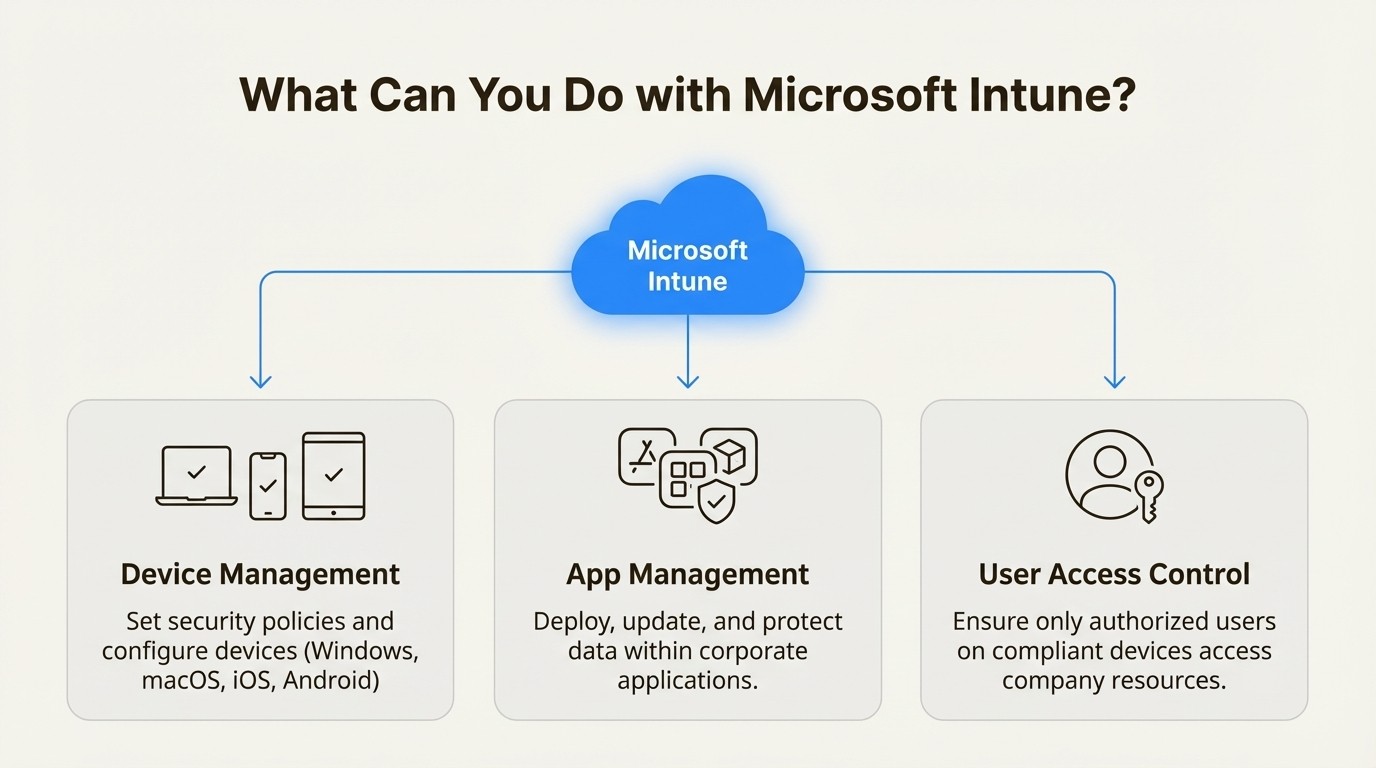
It’s all about giving your team the freedom to work from anywhere while keeping your company’s data locked down, without needing any on-premise servers.
An overview of Microsoft Intune Plan 1
Think of Microsoft Intune Plan 1 as the starting point for most people. It's the standard package that comes with many popular Microsoft 365 subscriptions, so you might already have it without even realizing it. It gives you all the core tools most organizations need to get going with modern device management.
Core features of Microsoft Intune Plan 1
So what do you actually get for your money (or as part of your bundle)? Plan 1 is built to handle the essentials of endpoint management and security from one web-based admin center.
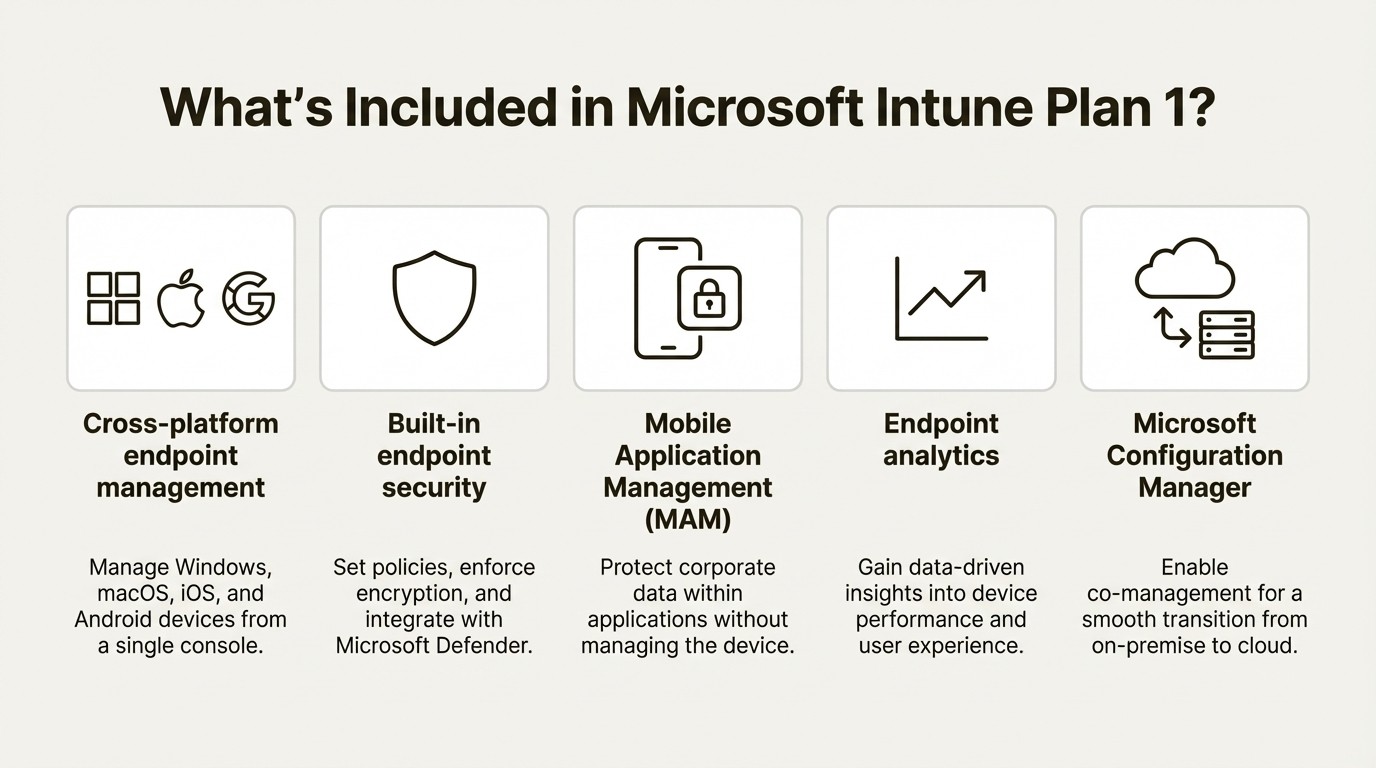
According to Microsoft, Plan 1 includes these core capabilities:
Cross-platform endpoint management: This is the bread and butter of Intune. You can manage a whole fleet of devices, whether they’re running Windows, macOS, iOS/iPadOS, or Android. It lets you enroll devices, push out configuration profiles, and apply security policies from one spot.
Built-in endpoint security: You can set up security baselines and policies to protect your devices. This covers things like enforcing encryption, setting password rules, and hooking into Microsoft Defender for Endpoint to fight off threats.
Mobile Application Management (MAM): This is a huge one, especially if your company has a BYOD policy. MAM lets you protect corporate data at the app level. You can stop users from copying sensitive data from a work app (like Outlook) into a personal app (like a notes app), without needing to take over their entire personal device.
Endpoint analytics: Intune provides data-driven insights into how your devices are performing. You can spot trends, find hardware or software problems that are slowing people down, and proactively fix things before your help desk is buried in tickets.
Microsoft Configuration Manager: If you’re moving from a more traditional on-premise setup with Configuration Manager (you might know it as SCCM), Plan 1 licenses also let you use it in a co-management setup. This can make the shift to the cloud a lot smoother.
This device health, specification, and software data resides within the Intune portal. When a support agent receives a Jira ticket, such as "My laptop is slow," they typically need to access the Intune portal separately to find the device information. This context-switching between applications can add steps to the resolution process.
User vs. device licensing
This is where things can get a little tricky. Microsoft has two main ways to license Intune Plan 1: per-user and per-device.
Here’s a simple breakdown based on Microsoft's official documentation:
License Type | How it Works | Best For | Key Limitations |
|---|---|---|---|
Microsoft Intune Plan 1 (Per-User) | One user license covers all of that user's devices (up to 15). Policies and access are tied to the user's identity. | The standard for most organizations. Ideal for knowledge workers who use multiple devices (laptop, phone, tablet). | Can be less cost-effective for shared devices. |
Microsoft Intune Plan 1 Device | Licensed per device, regardless of how many users access it. Not tied to a specific user identity. | Shared devices like kiosks, conference room equipment, or dedicated single-use devices in a warehouse or retail setting. | Lacks user-centric features like Conditional Access or Intune app protection policies. |
Regardless of the license model, having a centralized view of all devices is beneficial. Tools that integrate with Intune, such as Asset Management for Jira, can sync device data from Intune to provide a unified inventory for IT teams.
What’s not included: Add-ons and upgrades
Plan 1 is solid, but it's not the whole story. Microsoft definitely has an upgrade path they'd love for you to follow. Many of the more advanced features are kept for add-on licenses or bundled into pricier plans like Microsoft Intune Plan 2 or the Microsoft Intune Suite.
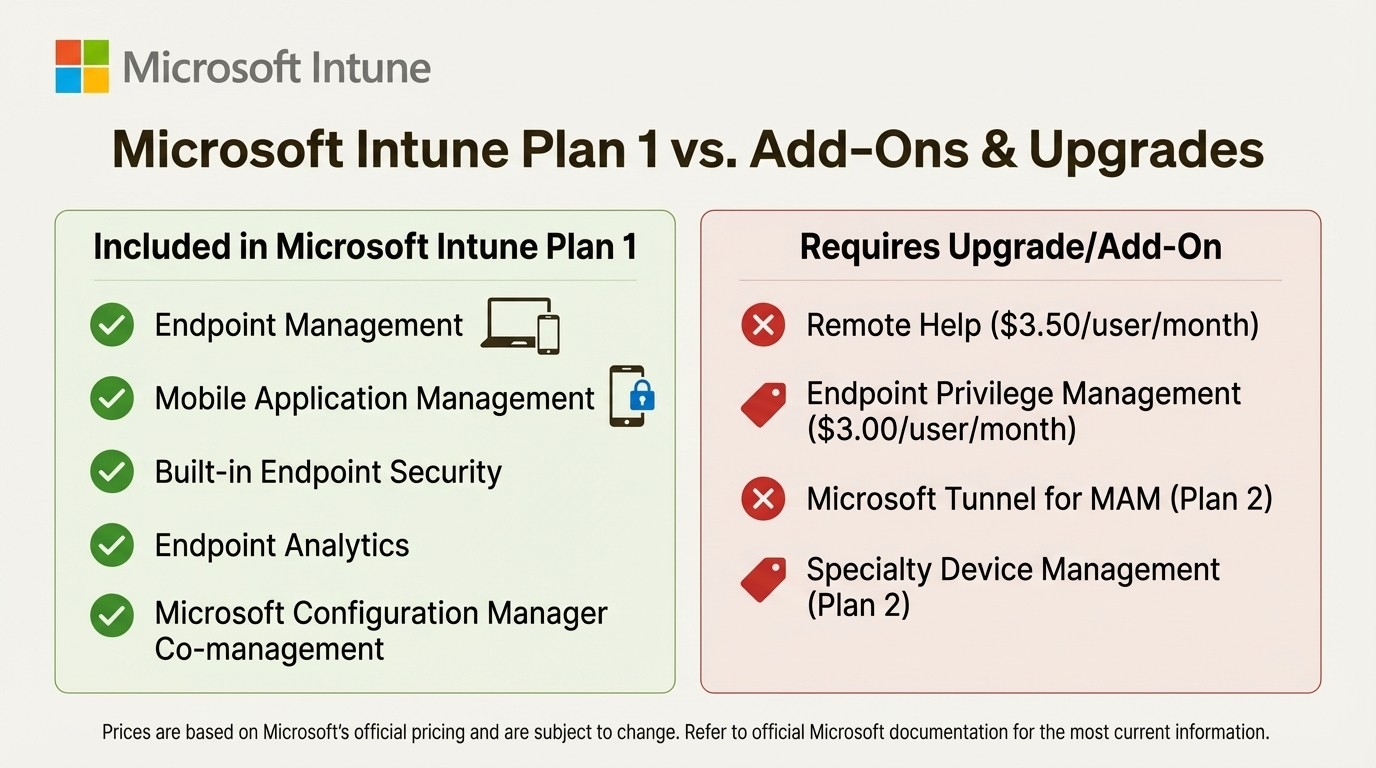
An infographic comparing the features of Microsoft Intune Plan 1 with the advanced features available as add-ons or in higher-tier plans.
Here are some key features not in Plan 1 that you'll need to upgrade for, according to Microsoft's pricing page:
Microsoft Intune Remote Help: A secure, cloud-based tool for your help desk to remotely assist users. This is an add-on.
Endpoint Privilege Management: Lets standard users do certain tasks with elevated permissions without giving them full admin rights. This is part of the Intune Suite or an add-on.
Microsoft Tunnel for MAM: A lightweight VPN for mobile apps on devices that aren't fully enrolled, so they can access on-prem resources. This is a big feature of Intune Plan 2.
Management of specialty devices: If you need to manage things like AR/VR headsets or big smart-screen devices, you'll need Plan 2.
Microsoft Intune Plan 1 pricing
Now for the big question: what does it cost?
If you buy it by itself, Microsoft Intune Plan 1 is listed at $8.00 per user/month with an annual commitment. The device-only license is usually a bit cheaper.
But let's be real, most people don't buy Intune by itself. It's usually part of a bigger Microsoft 365 bundle, which is often the cheapest way to get it. According to Microsoft's documentation, Microsoft Intune Plan 1 is included in these popular licenses:
Microsoft 365 E3 and E5
Microsoft 365 Business Premium
Microsoft 365 F1 and F3 (for frontline workers)
Enterprise Mobility + Security (EMS) E3 and E5
Microsoft 365 Education A3 and A5
If your company is on one of these plans, you're in luck—you probably already have Intune Plan 1 and can start managing your devices right away.
For features that aren't in Plan 1, you can buy them as add-ons. Here’s a peek at the standalone pricing for some of the advanced tools, which are otherwise rolled into the Intune Suite ($10.00/user/month):
Remote Help: $3.50 per user/month
Endpoint Privilege Management: $3.00 per user/month
Advanced Analytics: $5.00 per user/month
This pick-and-choose approach gives you some flexibility, but it also means you really need to know what you're paying for.
Connecting Microsoft Intune Plan 1 data to Jira
With Microsoft Intune Plan 1, device data is available within its own portal. For IT support teams that use Jira Service Management, this means they often work across two separate systems. A typical workflow might involve:
A ticket comes into Jira.
The agent opens the Intune admin center in a new tab.
They search for the user or device.
They find the necessary details and switch back to Jira to continue troubleshooting.
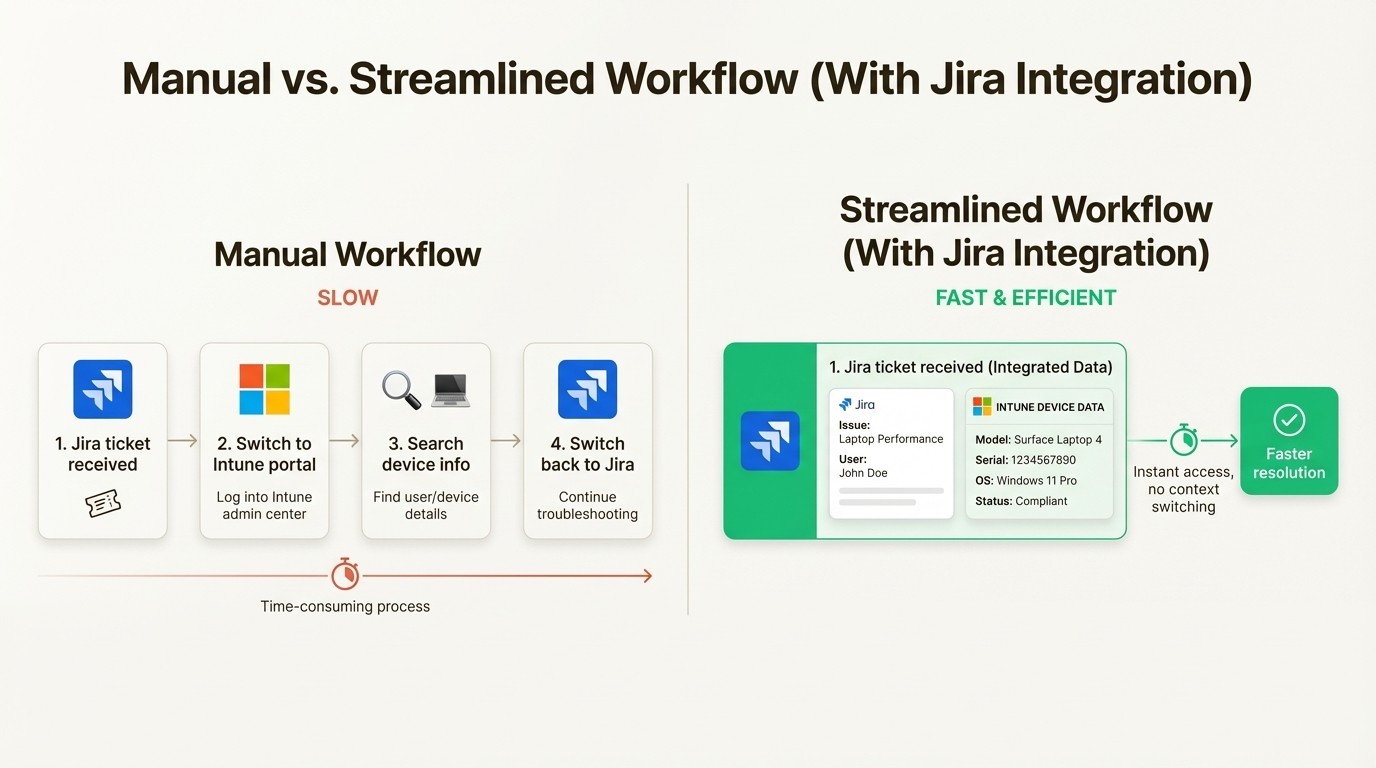
This process can be streamlined by integrating the two systems. Solutions like Asset Management for Jira are designed to connect asset data directly into Jira, creating a single source of truth for the IT team. The integration with Microsoft Intune can automate this process.
Such integrations typically offer these functionalities:
Automatic syncing: They connect to Intune and automatically import and sync devices, users, and their assignments, reducing manual data entry.
Data within Jira: Asset information, such as model, serial number, and OS version, becomes visible directly within the Jira issue view.
Contextual tickets: A custom field can link specific devices to Jira tickets, providing support agents with immediate context.
By connecting Intune to Jira, support teams can eliminate the need for constant application switching. This provides them with the information to resolve issues more efficiently, which can help reduce user downtime and inform hardware-related decisions.
For a visual guide on what Microsoft Intune Plan 1 offers, check out this helpful video from Choice Solutions. It provides a straightforward overview of the core functionalities and how they can be applied in a business environment.
Is Microsoft Intune Plan 1 right for you?
For many businesses looking to manage their device fleet, Microsoft Intune Plan 1 is a suitable starting point. It has the core features you need to secure and manage your devices on different platforms, and there's a good chance it's already in the Microsoft 365 subscription you're paying for.
By understanding its features, licensing, and what's not included, you can make an informed choice. For many small to mid-sized companies, Plan 1 is more than enough to get the job done.
But managing devices is one thing. The real win is when you get that device data into the hands of the people who need it. While Intune is great at managing devices, its data is most valuable when it's easily accessible to the teams on the front lines.
For companies that use Jira for IT support, integrating Intune data can further enhance efficiency by making device information readily accessible within the support workflow. Tools that offer this integration, such as Asset Management for Jira, can help streamline processes and provide support teams with the context they need.



