SaaS License Management: The Complete Guide for IT Teams
Master saas license management to cut costs, reduce security risks, and streamline IT operations. A practical guide to gaining control over your SaaS stack.

Colin Reed
IT Expert and Content Writer
Last Updated

The number of SaaS apps in most companies has grown significantly. Many organizations manage anywhere from 100 to over 300 different applications. This provides teams with specialized tools for their tasks.
However, this growth can also lead to uncontrolled spending, security vulnerabilities, and operational inefficiencies. This challenge is commonly known as SaaS sprawl.
This guide explains what SaaS license management is, why it is important, and the steps you can take to implement it effectively.
What is SaaS license management?
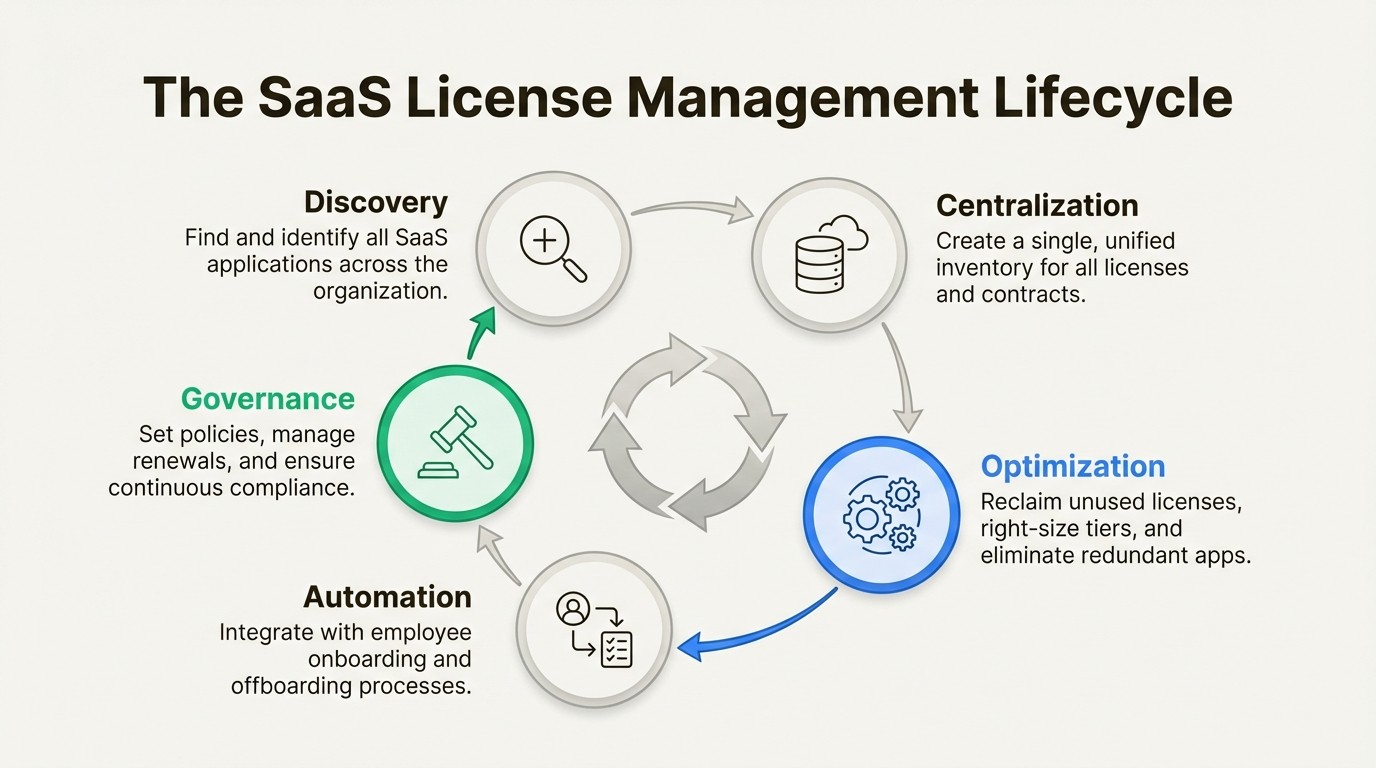
SaaS license management is the process of tracking, controlling, and optimizing all the software-as-a-service subscriptions your company uses. It is a specialized component of the broader IT Asset Management (ITAM) discipline, with a focus on cloud-based applications.
The goal is to create a single, centralized repository for all SaaS information. This ensures you are only paying for software that is actively used, while also maintaining data security and compliance.
Why effective SaaS license management is important
Without a clear strategy, the convenience of SaaS can create significant challenges for finance, security, and IT teams. Unchecked SaaS sprawl can lead to wasted expenditure, increased security risks, and operational delays.
Managing financial implications
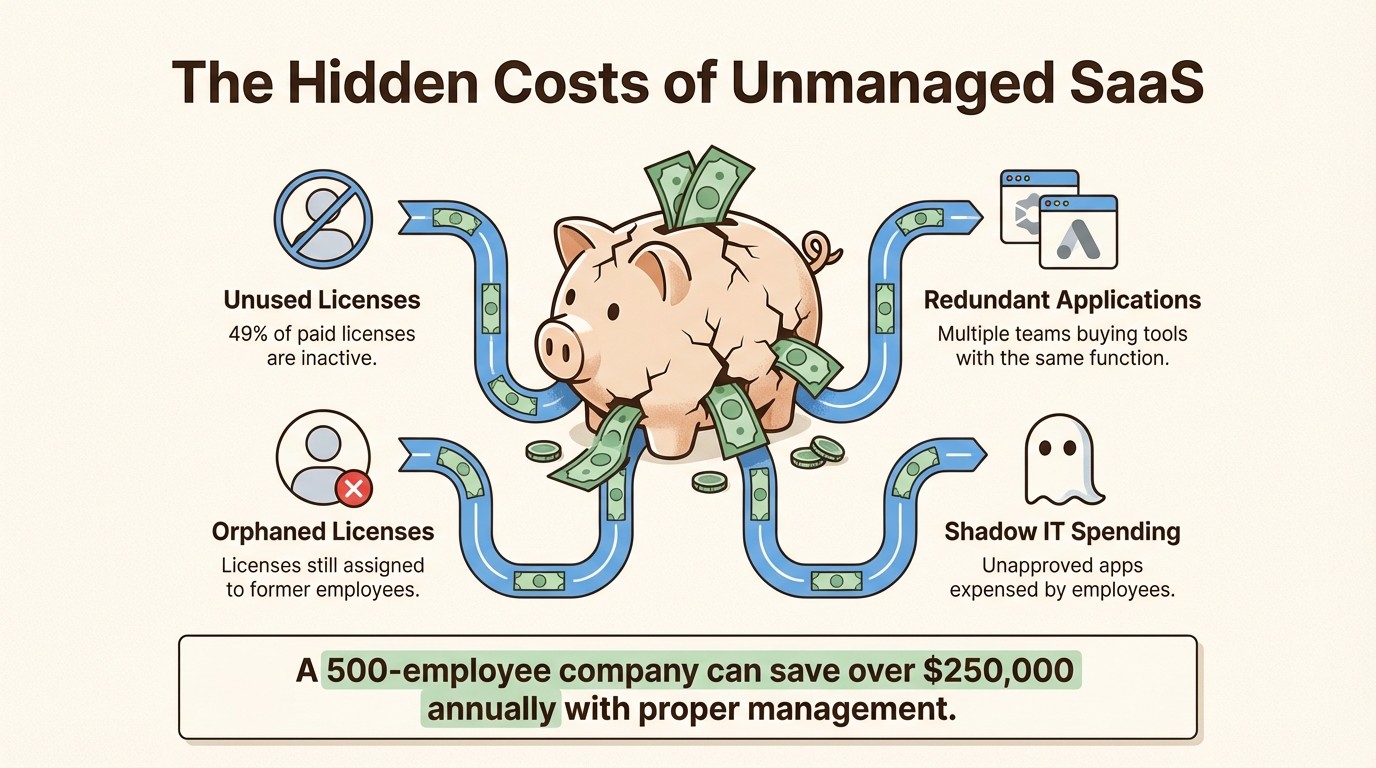
Unmanaged SaaS can be a significant drain on a company's budget. On average, companies only use about 49% of the licenses they pay for.
This waste occurs for several reasons. There are redundant applications, where different teams purchase separate tools with overlapping functionality. There are also licenses assigned to former employees that were never deactivated. A central inventory is the only way to identify this waste. For instance, a 500-employee company can often find around $250,000 in annual savings by organizing its assets.
Mitigating security and compliance risks
Another challenge is "Shadow IT," which occurs when employees sign up for and expense applications without IT approval. More than a third of a company's apps typically fall into this category.
These unvetted apps may not meet your company's security standards, which increases the risk of a data breach. Nearly two-thirds of employee-expensed apps have a poor or low security rating. It also creates significant compliance challenges with regulations like GDPR or HIPAA if sensitive data is stored in an unapproved tool. A system with a fully searchable audit log is necessary to monitor this. A Cloud Fortified app like Asset Management for Jira builds this audit trail inside Jira, helping you stay prepared for security reviews.
Streamlining IT operations
Ineffective license management also creates challenges throughout the employee lifecycle. Onboarding can be delayed because new hires lack necessary access, and offboarding becomes a security risk if their access is not promptly revoked.
It can also slow down IT support. When a ticket is submitted, technicians may spend time manually gathering information about a user's device and software licenses before they can begin troubleshooting. Linking assets directly to Jira tickets provides instant context. Teams using an integrated tool like Asset Management for Jira have been able to resolve tickets 34% faster by reducing information-gathering time by 96%.
Key challenges in SaaS license management
Managing SaaS licenses presents several common challenges, each with a practical solution.
Lack of centralized visibility
A primary challenge is that license information is often decentralized, tracked in various spreadsheets, email receipts, or not at all. This makes it difficult to get a clear view of what you own and who is using it. According to the Flexera 2025 State of ITAM Report, complete visibility into IT assets has dropped to just 43%.
The solution is to create a single source of truth. This involves consolidating all your license information, contracts, and user assignments into one platform. Using a tool that integrates into a system you already use, like Jira, is a practical way to do this without adding another standalone tool to your team's stack. Asset Management for Jira offers this native experience, placing all your asset data where your IT team is already working.
Disorganized renewals
Unexpected auto-renewals for unused software are a significant source of wasted expenditure. Conversely, missing a renewal for a critical tool can cause business disruptions or result in unfavorable contract terms.
The solution is to proactively manage renewals. This requires a central calendar with automated reminders for all contracts. Asset management tools can help by providing notifications for expirations, which is a core feature in Asset Management for Jira.
Inefficient license allocation
Companies often assign expensive, full-featured licenses to users who only require basic functionality. Additionally, licenses from former employees are often not reclaimed, remaining inactive while incurring costs.
Monitoring actual usage is necessary to right-size license allocation. Automated workflows are also needed to reclaim licenses immediately upon an employee's departure. This is a fundamental part of ITAM, and a tool like Asset Management for Jira can help automate this process, leading to a 98% equipment recovery rate from departing employees.
Best practices for implementing SaaS license management
Here are some practical strategies for establishing a SaaS license management program.
Conduct a comprehensive audit
The first step is discovery. You cannot manage assets you are unaware of. This is a common challenge for IT teams.
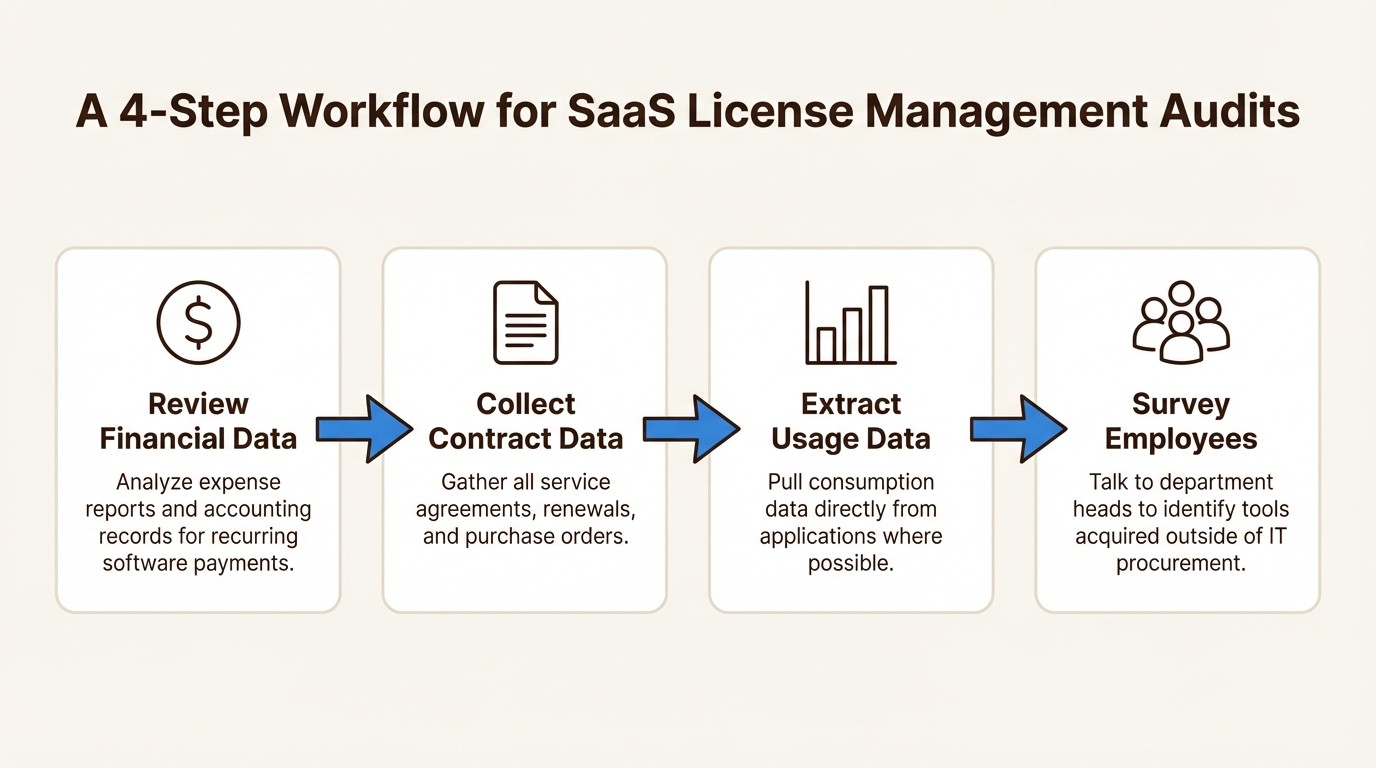
This requires gathering data from multiple sources to get a complete picture.
Financial data: Review expense reports and accounting ledgers to identify all recurring software payments.
Contract data: Collect all master service agreements, renewal documents, and purchase orders.
Usage data: When possible, extract consumption data directly from the applications.
Employee surveys: Communicate with department heads about the tools their teams use, particularly those acquired outside of standard IT procurement.
Track usage and optimize continuously
Effective license management is an ongoing process, not a one-time project. It requires continuous effort.
Review your usage data regularly to identify underutilized licenses. You can either reclaim them for a central pool or downgrade them to a less expensive tier. This process of reallocating unused licenses, known as "license harvesting," can result in significant cost savings.
Integrate with the employee lifecycle
Map out the key stages of an employee's journey with the company, including onboarding, role changes, and offboarding.
The objective is to automate the provisioning of correct licenses from day one and, equally important, automate the revocation of all access on an employee's final day. This closes security gaps and prevents payment for unused licenses.
Choose the right tools
Spreadsheets are a common starting point, but they can quickly become inaccurate and difficult to manage as an organization grows.
You have a choice between large, standalone ITAM platforms and more lightweight, integrated solutions. If your team uses Jira extensively, a native solution can be a practical choice. Asset Management for Jira is an example of a tool designed for this environment. It is a native solution designed for quick setup, offering an alternative to the more extensive configuration required by a full CMDB.
Factor | Atlassian Assets (JSM Premium/Enterprise) | Asset Management for Jira (Marketplace App) |
|---|---|---|
Availability | Bundled with JSM Premium or Enterprise plans only. | Installs into any Jira Cloud instance (including Free/Standard). |
Pricing Model | Per-agent subscription + consumption fees for assets over a set limit. | Predictable per-user pricing with unlimited assets included. |
Implementation | Designed for deep CMDB configuration, which may involve a longer implementation process. | Designed for rapid implementation with features like CSV imports and MDM sync. |
Best For | Enterprises needing a complex CMDB and the full JSM Premium feature suite. | Teams of all sizes on any Jira plan looking for a focused asset tracking solution. |
SaaS license management pricing models
When managing SaaS, you'll see common license models like Per-User, Tiered, and Usage-Based. For the tools you use to manage them inside Jira, the pricing typically falls into two categories, as covered in this Jira asset management pricing guide.
First is the Bundled Approach, which is what you get with Atlassian Assets. It's included with an upgrade to Jira Service Management Premium. The price is tied to your per-agent plan, but you also need to be aware of potential consumption fees if you exceed the asset limit.
Next is the Marketplace App Approach. This is where Asset Management for Jira fits. It offers a predictable, tiered cost based on your number of Jira users. It scales with your team, not your inventory, and includes unlimited assets.
Team Size | Standard Edition | Advanced Edition |
|---|---|---|
Up to 10 (Flat fee) | $10.00/month | $20.00/month |
11–100 | $2.85/user | $3.25/user |
101–250 | $1.75/user | $2.25/user |
251–1000 | $1.10/user | $1.15/user |
1001–2500 | $0.75/user | $0.75/user |
Visualizing these concepts can help solidify your understanding. The video below provides a clear overview of the fundamentals of SaaS license management, explaining the key terms and the importance of having a strategy in place.
This video from Zylo offers a clear overview of the fundamentals of SaaS license management and why a strategy is essential.
The growth of SaaS requires a disciplined approach to management. Effective management helps control costs, reduce security risks, and make IT operations run more smoothly.
Getting started is more straightforward than it may seem. The key is to use tools that fit into the workflows your team already uses.
If your team uses Jira for IT support, a practical first step is to integrate your asset and license data into that system. This avoids switching between spreadsheets and support tickets. You can start a free trial of Asset Management for Jira to build the single source of truth needed to streamline processes.
Frequently Asked Questions
Q1: What is the most important first step in SaaS license management?
A1: The first and most critical step is discovery. You need to conduct a thorough audit to determine exactly what SaaS applications your company is paying for and who is using them. You cannot manage what you are unaware of, so pulling data from finance records, contracts, and employee expense reports is the best place to start.
Q2: How does effective SaaS license management reduce security risks?
A2: It helps by identifying "Shadow IT," which are applications employees use without IT approval. These unvetted tools can have significant security flaws. A proper management process allows you to identify these apps, assess their risk, and ensure all software meets your company's security standards, which is key to preventing data breaches.
Q3: Is SaaS license management only for large enterprises?
A3: No. While large enterprises have more applications to track, small and mid-sized businesses can also waste a significant portion of their budget on unused licenses and redundant software. Implementing a basic SaaS license management process can lead to immediate cost savings and improved security, regardless of company size.
Q4: How often should a company review its SaaS license management processes?
A4: This is not a one-time task. You should review your SaaS usage and licenses at least quarterly. This regular check-in helps you identify underutilized licenses to reclaim, find new shadow IT apps, and prepare for upcoming contract renewals. For larger or faster-growing companies, a monthly review may be more appropriate.
Q5: What are the biggest financial pitfalls of poor SaaS license management?
A5: The biggest pitfalls are wasted spending on unused or underutilized licenses, which can account for a large portion of your software budget. Another major issue is paying for redundant applications with overlapping functionality. Finally, unexpected auto-renewals for software you no longer need can be a constant financial drain.
Q6: Can a tool like Asset Management for Jira handle all aspects of SaaS license management?
A6: A tool like Asset Management for Jira provides a strong foundation. It helps you centralize your license inventory, track assignments, and manage renewals directly within Jira where your IT team works. By creating a single source of truth, it automates many of the tedious parts of the process, helping you control costs and reduce risk effectively.



