A Straightforward Guide to Asset Management Reporting
Excerpt: Tired of messy spreadsheets and disconnected data? This no-fluff guide breaks down asset management reporting to help you optimize costs and improve efficiency.

Colin Reed
IT Expert and Content Writer
Last Updated

You have data on every laptop, software license, and server your company owns. But when it’s time to make a call on the budget, that information is probably scattered across messy spreadsheets and different systems, totally disconnected from the daily work happening in a tool like Jira.
This isn't just a messy desk problem; it’s a business problem. Without good reporting, you can't make smart decisions about what to buy, when to fix things, or how to stay compliant. You're left guessing, which leads to wasted money, higher risks, and a constant struggle to show your team's value.
Good asset management reporting is what connects that raw data to real business insights. It’s how you spot problems before they happen, match your spending to what you actually need, and start talking about IT in terms of business impact.
What is asset management reporting, really?
Simply put, asset management reporting is the process of gathering, analyzing, and presenting data about your company’s hardware and software to help make better decisions. It’s more than just a list of what you own. According to Gartner's definition, IT asset management (ITAM) is about giving an accurate account of your technology's lifecycle costs and risks. It means seeing the whole story, from the day you buy a laptop to the day you retire it. To help visualize this, here is a breakdown of the old way versus the new way.
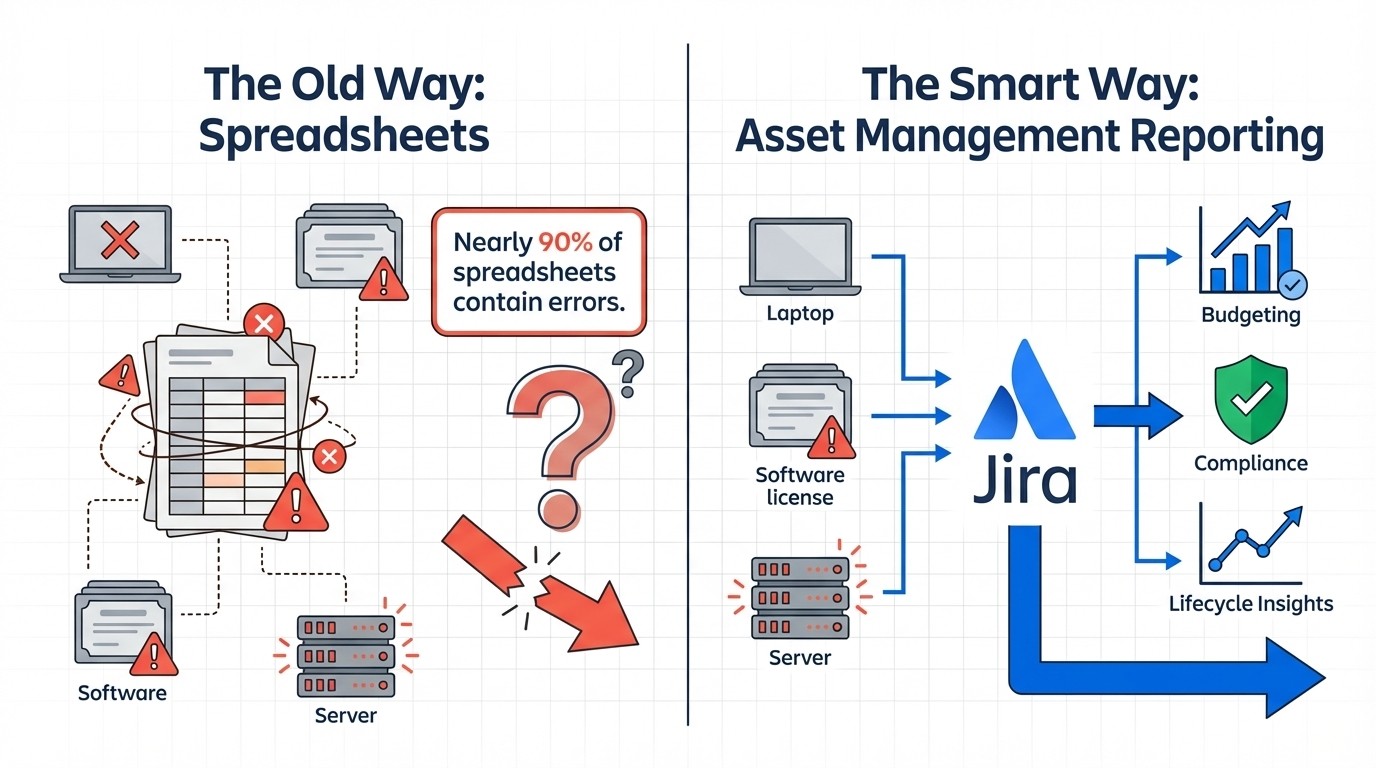
The goal isn't just to know what you have, but to use it wisely. Good reporting answers the questions that probably keep you up at night: Are we paying for software licenses nobody is using? Which laptop models are always breaking and creating support tickets? Are we ready for our next compliance audit, or are we just crossing our fingers?
This is where spreadsheets can become challenging. While suitable for simple lists, they may not be ideal for complex financial and operational decisions. With studies showing that nearly 90% of spreadsheets contain errors, their reliability as a single source of truth can be a concern. To get real insights, you need a system built for the job.
Key reports for asset management
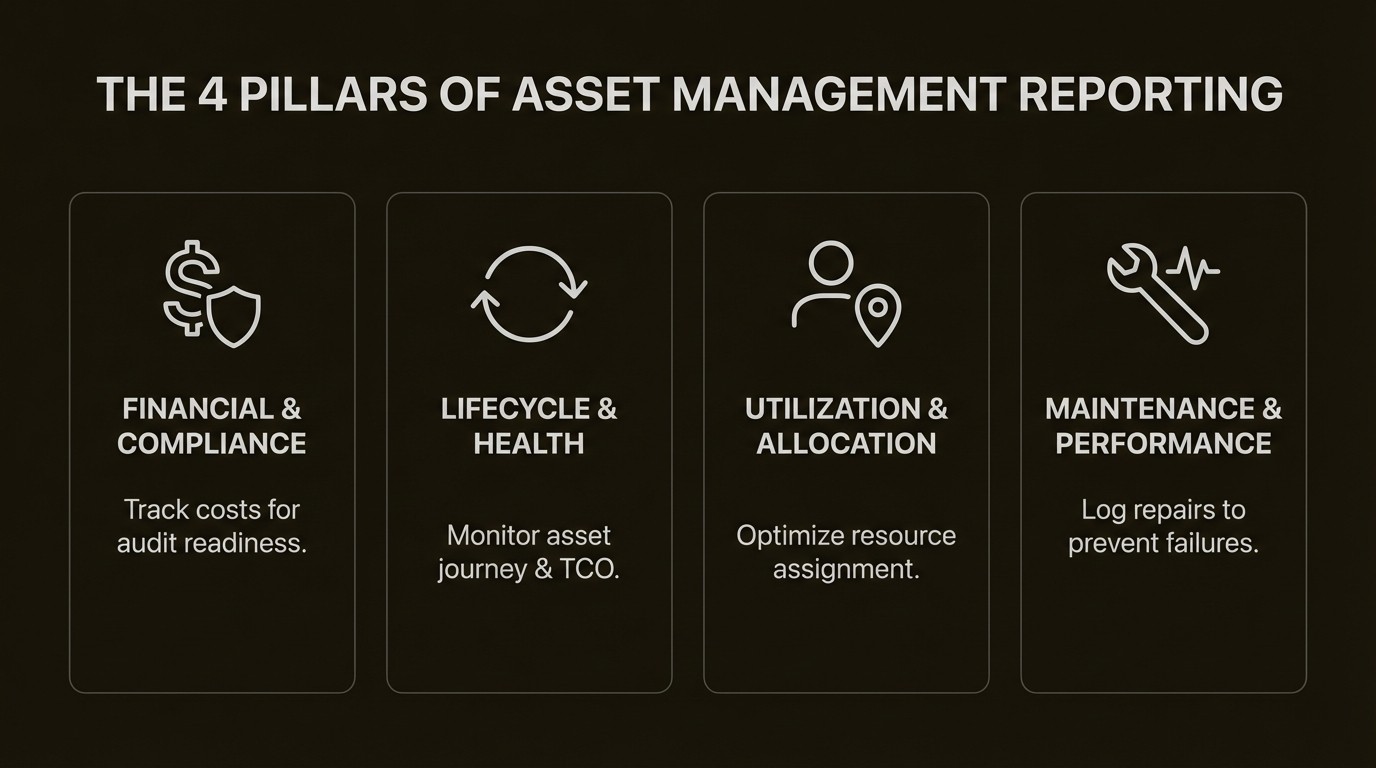
You could generate dozens of reports, but a smart strategy focuses on a handful that give you a full picture of your asset portfolio's health, value, and risks.
Financial and compliance audit reports
These reports give you the hard numbers on what your assets are worth: purchase price, current value after depreciation, and eventual disposal costs. For your finance team, these reports are essential for budgeting, accounting, and getting ready for audits.
Why does it matter? Inaccurate financial data is a huge liability. This isn't just a theoretical problem. A city audit in College Station, Texas, found that 191 PCs completely unaccounted for in the IT department's records. This highlights a significant compliance risk. Solid financial reports make sure you’re compliant and can account for every dollar spent.
The trouble, of course, is that this data rarely lives in one place. Your financial data is in the accounting system, while asset status info is buried in a spreadsheet. Manually piecing them together for an audit can be a complex and time-consuming task.
Asset lifecycle and health reports
This report gives you an overview of your entire asset portfolio, tracking a device's journey from purchase and deployment all the way through maintenance and retirement. It shows the asset's complete history, including its performance and, most importantly, its total cost of ownership (TCO).
This is how you prevent expensive surprises. Sure, that laptop model was cheap at $1,500, but if it costs $2,000 in repairs over two years, was it really a good deal? This data helps you make smarter buying decisions. It also helps you find "ghost assets"—devices that are still on your books and losing value but are physically nowhere to be found.
The main challenge is that you can't get an accurate lifecycle view without connecting the asset to what's happening in the real world. Maintenance requests and incident tickets in Jira are a huge part of an asset's story, but they're often completely separate from the asset register.
Utilization and allocation reports
These reports answer simple but critical questions: Who has what? Where is it? And is it actually being used? This goes for everything from laptops and monitors to software licenses.
This is where you can find some easy cost savings. A software license usage report can instantly show you licenses that are assigned but not being used, letting you reassign them or cut unnecessary spending. These reports are also key for making employee onboarding and offboarding go smoothly. New hires get what they need on day one, and you can make sure departing employees don't walk away with thousands of dollars of company property.
Tracking this manually can be challenging, especially with remote and hybrid work. You need a system that can automatically tie assets to specific users and locations, without relying on someone remembering to update a spreadsheet.
Maintenance and performance reports
These reports track everything related to keeping assets running: scheduled maintenance, repair histories, and unplanned downtime. They give you a clear look at the reliability of different asset models and even specific vendors.
This is what lets you shift from fixing things when they break to preventing problems in the first place. By seeing which assets create the most support tickets, you can anticipate future issues, budget for replacements, and cut down on the kind of downtime that hurts productivity. As Chris Hayes, CIO at Stickley, puts it, having this data "improproves our ability to get ahead of significant failures."
The roadblock here is a common one. All that useful maintenance data is often logged in a service desk like Jira Service Management, while the asset's basic details are in a spreadsheet. The two systems often don't communicate, making it difficult to spot trends that could save time and money.
Building an effective asset management reporting framework in Jira
The real benefit of reporting isn't just having data; it's having one place where that data lives and is trusted. If your team already uses Jira to manage incidents and service requests, it just makes sense for your asset data to live there too. Constantly switching between Jira and a spreadsheet can be slow and may increase the risk of mistakes.
Centralize data with a native Jira solution
When your asset register is separate from your service desk, your support team may lack important context. They see a ticket about a broken laptop but have no easy way to check the device's warranty status, repair history, or even who it belongs to. To find this information, they have to leave Jira, find a spreadsheet, and hope it's up to date.
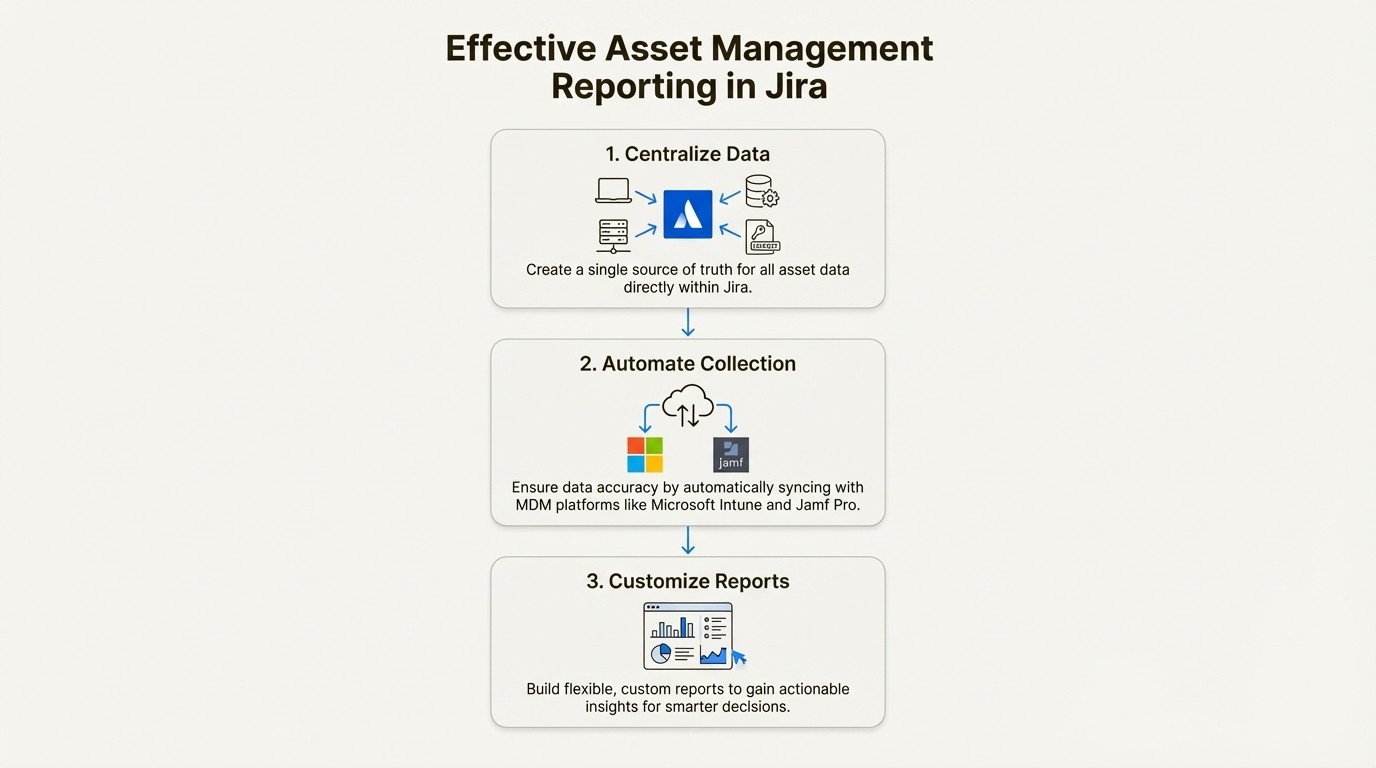
A native solution like Asset Management for Jira changes this workflow by building your asset register directly inside Jira. This isn't just a link to another system; it means asset information can be linked to any Jira issue as a custom field. Suddenly, your team has all the context they need right in the ticket. This turns your asset data from a static list into a living, integrated part of your daily work, available in Jira filters, gadgets, and queues.
Automate data collection for accuracy
Manual data entry can be prone to errors. It not only takes time but also increases the likelihood of incorrect data. People forget to log changes, they make typos, and soon the information is outdated and useless for reporting.
Automation is a key strategy for improving data quality. A modern asset management tool should sync directly with the systems that already manage your devices. For example, Asset Management for Jira integrates with major device management (MDM) platforms like Microsoft Intune, Jamf Pro, and Kandji. It automatically imports your devices, uses smart matching to avoid duplicates, ties them to the right users, and keeps the records updated without anyone lifting a finger. This can eliminate the need for manual importing and checking of CSV files.
Create custom reports for specific needs
Standard, out-of-the-box reports are a decent start, but they're rarely enough. Every organization is different and tracks different things. You need the flexibility to build reports that answer the specific questions your business is asking.
A flexible tool lets you define your own asset types, create as many custom fields as you need, and build reports with simple conditions. With a tool like Asset Management for Jira, you can easily create and export reports on anything from expiring software licenses in the finance department to all devices due for a warranty refresh next quarter. It’s this flexibility that led Jeff Rudacille, IT Director at Drips, to praise its "lightweight nature and customization capabilities" as a key benefit.
Turning asset management reporting into real business value
Good reports don't just sit on a dashboard; they lead to action and produce real results. Here’s how you can use your asset data to make a difference in the business.
Smarter budgeting and forecasting: With accurate data on asset age, maintenance costs, and warranty expirations, you can build a budget based on facts, not hunches. You can forecast expenses accurately and walk into budget meetings with the evidence to back up your requests.
Proactive problem-solving: Instead of waiting for things to break, you can use performance reports to get ahead of failures. As the CIO at Stickley noted, using Asset Management for Jira helps them "move ahead of failures more proactively" by directly connecting user-reported issues in Jira with specific hardware models. This reduces downtime and keeps things running smoothly.
Better security and compliance: A complete, current asset inventory is the starting point for any good security plan. A fully searchable audit log gives you a clear trail of what you have, where it is, and who is responsible for it. With automated alerts for things like expiring warranties or non-compliant software, you can close security gaps before they become big problems.
More accountability: When assets are clearly assigned to users, departments, and locations, accountability improves. Tracking and audit reports make it easy to see an asset's entire history, from the moment it's checked out to when it's checked back in. This simple visibility drastically reduces the risk of lost or stolen equipment.
To see how these reporting principles translate into practice, it's helpful to walk through a tutorial. The video below offers a detailed look at mastering IT asset management metrics, providing practical steps for turning raw data into valuable insights that drive efficiency and compliance.
This video offers a detailed look at mastering IT asset management metrics, providing practical steps for turning raw data into valuable insights.
Moving beyond spreadsheets
Ultimately, good asset management reporting isn't just an IT task; it's a business necessity. It gives you the visibility to control costs, reduce risk, and make smart, strategic decisions. However, managing this with disconnected spreadsheets can be challenging and inefficient.
The most direct path to clarity is to manage your assets where your work already happens. By bringing your asset data directly into your service management workflow in Jira, you give your team the context they need to solve issues faster and provide better support to everyone.
If your team runs on Jira, consider moving beyond spreadsheets. See how Asset Management for Jira can give you a single source of truth for all your IT assets and the powerful, customizable reporting you need. Start a free trial today and start turning your data into decisions.



