Is Jira Service Management Premium worth it? A 2026 cost-benefit analysis
Compare JSM Premium pricing, features, and ROI against Standard and free tiers to determine if the upgrade makes financial sense for your team in 2026.

Colin Reed
IT Expert and Content Writer
Last Updated
If you're evaluating Jira Service Management Premium in 2026, you're probably facing one of two situations: either your team is outgrowing the Standard plan, or you're migrating from OpsGenie before it shuts down in April 2027. Either way, you're looking at a steep price increase and wondering if the math works.
Jira Service Management Premium costs $51.42 per agent per month, 2.5 times more than Standard. For some teams, the advanced automation, asset management, and 24/7 support justify the cost. For others, it's overkill that drains budget without delivering proportional value.
This analysis breaks down the real total cost of ownership, including the hidden fees that don't appear on the pricing page, to help you make a data-driven decision.
What Jira Service Management Premium actually costs
Atlassian publishes straightforward per-agent pricing, but the real cost depends on your usage patterns and which add-ons you need.
Base pricing across all tiers
Plan | Price per agent/month | Annual equivalent | Key limits |
|---|---|---|---|
Free | $0 | $0 | 3 agents, 2GB storage, 500 automations/month |
Standard | $20 | ~$17 | 100,000 agents, 250GB storage, 5,000 automations/month |
Premium | $51.42 | ~$47 | 100,000 agents, unlimited storage, 1,000 automations/user/month |
Enterprise | Custom | Custom | Multiple sites (up to 150), unlimited automation |
Annual billing saves about 17%, so a 50-agent team on Premium pays roughly $2,350 monthly on annual billing versus $2,570 on monthly.
Hidden costs that inflate your bill
The base price is just the starting point. Here's what actually shows up on your invoice:
Status page: Not included in any JSM tier. You'll need a separate Statuspage.io subscription at $29-109 per month.
Virtual agent overages: Premium includes 1,000 assisted conversations per month. After that, you pay $0.30 per conversation. A team handling 2,000 AI conversations monthly pays an extra $300 per month in overage fees.
Asset object overages: Premium includes 50,000 asset objects. Exceed that and you pay $0.02 per object per month. A company with 75,000 assets pays $6,000 annually in overage fees alone.
Atlassian Guard for SSO: Standard and Premium require a separate Atlassian Guard subscription for SSO, SCIM, and advanced security. Only Enterprise includes Guard Standard.
Marketplace apps: Most teams need 3-5 apps (Tempo Timesheets, ScriptRunner, Zephyr, and others), typically adding 35-150% to base costs.
Implementation and training: Budget 1-2 weeks for setup and 2-4 hours of training per user. For a 50-person team, that's 100-200 hours of lost productivity during ramp-up.
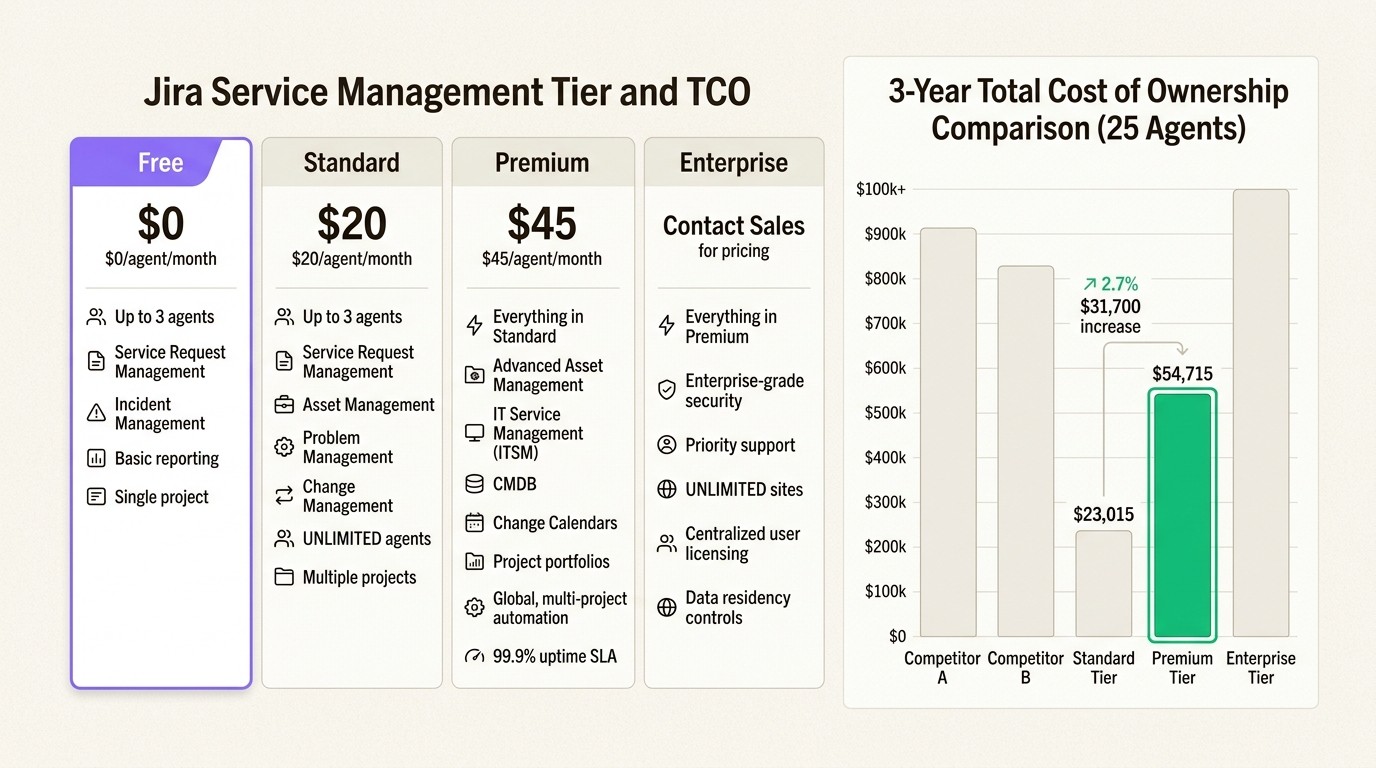
3-year TCO examples
Looking at the three-year picture changes the calculation:
Scenario | Year 1 | Year 2 | Year 3 | 3-year total |
|---|---|---|---|---|
25 agents (Standard) | $8,000 | $7,150 | $7,865 | $23,015 |
25 agents (Premium) | $17,926 | $17,519 | $19,270 | $54,715 |
100 agents (Standard) | ~$28,000 | ~$26,000 | ~$28,600 | ~$82,600 |
100 agents (Premium) | ~$72,000 | ~$70,000 | ~$77,000 | ~$219,000 |
JSM Premium costs 138% more than Standard over three years for a 25-agent team. That gap widens as you add users.
What you get for the Premium price
So what exactly does that extra $30+ per agent per month buy you? Let's break down the features that matter most for IT teams.
AI and automation capabilities
Jira Service Management Premium includes Atlassian Rovo, which provides AI-powered search, chat, and agents. The virtual service agent handles 1,000 conversations per month at no extra cost, escalating complex issues to human agents when needed.
The bigger difference is automation scaling. Standard gives you 5,000 automation rule runs per month total. For a 100-person team, that is 50 rules per person. Premium gives each user 1,000 rules per month, pooled across the team, so that same 100-person team gets 100,000 monthly rule runs.
If your team uses automation for ticket routing, SLA tracking, and CI/CD integration, you'll hit Standard's limits fast.
Asset and configuration management
Here's where the math gets interesting for asset-heavy organizations. Premium includes 50,000 asset objects, enough for roughly 500-1,000 devices with full configuration data. But if you're managing laptops, phones, monitors, and network equipment for a 1,000-employee company, you'll likely exceed that limit.
Standard only includes 5,000 objects, which fills up quickly. The asset management features include automated discovery, dependency mapping, and integration with Azure and Intune. For teams already using Microsoft's device management, this integration keeps asset data synchronized without manual imports. For a deeper look at asset management in Jira, see our comprehensive guide to Jira asset management.
However, if asset management is your primary concern, the consumption-based pricing creates uncertainty. Every new device adds to your potential overage costs.
Advanced ITSM features
Premium unlocks several capabilities that matter for larger or more regulated teams:
Advanced incident management: On-call scheduling, heartbeat monitoring, incident investigation views, and unlimited post-incident reviews
Change management: AI-powered risk assessment, deployment gating with CI/CD tools, and change calendars
AIOps: AI-driven alert grouping, automatic incident creation, and post-incident review generation
Support and reliability: 24/7 premium support with under-one-hour response for critical issues, plus a financially-backed 99.9% uptime SLA
The 24/7 support is a genuine differentiator. Standard only offers 9-to-5 regional support, which creates real risk if your team operates across time zones or handles after-hours incidents.
Cost-benefit analysis by team size
Whether Premium delivers ROI depends heavily on your team size and how you use the platform.
Small teams (under 25 agents)
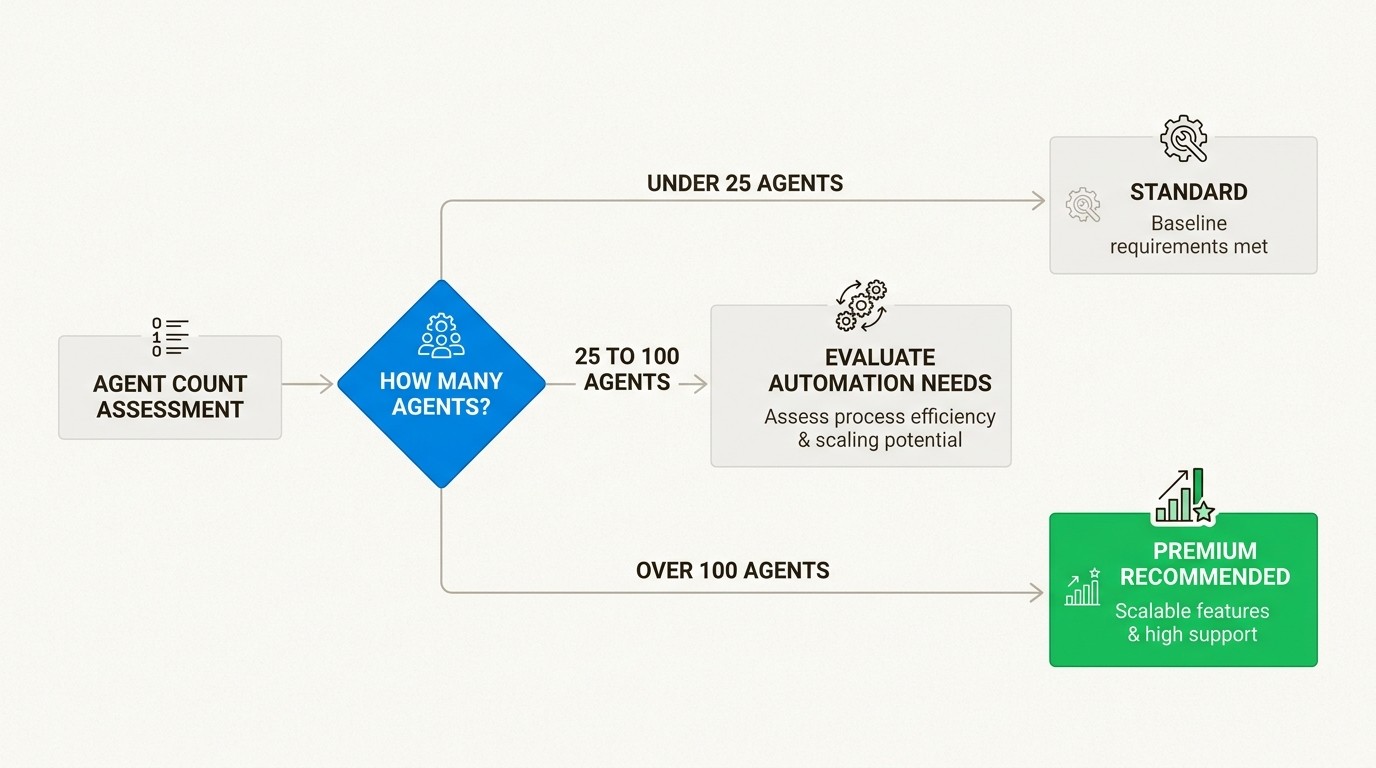
For teams under 25 agents, Standard usually suffices. You're unlikely to hit the 5,000 automation limit, and 5,000 asset objects covers basic inventory tracking. The 158% price increase for Premium is hard to justify unless you have specific compliance requirements or need 24/7 support coverage.
If you're an OpsGenie migrant with 25 users, your annual cost jumps from $5,985 to $15,426 for equivalent incident management features. That $9,441 annual increase buys you plenty of standalone incident management tools.
Mid-size teams (25-100 agents)
This is where Premium starts making sense. At around 50 agents, several factors typically converge:
You're hitting the 5,000 automation limit on Standard
Your asset count exceeds 5,000 objects
You need 24/7 support because your team spans multiple time zones
The per-user automation allocation (1,000 rules) becomes valuable
For a 50-agent team, Premium costs about $30,000 annually versus $12,000 for Standard. The question is whether the productivity gains and risk reduction from advanced automation and support justify that $18,000 annual difference.
Large teams (100+ agents)
At 100+ agents, Premium becomes the default choice. The math shifts because:
You almost certainly exceed Standard's automation and asset limits
The cost of workarounds and manual processes exceeds the Premium upgrade cost
Compliance and audit requirements typically demand the 99.9% SLA
You likely need advanced incident management and change management workflows
For a 100-agent team, the three-year TCO difference between Standard and Premium is roughly $136,000. But the cost of not having adequate automation, asset tracking, and support often exceeds that amount in lost productivity and risk exposure.
When to upgrade from Standard
Consider upgrading when you hit any of these triggers:
Automation limits: Approaching 5,000 rule runs per month
Support gaps: Need coverage outside 9-to-5 regional hours
Asset growth: Exceeding 5,000 objects or anticipating growth
Compliance requirements: Need the 99.9% SLA or audit trails
Incident complexity: Need on-call scheduling, post-incident reviews, or AIOps features
JSM Premium vs. the alternatives
The ITSM market has viable alternatives that may fit your needs better depending on your priorities.
Freshservice comparison
Freshservice offers a different pricing and feature model. Their Growth plan at $49 per agent per month includes asset management, whereas JSM gates asset management to Premium at $51.42. Freshservice also includes their AI assistant (Freddy) in Enterprise, though with session-based pricing.
For a 50-agent team comparing Freshservice Growth to JSM Premium, the costs are roughly comparable, but Freshservice includes more features at lower tiers. The trade-off is ecosystem integration: JSM connects natively with Jira Software, Confluence, and Bitbucket, while Freshservice relies more on third-party integrations. For a detailed feature comparison, read our Freshservice vs Jira Service Management for asset management analysis.
The OpsGenie migration reality
If you're migrating from OpsGenie, the pricing shift is stark:
Tool | Price per user/month | Annual cost (25 users) |
|---|---|---|
OpsGenie Standard | $19.95 | $5,985 |
JSM Standard | $20.00 | $6,000 |
JSM Premium | $51.42 | $15,426 |
OpsGenie users need Premium for equivalent incident management capabilities. The 158% cost increase is forcing many teams to evaluate alternatives like Spike.sh, which positions itself as an OpsGenie replacement at roughly 73% lower cost than JSM Premium.
Asset management alternatives
For teams primarily concerned with asset tracking, JSM Premium's consumption-based pricing creates budget uncertainty. The asset management features in JSM are solid, but the $0.02 per object overage fee adds up quickly at scale.
Alternatives like Asset Management for Jira offer unlimited asset tracking with predictable per-user pricing. If your primary need is tracking hardware and software assets rather than full ITSM, a dedicated asset management tool often delivers better value. Check our Jira asset management pricing guide and our guide on choosing a Jira asset management plugin for more details.
The asset management factor
Asset management is often the deciding factor for Premium upgrades, but it deserves careful analysis.
JSM Premium includes 50,000 asset objects. That sounds like a lot, but consider what counts as an object: each laptop, monitor, phone, software license, network device, and configuration item. A 500-employee company with 1,000 devices plus software licenses and network equipment can easily exceed 50,000 objects.
At $0.02 per object per month, going from 50,000 to 75,000 objects costs $6,000 annually in overage fees. Scale to 100,000 objects and you're paying $12,000 per year in overages alone.
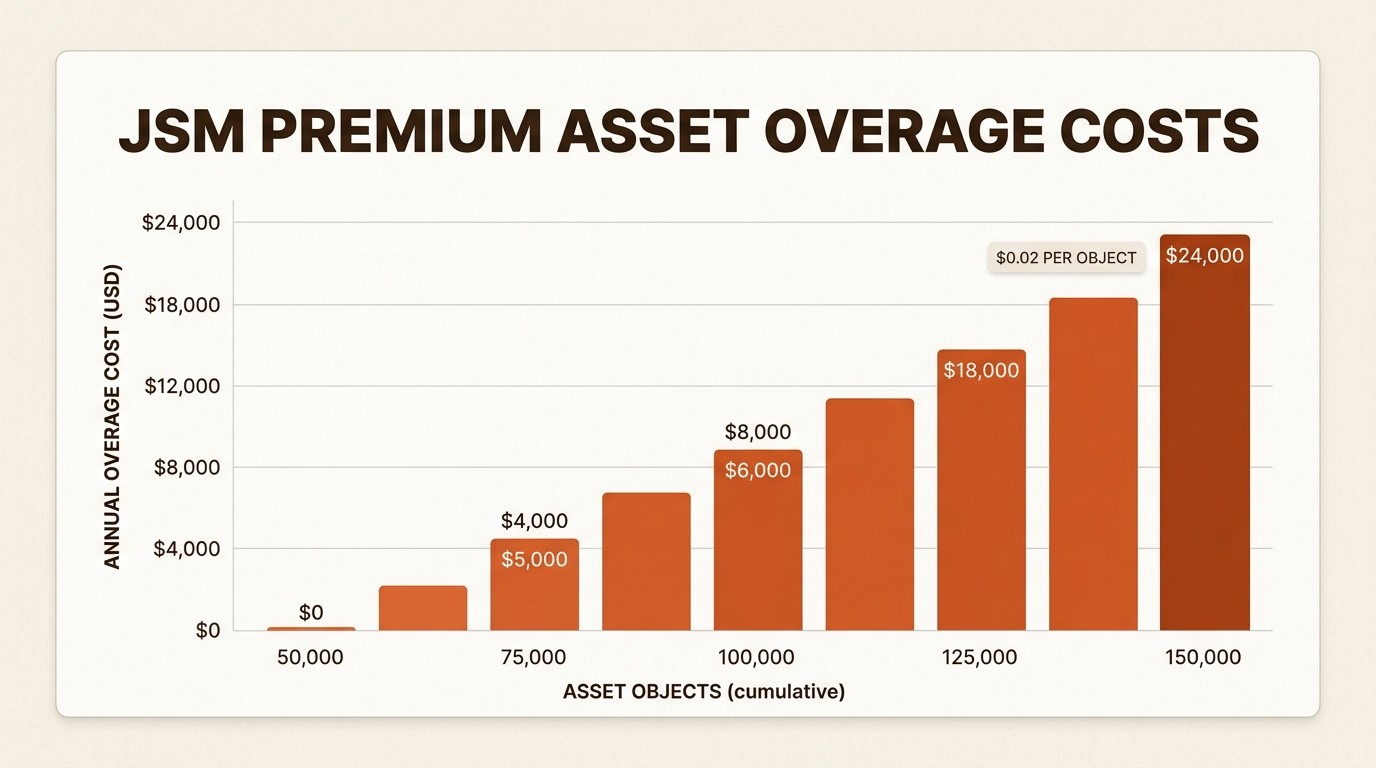
This consumption-based model creates two problems: unpredictable budgeting and disincentives for thorough asset tracking. Teams may avoid tracking lower-value assets to stay under limits, creating blind spots in their inventory.
For organizations where asset management is critical, alternatives with unlimited asset tracking often make more financial sense. You get complete visibility without watching a meter tick up every time you add a monitor to the system. Learn more about Intune asset management solutions for Jira teams if you're using Microsoft's device management.
Making the right choice for your IT team
The decision framework comes down to three factors: automation needs, support requirements, and asset tracking complexity.
Choose Standard if:
Your team is under 50 agents
You're not hitting automation limits
9-to-5 regional support covers your needs
Asset tracking is basic or handled in another system
Budget is constrained
Choose Premium if:
You're hitting the 5,000 automation limit regularly
You need 24/7 support for global operations
Asset management is critical to your operations
You need advanced incident management or change management
The 99.9% SLA is a business requirement
Evaluate alternatives if:
Asset management is your primary need (consider dedicated ITAM tools)
You're migrating from OpsGenie and sticker-shocked by the 158% increase
You want predictable pricing without consumption-based overages
Your ITSM needs are focused on incident management rather than full service management
The safest approach is starting with Standard and upgrading when you hit concrete limits. JSM offers trial periods for Premium, so you can validate the value before committing to the 2.5x price increase.
For asset-heavy organizations, consider whether JSM Premium's consumption model aligns with your budget predictability needs. Sometimes the better value comes from specialized tools that do one thing exceptionally well rather than an all-in-one platform with usage-based pricing.
If asset management is driving your Premium evaluation, explore Asset Management for Jira for predictable pricing with unlimited assets. Check our features and pricing to compare.
Frequently Asked Questions
Is Jira Service Management Premium worth the 2.5x price increase over Standard?
It depends on your team size and usage patterns. For teams under 25 agents, rarely. For teams of 50+ that hit automation limits or need 24/7 support, usually yes. Calculate your three-year TCO including potential overage fees before deciding.
How much do asset object overages actually cost in JSM Premium?
$0.02 per object per month beyond the 50,000 included. A company with 75,000 assets pays $6,000 annually in overage fees. At 100,000 assets, overages reach $12,000 per year.
Can I stay on JSM Standard and use a separate asset management tool?
Yes, many teams use dedicated asset management solutions alongside JSM Standard. This often provides better asset tracking capabilities at predictable pricing while avoiding Premium's consumption-based overages.
What is the real cost increase for teams migrating from OpsGenie?
OpsGenie Standard was $19.95 per user per month. JSM Premium is $51.42 per user per month for equivalent incident management features. That is a 158% increase, or roughly $9,441 more per year for a 25-agent team.
Does JSM Premium include status pages?
No, status pages require a separate Statuspage.io subscription at $29-109 per month regardless of your JSM tier. This is an additional cost many teams overlook in their TCO calculations.
When should I choose Enterprise over Premium?
Enterprise makes sense when you need multiple sites (up to 150), unlimited automation, Atlassian Guard Standard included, or the 99.95% uptime SLA. For most teams under 1,000 agents, Premium suffices.



