10 hardware asset management best practices for IT teams in 2026
Learn 10 proven hardware asset management best practices to reduce costs, improve compliance, and streamline IT operations. Practical guide for mid-market teams.

Colin Reed
IT Expert and Content Writer
Last Updated

The average company loses track of 30% of its IT assets. Not because they're stolen, but because there's no system to track them. Ghost assets sit on your books while zombie assets clutter your closets. Meanwhile, you're buying new equipment you might not need.
Hardware asset management (HAM) fixes this. It's the practice of tracking physical IT equipment—from laptops and monitors to servers and network gear—through every stage of its life. Done right, it saves money, improves security, and keeps your IT team sane.
Let's break down 10 best practices that actually work.
What is hardware asset management?
Hardware asset management is the systematic tracking of physical IT equipment. We're talking about laptops, desktops, servers, monitors, printers, networking equipment—anything with a power button that your company owns.
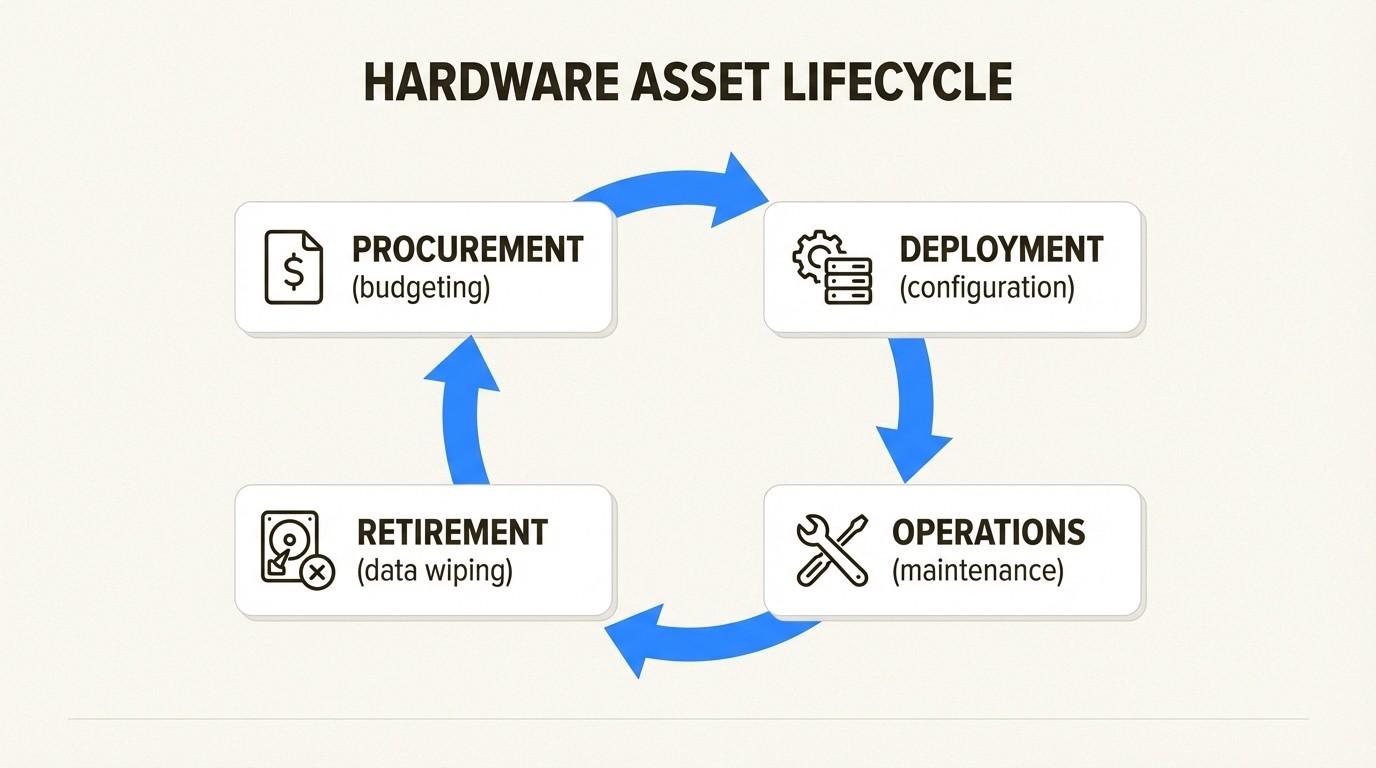
The practice covers the full lifecycle:
Procurement: Planning, budgeting, and purchasing
Deployment: Configuration, assignment, and installation
Operations: Maintenance, support, and monitoring
Retirement: Data wiping, disposal, and replacement planning
HAM connects to broader IT asset management (ITAM), which includes software licenses and digital assets. But hardware has unique challenges: physical location matters, equipment breaks, and disposal requires security protocols.
The global ITAM market is expected to double by 2026, exceeding $2 billion. Why? Because companies are realizing that unmanaged assets drain budgets. The U.S. hardware asset management market alone is projected to hit $23.3 billion by 2034. Organizations are investing because the ROI is clear.
1. Start with automated asset discovery
You can't manage what you don't know exists. Yet 30% of organizations still lack formal IT asset management programs, according to Gartner research cited by Teqtivity.
Manual spreadsheets fail at scale. They're outdated the moment you save them, and nobody wants to spend hours auditing equipment.
Automated discovery tools scan your network to identify connected devices. They pull details like hardware specs, installed software, and user assignments. Modern tools integrate with MDM platforms like Intune, Jamf, and Kandji to capture devices whether they're in the office or remote.
This eliminates two common problems:
Ghost assets: Equipment on your books that's missing or stolen
Zombie assets: Equipment physically present but not tracked in any system
Here's a quick win: run automated discovery before your next procurement cycle. You might find you already own what you were planning to buy.
For more on inventory tools, see our practical guide to hardware inventory software.
2. Implement a centralized asset inventory
Once you discover assets, you need a single source of truth. Scattered spreadsheets and departmental silos create confusion.
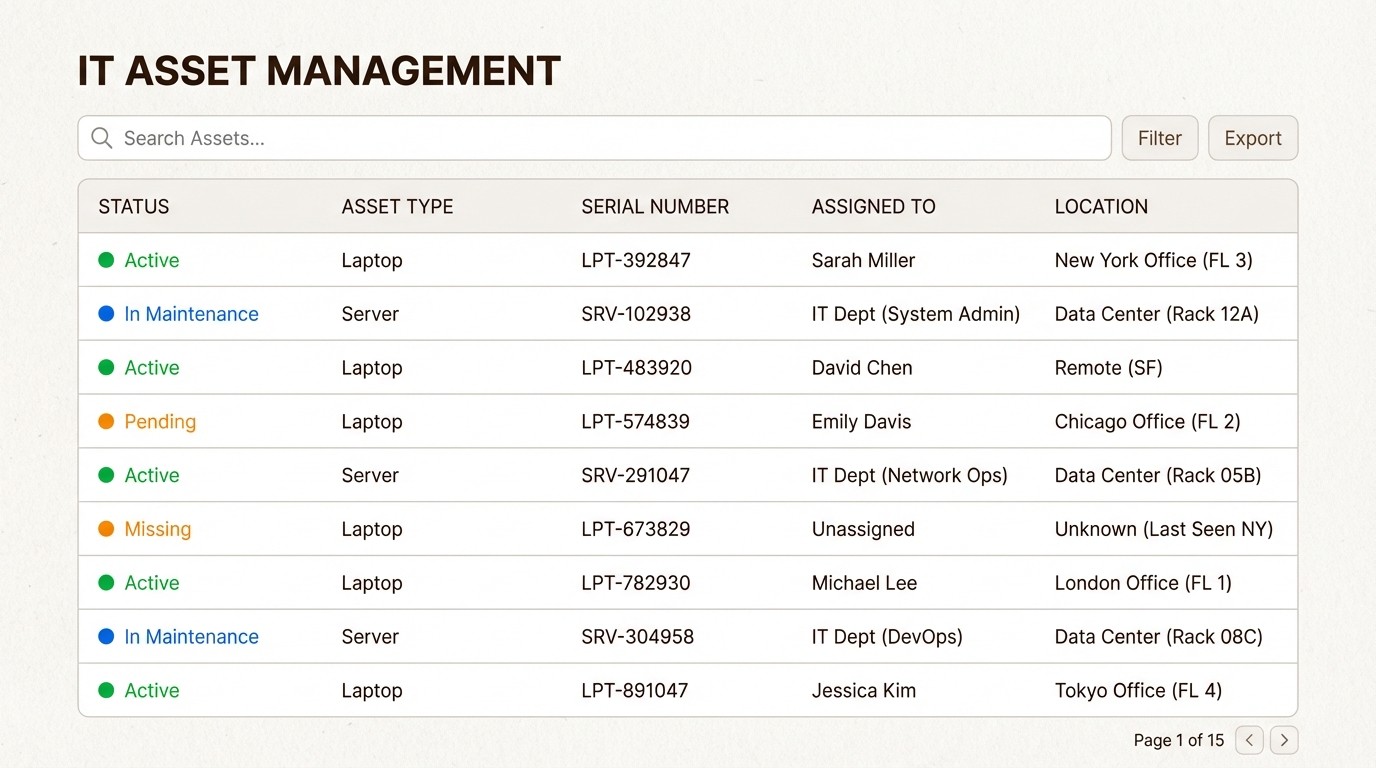
A centralized inventory tracks the data that matters:
Serial numbers and asset tags
Purchase dates and vendors
Warranty expiration dates
Current assignments and locations
Maintenance history
Barcode or QR code tagging bridges the physical and digital worlds. Scan a laptop's tag with your phone, and you instantly see its full history.
Regular audits keep the data honest. Monthly spot-checks or quarterly full audits catch discrepancies before they multiply. When everything is centralized, audits take hours instead of days.
The payoff? Faster troubleshooting (you know exactly what equipment a user has), accurate budgeting (no surprise replacement needs), and compliance readiness (auditors get clean reports).
3. Track the full asset lifecycle
Knowing what you have today isn't enough. You need to know where it's been and where it's going.
Lifecycle tracking means recording:
Procurement details (PO numbers, costs, vendors)
Deployment dates and initial configurations
Maintenance logs and repair history
Warranty claims and support tickets
End-of-life dates and replacement timelines
This data transforms asset management from reactive to proactive. Instead of replacing equipment when it breaks, you plan replacements before failures disrupt work.
Warranty tracking deserves special attention. Automated alerts 30 or 60 days before expiration give you time to renew, replace, or budget accordingly. Nothing hurts like an urgent server repair that isn't covered because the warranty lapsed last month.
Financial tracking matters too. Depreciation schedules, total cost of ownership calculations, and refresh forecasting all depend on accurate lifecycle data.
4. Prioritize critical assets
Not every device deserves equal attention. A spare monitor and a production server shouldn't be managed the same way.
Tier your assets by business impact:
Tier 1 (Business-critical): Servers, core network infrastructure, executive workstations. These get the most rigorous tracking, fastest support response, and earliest replacement priority.
Tier 2 (Important): Standard employee laptops, department printers. Regular tracking and standard support SLAs.
Tier 3 (Standard): Spare peripherals, test equipment. Basic tracking, lowest priority for replacement.
This tiering lets you focus security and maintenance efforts where they matter most. A compromised server affects the whole company. A compromised test laptop affects one project.
Risk-based categorization also helps during audits and compliance reviews. You can demonstrate that your most sensitive assets receive appropriate protection.
For more on categorization strategies, check our comprehensive guide to IT asset inventory management.
5. Automate routine workflows
Manual processes break down as teams scale. They're also boring, which means people skip steps or make mistakes.
Automation handles the repetitive work:
Status updates when assets are checked in or out
Warranty expiration alerts sent to procurement
Low-stock notifications when spare inventory runs thin
Assignment notifications to users and their managers
Ticket creation when maintenance is due
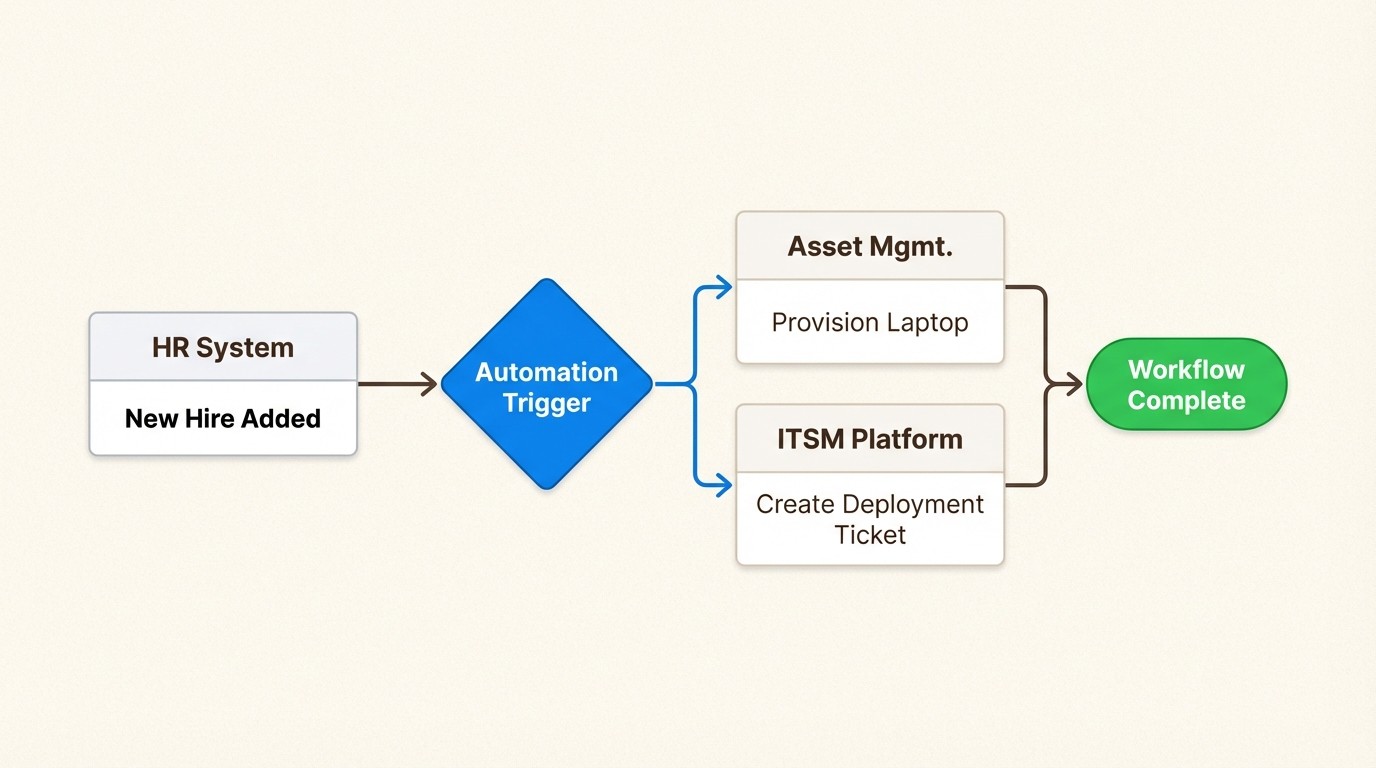
The best automation connects your asset management system to your ITSM platform. When a user submits a ticket about a laptop issue, the technician sees the device's full history—purchase date, past repairs, warranty status—without switching tools.
Integration with HR systems enables automatic provisioning. New hire starts Monday? The workflow assigns a laptop, creates accounts, and schedules delivery automatically.
The result: fewer errors, faster response times, and IT staff freed from paperwork to focus on strategic work.
6. Establish clear governance policies
Tools and processes need rules. Written policies define how your organization handles hardware assets.
Key policy areas include:
Procurement: Who can approve purchases? What's the standard equipment for each role?
Usage: Can employees take equipment home? What's the policy for personal use?
BYOD: Which personal devices can access company resources? What security requirements apply?
Remote work: How do you ship equipment to remote employees? How do you recover it when they leave?
Disposal: What's the process for retiring equipment? Who handles data wiping?
Policies only work if people follow them. Build enforcement into workflows rather than relying on documentation alone. If the system won't let someone request non-standard equipment without VP approval, the policy enforces itself.
Remote work has complicated asset management significantly. Employees aren't down the hall anymore—they're across the country or the world. Your policies need to address shipping logistics, international compliance, and equipment recovery at termination.
7. Secure assets throughout their lifecycle
Security isn't just firewalls and antivirus. Physical assets contain sensitive data, and every stage of the lifecycle presents risks.
Chain of custody: Track who has handled high-value assets. Document transfers between employees, to repair vendors, and into storage.
Encryption: Require full-disk encryption on all laptops and mobile devices. If a device is lost or stolen, encrypted data is significantly harder to exploit.
Data wiping: Before any equipment leaves your control—whether sold, recycled, or returned to a vendor—securely wipe all data. Use certified wiping procedures and document completion with certificates of destruction.
Rogue device detection: Automated discovery helps identify unauthorized devices on your network. That unknown laptop connecting to WiFi might be a contractor's device, or it might be a threat.
Compliance requirements vary by industry. Healthcare organizations face HIPAA rules about device tracking. Public companies need SOX-compliant asset records for financial audits. GDPR requires knowing where personal data resides, which means knowing which devices store it.
For a practical checklist, see our IT asset recovery offboarding guide.
8. Optimize asset utilization
Buying less is cheaper than managing more. Asset utilization tracking helps you identify waste.
Common optimization opportunities:
Idle equipment: Laptops assigned to users who never use them, or servers running at 5% capacity
Over-provisioning: Employees with high-end workstations who only check email
Missing redeployment: Equipment sitting in storage that could serve new hires
Usage monitoring—either through automated tracking or periodic surveys—reveals these patterns. One company might discover 20 laptops sitting unused in a closet. Another finds that half their developers don't need the expensive graphics cards they were assigned.
Pool programs help with infrequently used equipment. Instead of buying a projector for every conference room, maintain a checkout pool. Employees reserve what they need, return it when done, and you buy fewer devices overall.
The financial impact is real. Better utilization can reduce total cost of ownership by 5-30% over an asset's lifetime.
9. Plan budgets proactively
Asset data enables smarter financial planning. Instead of reactive panic purchases, you forecast needs and spread costs.
Start with replacement forecasting. If you know laptop lifecycles are typically four years, and you know which machines were purchased in 2021, you can predict 2025 replacement needs with reasonable accuracy.
Communicate early with finance teams. Nobody likes surprise $50,000 equipment requests. But a quarterly report showing "Q3 will need 15 laptop replacements at $1,500 each" lets everyone plan.
Build business cases with data. When users complain about slow computers, asset records show the device's age, warranty status, and comparable replacements. Decisions become factual instead of emotional.
Some organizations smooth costs by leasing instead of buying. Others use refresh cycles spread throughout the year rather than massive annual purchases. Both approaches benefit from accurate asset data.
10. Choose the right tools for your environment
The best tool is the one your team actually uses. Evaluate asset management software based on:
Ease of use: If logging an asset takes more than a minute, people won't do it consistently.
Integrations: Your asset tool should connect to ITSM, MDM, financial systems, and identity management. Data should flow automatically, not require manual re-entry.
Scalability: Will the tool handle your growth? A 100-person company has different needs than a 10,000-person enterprise.
Mobile access: IT staff need to update assets from anywhere—scanning barcodes in storage closets, checking inventory in data centers.
Reporting: Can you generate the compliance reports, budget forecasts, and utilization analyses you need?
For teams already using Jira, native integration eliminates context switching. Asset Management for Jira lives where your IT team already works, connecting asset data directly to tickets and workflows.
See our Jira asset management guide for implementation strategies, or check pricing to compare plans.
Getting started with hardware asset management
You don't need to implement everything at once. Start small and build momentum.
Week 1: Run automated discovery to see what you actually own.
Week 2: Tag your 20 highest-value assets and add them to a centralized system.
Week 3: Set up warranty alerts for equipment expiring in the next 90 days.
Month 2: Expand to all laptops and servers. Document your first policies.
Month 3: Add automation for common workflows like new hire provisioning.
Each small win builds credibility and proves value. Before long, asset management becomes standard practice rather than a special project.
If your team lives in Jira, Asset Management for Jira provides native asset tracking without adding another tool to your stack. Explore features or read the documentation to see how it fits your workflow.
Frequently Asked Questions
What are the most important hardware asset management best practices for small IT teams?
Start with automated discovery to establish baseline inventory, then focus on tracking your 10-20 most expensive assets. Set up warranty expiration alerts and create a simple checkout process for equipment loans. Small teams should prioritize automation to reduce manual work.
How often should we audit our hardware assets?
High-value assets (servers, executive laptops) should be verified monthly. Standard equipment can be audited quarterly. Spot-checks of random samples between full audits help catch discrepancies early. Automated discovery tools can run continuously to flag changes.
What's the difference between hardware asset management and IT asset management?
Hardware asset management (HAM) focuses specifically on physical equipment—laptops, servers, monitors, networking gear. IT asset management (ITAM) is broader, including software licenses, cloud subscriptions, and digital assets. HAM is a subset of ITAM with unique challenges like physical tracking and secure disposal.
How do hardware asset management best practices change for remote teams?
Remote work requires stronger shipping and logistics processes, clear BYOD policies, and remote wiping capabilities. Discovery tools must work across distributed networks, and recovery processes need to handle equipment returns from employee homes rather than office drop-offs.
What should we track for each hardware asset?
At minimum: serial number, asset tag, purchase date, warranty expiration, assigned user, and location. Ideally also track: purchase cost, vendor, maintenance history, software installed, and lifecycle status (active, in repair, retired).
How do we justify hardware asset management software to leadership?
Focus on measurable ROI: reduced unnecessary purchases (often 10-20% of IT spend), faster audit preparation (saving days of staff time), reduced security risk from lost devices, and extended asset lifespan through better maintenance tracking. Most organizations see payback within the first year.
What are common mistakes when implementing hardware asset management best practices?
Trying to track everything perfectly from day one (start with high-value items), relying on manual processes that people skip, neglecting to train end-users on checkout/return procedures, and failing to integrate asset data with ticketing and procurement systems. Another mistake is ignoring the retirement phase—secure disposal is as important as acquisition.



