CMDB vs Asset Management: What's the Difference in 2026
Asset management tells you what you have, what it's worth, and when to replace it. A CMDB (Configuration Management Database) tells you how everything connects, what depends on what, and what breaks if you change something.

Colin Reed
IT Expert and Content Writer
Last Updated
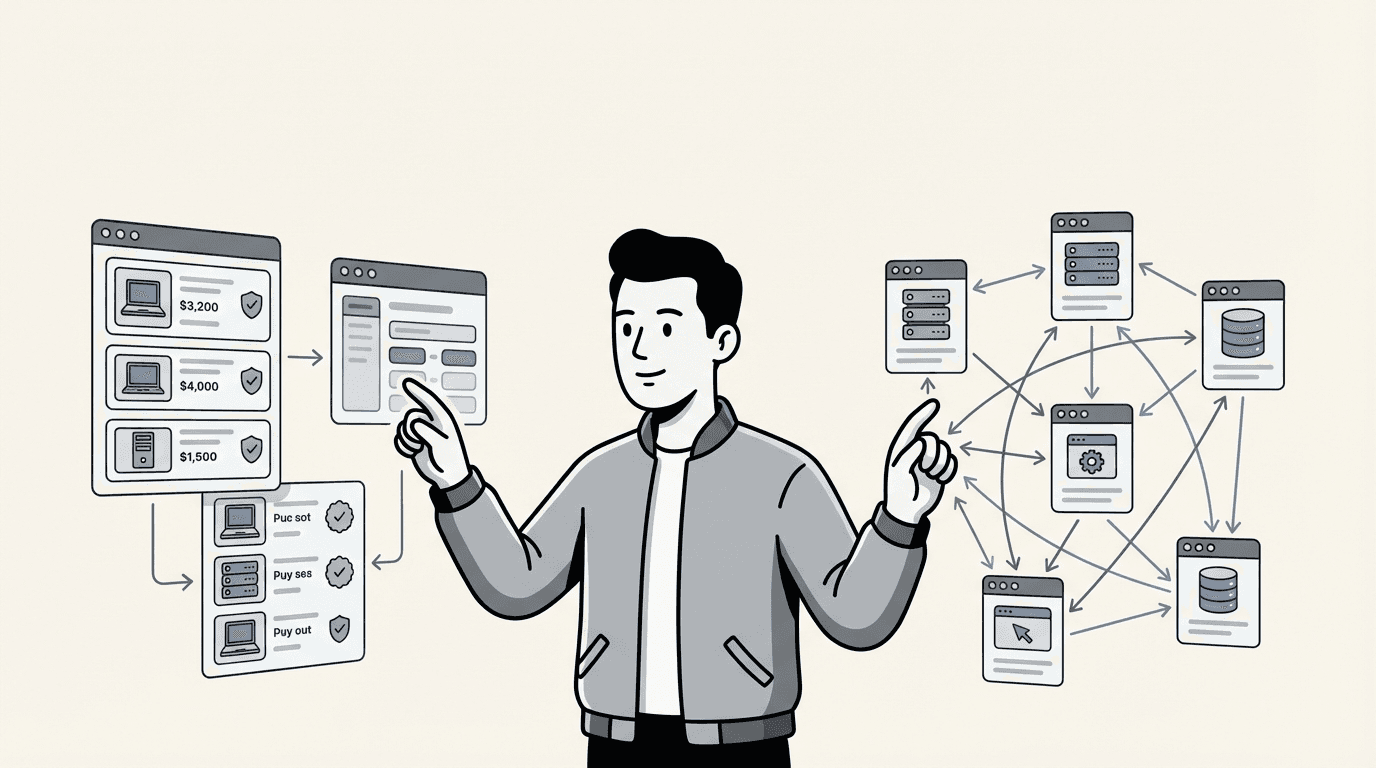
If you're evaluating how to track your IT infrastructure, you've probably run into two terms that sound similar but serve very different purposes: CMDB and asset management. Both help you understand what technology your organization owns. Both improve IT operations. But they answer fundamentally different questions.
Asset management tells you what you have, what it's worth, and when to replace it. A CMDB (Configuration Management Database) tells you how everything connects, what depends on what, and what breaks if you change something.
Most organizations need both eventually. But the order you implement them, and how much you invest in each, depends on your size, complexity, and immediate priorities. Here's what each one actually does, where they overlap, and how to decide which your organization needs first.
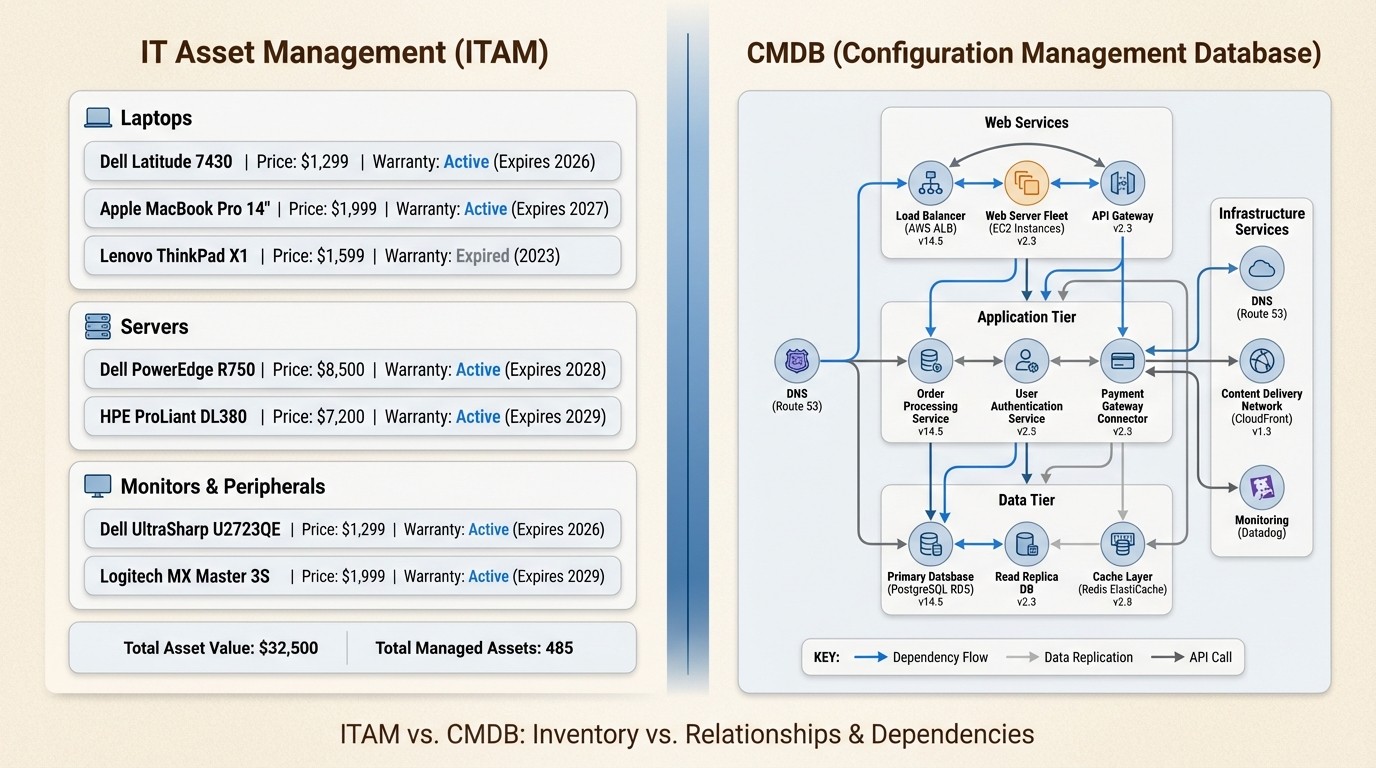
What is asset management (ITAM)?
IT Asset Management, or ITAM, is the practice of tracking your IT assets throughout their entire lifecycle. That lifecycle starts the moment you decide to buy something and ends when you dispose of it.
At its core, asset management answers four questions:
What do we own?
Where is it?
Who's responsible for it?
What's it costing us?
The assets tracked include hardware (laptops, servers, network equipment), software (licenses, subscriptions, cloud services), and sometimes non-IT equipment like conference room displays or phones. The focus is on financial and operational control.
Asset management systems track purchase dates, warranty information, depreciation schedules, assignment to users or departments, maintenance contracts, and disposal records. When an auditor asks for proof of software license compliance, asset management provides the answer. When finance wants to know the current value of IT equipment for insurance purposes, asset management has those numbers.
The primary stakeholders are IT managers, procurement teams, finance departments, and compliance officers. These are the people who need to control costs, prepare for audits, plan hardware refreshes, and ensure nothing slips through the cracks.
Common use cases include software license audits, where you prove you're using what you paid for. Hardware refresh planning, where you identify aging equipment before it fails. Cost optimization, where you find unused licenses or redundant purchases. And compliance reporting, where you demonstrate control over IT resources to regulators or internal auditors.
Most organizations start here because the value is immediate and the implementation is straightforward. You can get meaningful results in weeks.
What is a CMDB?
A Configuration Management Database, or CMDB, serves a different purpose. While asset management tracks what you own, a CMDB tracks how everything works together according to ITIL practices.
A CMDB stores information about Configuration Items (CIs). These are any components that need to be managed to deliver IT services. Servers, applications, databases, network switches, and even documentation can be CIs. The key difference from assets is relationships.
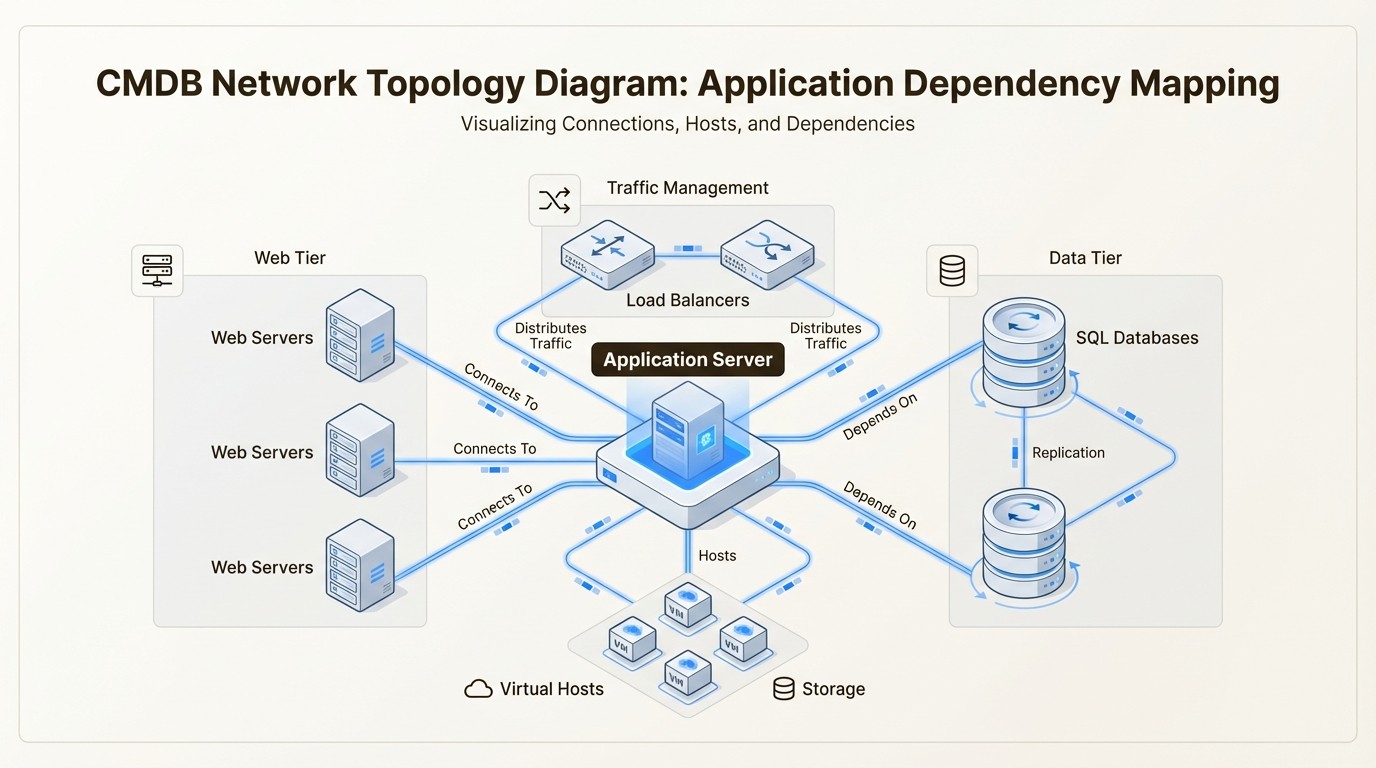
The CMDB maps dependencies. It knows that your customer portal application runs on three web servers, connects to a database cluster, relies on an authentication service, and sits behind a load balancer. If any of those components fails, the CMDB shows you exactly what's affected.
This matters most during changes and incidents. When you're planning a server upgrade, the CMDB reveals every application, service, and user that might be impacted. When something breaks at 2 AM, the CMDB helps you trace the problem upstream to find the root cause instead of treating symptoms.
The primary stakeholders are IT operations teams, service desk staff, change managers, and infrastructure architects. These are the people who keep services running, manage changes safely, and design resilient systems.
Common CMDB use cases include change impact assessment, where you evaluate the blast radius before making changes. Incident root cause analysis, where you trace failures through dependency chains. Service mapping, where you visualize how technical components support business services, as described by Freshworks. And risk assessment, where you identify single points of failure.
The value of a CMDB depends entirely on accuracy. An outdated CMDB is worse than no CMDB because it gives you false confidence. Maintaining that accuracy requires ongoing effort, automated discovery tools, and integration with your change management process, as noted by Device42.
CMDB vs asset management: Key differences
The distinction becomes clearer when you compare them across specific dimensions, as outlined by ITSM.tools and other industry experts.
Focus and purpose
Asset management focuses on the financial and lifecycle aspects of IT resources, as Flexera defines it. It cares about purchase price, warranty expiration, depreciation, and total cost of ownership. The goal is optimizing value and ensuring compliance.
A CMDB focuses on operational and technical relationships. It cares about configurations, dependencies, and service impact. The goal is maintaining service stability and enabling faster incident resolution.
Asset management is the view your CFO needs. The CMDB is the view your IT operations team needs.
What each system tracks
Asset management tracks:
Purchase price and dates
Warranty and maintenance contracts
Depreciation schedules
Current assignment and location
Lifecycle status (ordered, in stock, deployed, retired)
License entitlements and usage
A CMDB tracks:
Configuration details (OS versions, patch levels, settings)
Relationships and dependencies (hosted on, depends on, connected to)
Service mappings (which business services rely on which components)
Change history (what changed, when, and who made the change)
Incident associations (which components have failed before)
When to use each
You need asset management when:
Preparing for software license audits
Planning hardware refresh budgets
Tracking equipment assigned to remote employees
Ensuring warranty coverage doesn't lapse
Optimizing cloud subscription costs
Documenting assets for insurance or compliance
You need a CMDB when:
Planning infrastructure changes that could impact multiple services
Troubleshooting complex incidents spanning multiple systems
Identifying single points of failure in critical services
Mapping technical dependencies for business continuity planning
Assessing the risk of proposed changes
Understanding the full impact of security vulnerabilities
Complexity and implementation
Asset management is generally simpler to implement, as Cloudaware notes. You can start with a spreadsheet, though dedicated tools are better. Discovery tools can automatically populate asset data from your network. Most organizations see value within weeks of starting.
A CMDB requires more planning and ongoing maintenance. You need to define what constitutes a CI, establish relationship types, integrate with discovery tools, and connect to your change management process. The initial setup takes months, not weeks, according to InvGate. And the CMDB requires continuous attention to remain accurate.
This difference in complexity is why many organizations start with asset management and add a CMDB later, when their infrastructure complexity justifies the investment.
How CMDB and asset management work together
The most important thing to understand is that CMDB and asset management aren't competitors. They're partners, as Ivanti explains. Each provides context that makes the other more valuable.
Asset data enriches the CMDB. When a CI in your CMDB represents a physical server, knowing its purchase date, warranty status, and depreciation schedule helps with lifecycle planning. A server that's fully depreciated and out of warranty carries different risk than one under maintenance.
Conversely, relationship data from the CMDB informs asset decisions. When you're planning to retire a server, the CMDB shows you every application, service, and user that will be affected. This prevents surprises and helps you plan migrations properly.
Consider a real-world scenario: You have a server that's four years old. The asset management system shows it's fully depreciated, the warranty expires next month, and the maintenance renewal would cost $8,000. Without the CMDB, you might just renew the maintenance and move on.
But the CMDB reveals that this server hosts your customer portal application, which has twelve downstream dependencies including your payment processing system and customer database. Simply replacing the hardware isn't straightforward. You need to plan the migration, test everything, and schedule the change during a maintenance window.
Together, these systems give you the full picture. Asset management tells you the server needs attention. The CMDB tells you how to plan that attention without breaking production services.
This integration becomes essential as organizations grow. When you have hundreds of servers, thousands of applications, and complex service dependencies, you need both views to make informed decisions.
Which does your organization need?
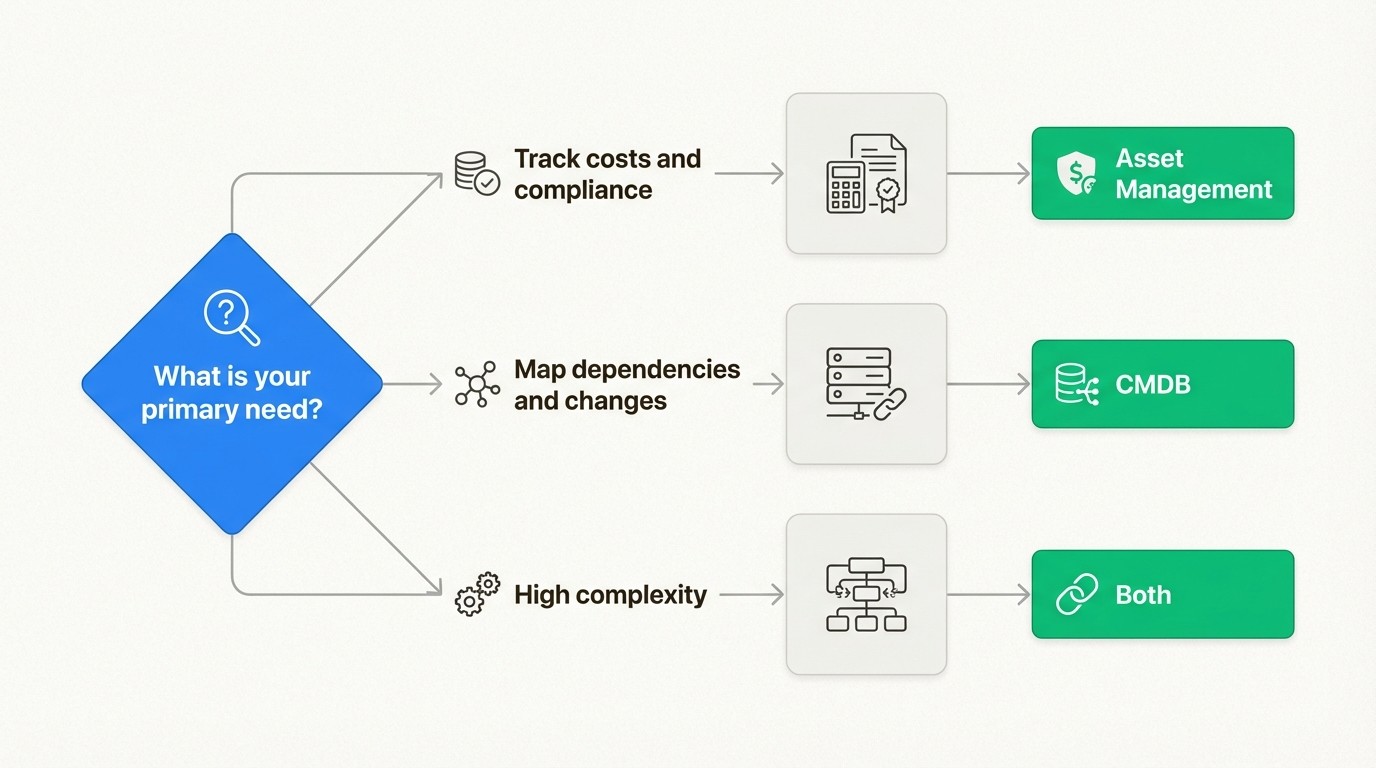
The right answer depends on your organization size, IT complexity, and immediate priorities.
Start with asset management if:
You're in the 200-2,000 employee range. Your IT team is small and stretched thin. You need to track hardware, software, and licenses but don't have complex service dependencies to manage. You're facing audits or compliance requirements. Budget is a consideration, and you want quick time-to-value.
Most mid-market organizations fall into this category. You need visibility into what you own, who's using it, and what it's costing you. You need to pass audits without scrambling for documentation. Asset management delivers this value directly and immediately.
Asset management also makes sense if your infrastructure is relatively simple. If you have straightforward application architectures without complex microservices or multi-cloud deployments, you may not need the relationship mapping that a CMDB provides.
Add a CMDB if:
You have complex IT infrastructure with many interdependencies. You're managing microservices, multi-cloud environments, or hybrid infrastructure. Changes frequently cause unexpected outages or service disruptions. You need detailed impact analysis for change management. Your ITSM processes are mature and you have resources to maintain the CMDB. You're in the enterprise range with 2,000+ employees.
The CMDB becomes valuable when complexity makes it hard to understand the full impact of changes. If you've ever made a "simple" infrastructure change that broke three unrelated services, you know why dependency mapping matters.
You need both when:
You're managing hybrid or multi-cloud infrastructure at scale. Compliance requirements demand both financial and technical audit trails. Change management is business-critical, and downtime is expensive. You're optimizing costs across complex environments where services share infrastructure.
The integration of both systems provides the complete visibility that large organizations need. Asset management ensures financial control and compliance. The CMDB ensures operational stability and informed change management.
Asset Management for Jira: A Practical ITAM Solution
For organizations that need asset management without CMDB complexity, Asset Management for Jira offers a practical path forward. It's built specifically for teams that already live in Jira and want asset tracking that integrates seamlessly with their existing workflow.
The key advantage is native Jira integration. Your asset data lives where your team already works. When someone opens a support ticket, the technician sees the full asset history, warranty status, and previous issues without switching systems. When you need to plan a hardware refresh, you can query asset data using JQL just like you query tickets.
This eliminates the context switching that kills productivity. IT teams don't need to learn a new interface or maintain data in multiple systems. Everything connects to the Jira ecosystem you already use.
Implementation is fast compared to enterprise CMDB deployments. Most organizations are tracking assets within days rather than months. The system auto-discovers devices through Microsoft Intune, Jamf, and Kandji integrations, so you're not starting from a blank spreadsheet.
Asset Management for Jira covers the core ITAM needs that most mid-market organizations have. Hardware tracking with assignment and lifecycle management. Software license management to stay audit-ready. Equipment checkout workflows for loaner devices. And asset linking to Jira tickets for faster support resolution.
Unlike standalone CMDBs that require dedicated administrators and ongoing maintenance, Asset Management for Jira is designed to be manageable by the IT generalists who already run your Jira instance. It doesn't require the specialized skills or ongoing overhead that enterprise configuration management requires.
And unlike spreadsheets, it provides the automation, searchability, and reliability that asset tracking actually requires. You get automated discovery, change history, and reporting without the manual data entry that makes spreadsheets so unreliable.
For organizations considering their options, our pricing is straightforward and predictable. Unlike Atlassian's Assets, which charges based on the number of objects you track, we offer per-user pricing with unlimited assets included. This makes budgeting simple and encourages comprehensive tracking rather than rationing your object count.
Making the right choice for your IT environment
So which do you need? Here's the short version.
Asset management answers "what do we own and what's it cost?" The CMDB answers "how does everything connect and what breaks if we change something?"
Most mid-market organizations should start with asset management. It delivers immediate value for audit readiness, cost control, and operational efficiency. The implementation is straightforward, and you'll see results within weeks.
Add a CMDB when your infrastructure complexity demands it. When you have so many interdependencies that you can't keep them in your head, when changes frequently cause unexpected problems, or when you need formal impact analysis for change management.
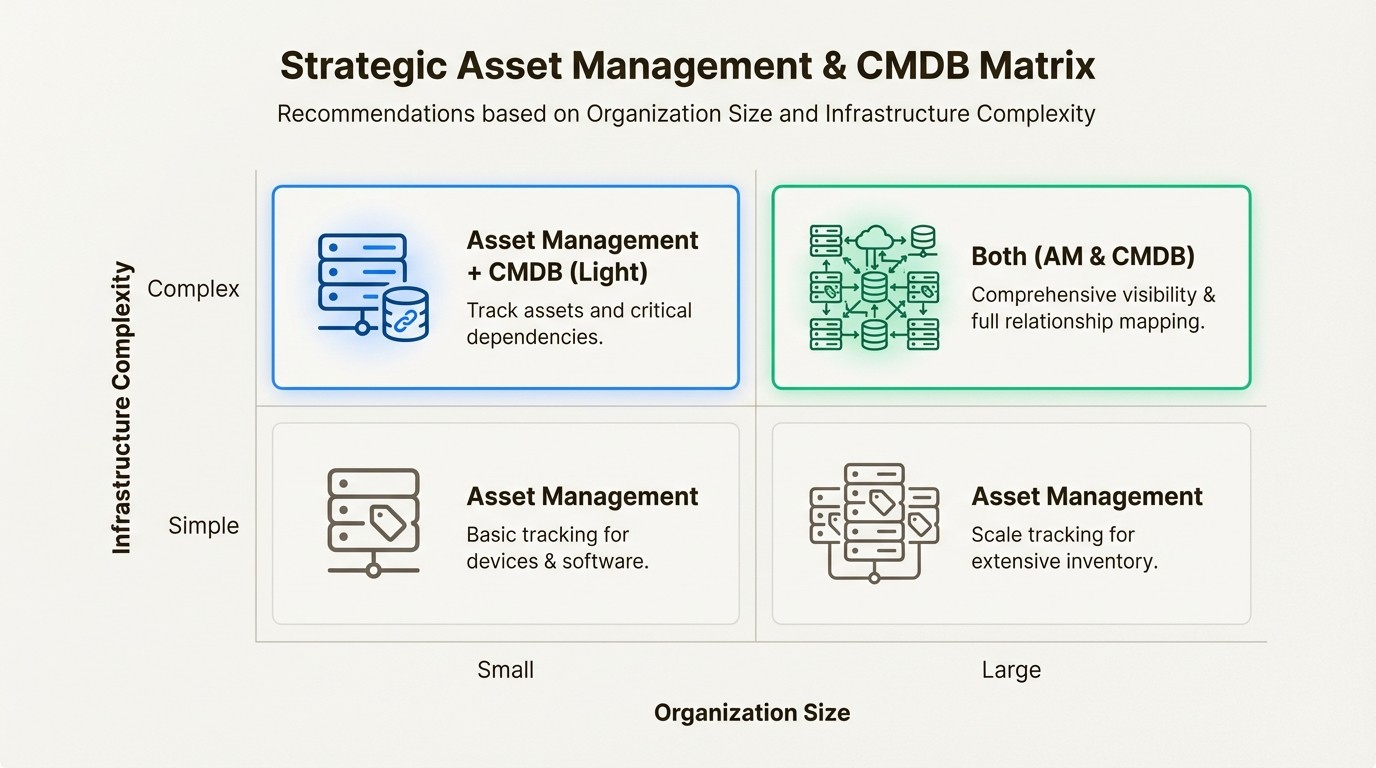
The integration of both systems delivers the complete visibility that mature IT organizations need. But you don't need to implement everything at once. Start with the foundation, prove value, and expand when the business case is clear.
If you're evaluating asset management solutions and your team lives in Jira, explore Asset Management for Jira. It's designed for the practical realities of mid-market IT teams who need reliable asset tracking without enterprise complexity. You can start with the core features you need today and expand as your requirements grow.
The goal isn't to implement the most comprehensive system possible. It's to implement the system that solves your current problems and positions you for future growth. Start there, and expand when it makes sense.
Frequently Asked Questions
Can I use a CMDB for asset management instead of buying both?
Technically yes, but it's usually a mistake. CMDBs aren't designed for financial tracking, contract management, or depreciation calculations. You'd need extensive customization to handle warranty tracking, license compliance, and procurement workflows. Most organizations find that using the right tool for each job delivers better results than forcing one system to do everything.
How do I know if my organization is complex enough to need a CMDB?
Ask yourself three questions. First, do infrastructure changes frequently cause unexpected outages or service disruptions? Second, can a single person keep track of all the dependencies between your systems, or is it too complex to hold in one person's head? Third, do you need formal impact analysis for change management approvals? If you answered yes to any of these, a CMDB would likely provide value.
What's the typical implementation timeline for asset management versus a CMDB?
Asset management implementations typically take weeks. You can start tracking assets immediately, and most organizations see meaningful value within the first month. CMDB implementations take months. You need to define CIs, establish relationships, integrate discovery tools, and connect to change management processes. The CMDB also requires ongoing maintenance to remain accurate, while asset management is more self-sustaining once established.
Do small organizations (under 200 employees) need either system?
Asset management makes sense for most organizations once they have more than 50-100 IT assets to track. Spreadsheets become unreliable around that scale. A CMDB is usually overkill for small organizations unless you have unusually complex infrastructure or strict compliance requirements. Start with asset management and add a CMDB only if you outgrow the simpler approach.
How does Asset Management for Jira compare to standalone CMDB tools like ServiceNow?
They're solving different problems. ServiceNow's CMDB is designed for enterprise configuration management with complex relationship mapping and service modeling. Asset Management for Jira focuses on practical asset tracking, license management, and equipment accountability for mid-market organizations. If you need enterprise CMDB capabilities, ServiceNow is the standard. If you need reliable asset management that integrates with your existing Jira workflow, Asset Management for Jira is purpose-built for that use case.
Can I migrate from asset management to a full CMDB later?
Yes, and this is a common progression. Many organizations start with asset management to establish basic visibility and control. As their infrastructure grows more complex, they add a CMDB and integrate it with their existing asset data. Starting with asset management doesn't lock you out of CMDB capabilities later. It simply gives you immediate value while you mature your IT management practices.



