Jira Assets: What every tier actually includes (Free → Standard → Premium)
A detailed breakdown of what Jira Assets includes at each pricing tier, from the free plan through Standard and Premium, so you can decide which level fits your IT asset management needs.

Colin Reed
IT Expert and Content Writer
Last Updated
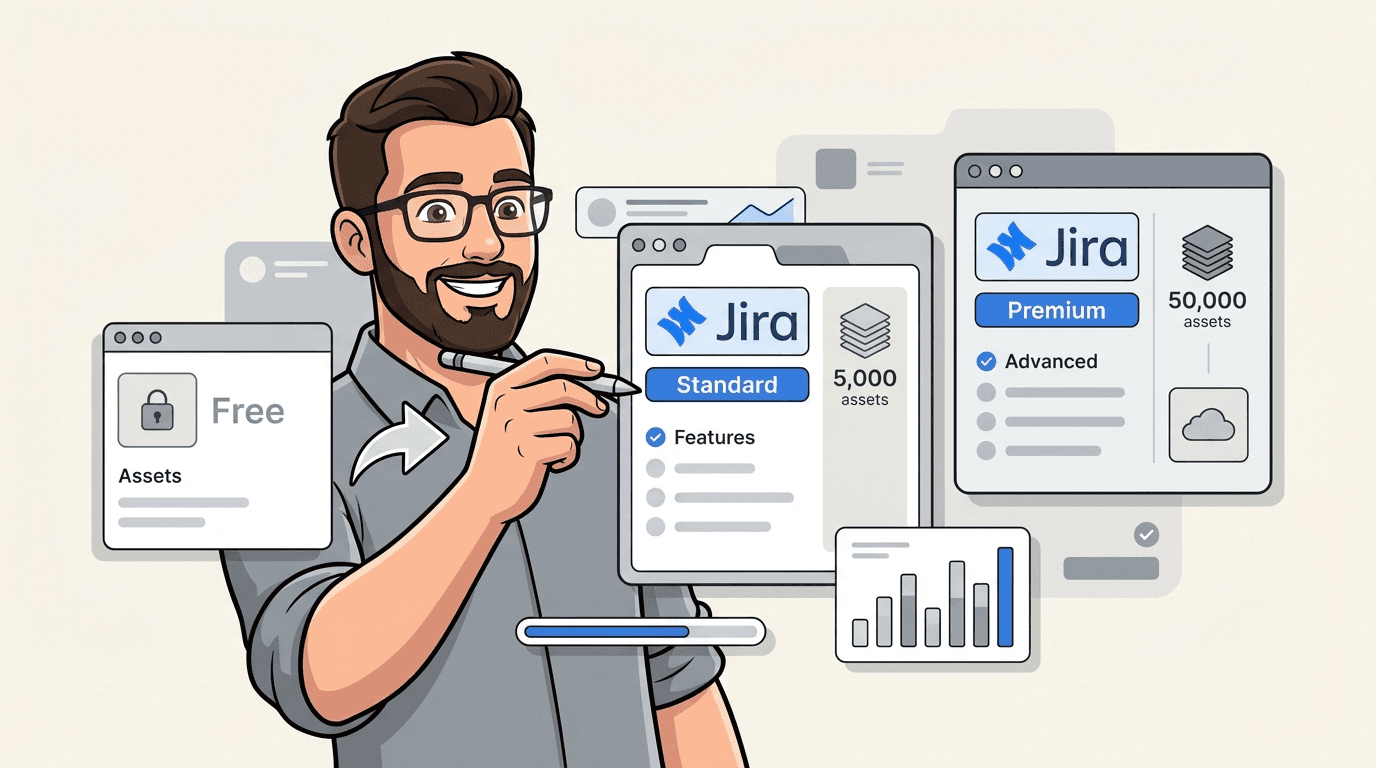
As of February 2026, Assets is now included in Service Collection Standard at no extra cost. If you're on Standard, you can start tracking up to 5,000 assets immediately without upgrading. Here's exactly what each Jira tier includes, how the new Standard offering works, and when it still makes sense to upgrade to Premium or Enterprise.
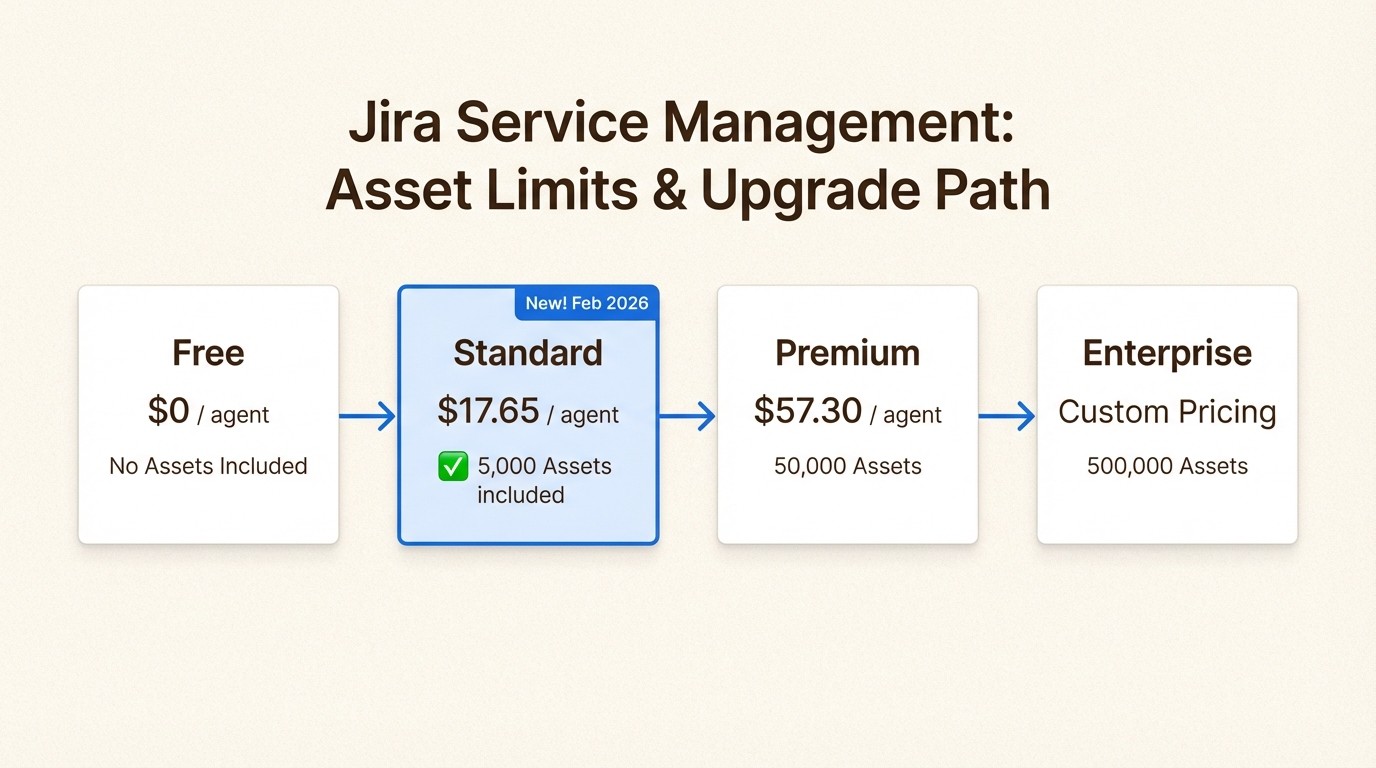
The short answer: Assets is now on Standard (with limits)
Let's cut to the chase. Jira Assets (formerly Insight) is now available on Service Collection Standard, Premium, and Enterprise plans. As of February 5, 2026, Standard includes 5,000 objects at no additional cost. Free tier still doesn't include Assets.
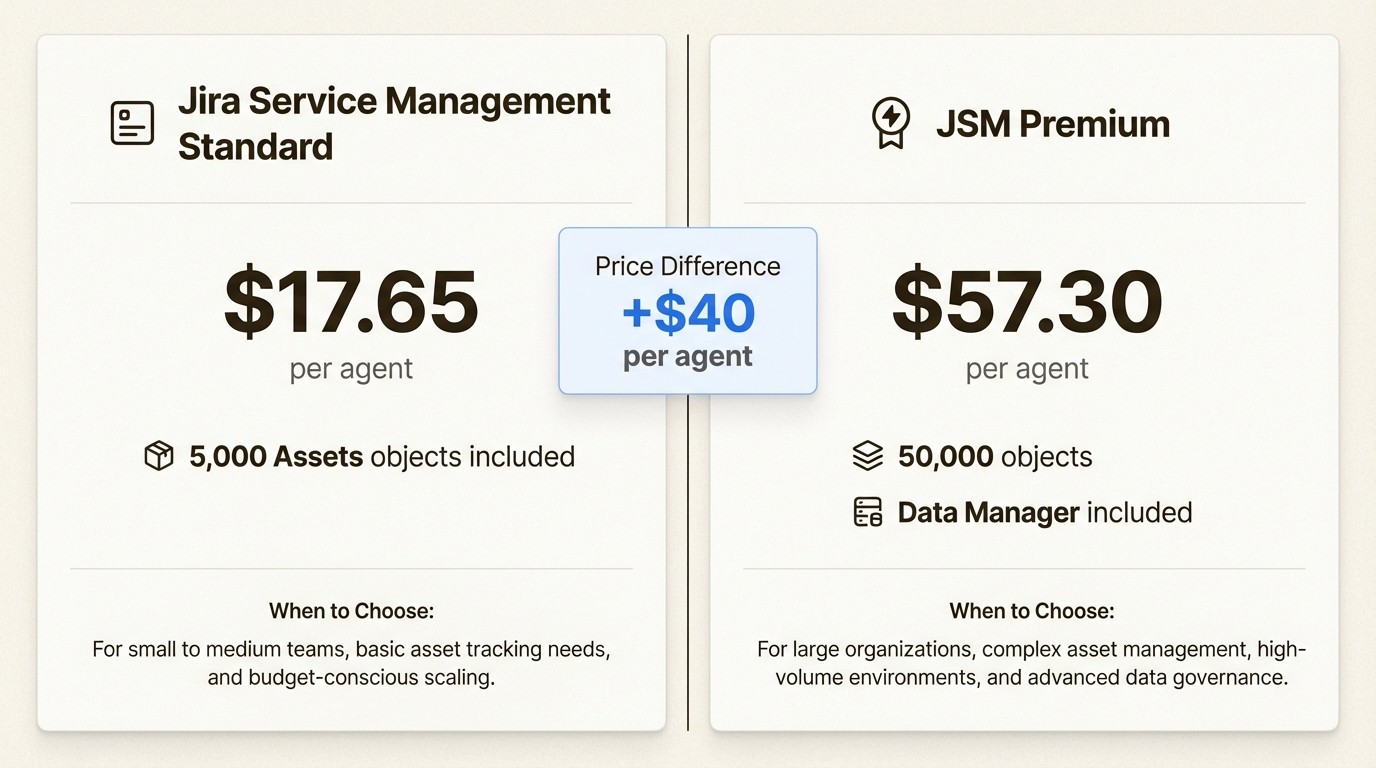
This is a significant change. Previously, you needed Premium ($57.30/agent/month) just to get Assets. Now you can track up to 5,000 assets on Standard ($17.65/agent/month), which is a much more accessible entry point for small to medium IT teams.
There's still confusion between Jira Software Premium and Jira Service Management Premium. Jira Software Premium ($14.54/user/month) does not include Assets. You need JSM Standard or higher for asset management capabilities.
What each Jira tier actually includes
Jira Service Management comes in four tiers. Here's the breakdown of what you actually get for Assets:
Free tier
The Free tier supports up to 10 users and includes basic ticketing, 2GB of storage, and 100 automation rule runs per month. You get community support only.
Assets availability: Not included. If you want asset management on a free plan, you'll need to look at marketplace apps like Asset Management for Jira.
Standard tier
Standard costs $17.65 per agent per month and supports up to 100,000 users per site. You get 250GB of storage, 1,700 automation runs per month, and 9/5 regional support with a 2-hour response time for critical issues.
Assets availability: Now included with 5,000 objects at no extra cost. This is the big change as of February 2026. You can track laptops, software licenses, facilities, contracts, and more right out of the box.
If you exceed 5,000 objects, you pay overage fees starting at $0.02 per object per month (with volume discounts as your needs increase). This is lower than the $0.05 rate on Premium.
Premium tier
JSM Premium costs $57.30 per agent per month. That's more than 3x the Standard price. For that jump, you get:
Unlimited storage
24/7 support with 1-hour response for critical issues
99.9% uptime SLA
Cross-team planning and dependency management
Customizable approval processes
Assets with 50,000 objects included (10x the Standard limit)
Assets Data Manager with opinionated, ready-to-use schemas
Scheduled imports to keep asset data fresh and automated
The Premium tier is designed for teams that need full ITSM capabilities and more advanced asset management. The Data Manager feature provides pre-built schemas and more sophisticated IT and employee support use cases.
Enterprise tier
Enterprise is custom pricing with annual billing. It includes everything in Premium plus 500,000 Assets objects (10x the Premium limit), 30-minute response times for critical issues, a 99.95% uptime SLA, and advanced security features like Atlassian Guard Standard.
This tier is for large organizations with complex compliance requirements and multiple Jira instances (up to 150 supported).
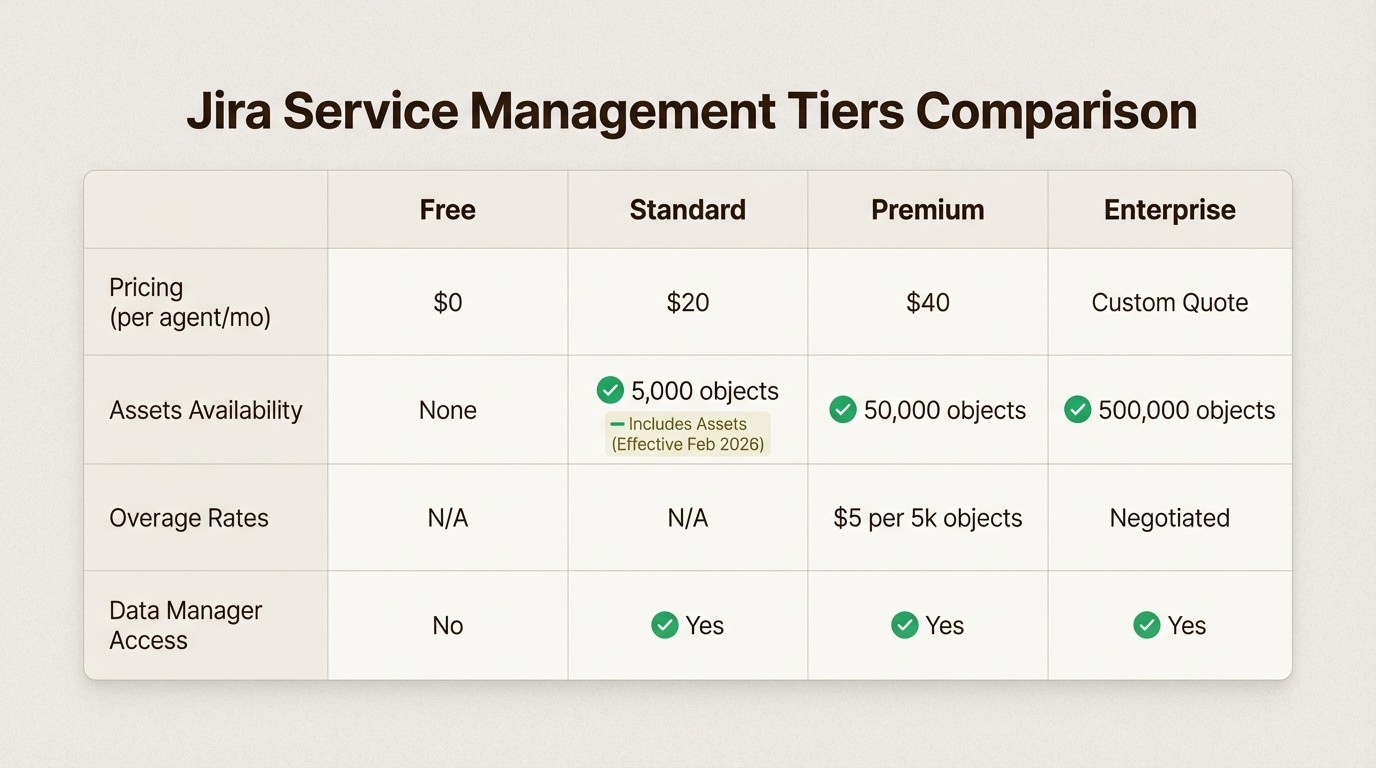
How Assets pricing actually works on each tier
The pricing model varies by tier, and understanding the differences is key to choosing the right plan.
Standard tier pricing
Included: 5,000 objects at no extra cost
Overage: Starting at $0.02 per object per month (volume discounts apply)
This is a significant improvement. Previously, Standard had no Assets at all. Now you get 5,000 objects included, which is enough for many small to medium IT teams. The $0.02 overage rate is also lower than Premium's $0.05 rate.
Premium tier pricing
Included: 50,000 objects
Overage: $0.05 per object per month
Premium gives you 10x the object limit and adds Data Manager capabilities. An "object" is anything you track—laptops, monitors, software licenses, keyboards, mobile phones, servers, network equipment. For a 500-person company, you could easily have thousands of objects.
If you're on Premium with 75,000 assets, you're paying an extra $1,250 per month in overage fees (25,000 extra objects × $0.05) on top of your base subscription.
Enterprise tier pricing
Included: 500,000 objects
Overage: Custom pricing
Enterprise includes 500,000 objects, which is enough for most large organizations. System schemas (like Services) don't count toward your limit, and objects in Data Manager don't count either.
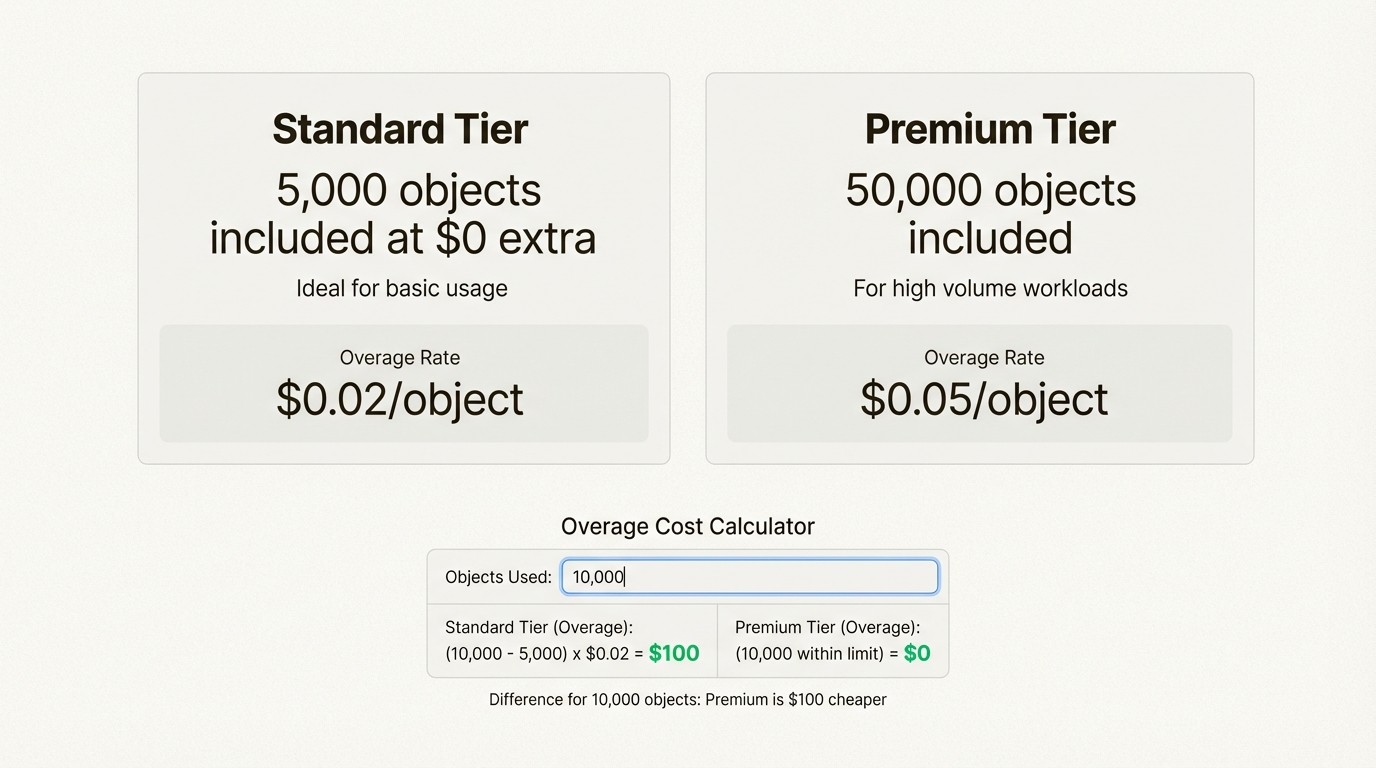
When to stay on Standard vs. when to upgrade
With Assets now on Standard, the decision calculus has changed. Here's how to decide.
Stay on Standard if...
You have fewer than 5,000 assets to track. For many small to medium IT teams, 5,000 objects is plenty. Laptops, monitors, software licenses, and basic equipment for a team of 50-100 people typically fits within this limit.
You don't need advanced asset management features. Standard gives you the core Assets functionality without the Data Manager schemas, scheduled imports, and advanced IT use cases.
You want the lowest overage rates. At $0.02 per object (vs. $0.05 on Premium), Standard is more cost-effective if you occasionally exceed your limit.
Upgrade to Premium if...
You have more than 5,000 assets. Premium's 50,000 object limit gives you room to grow. The 10x increase in included objects often pays for itself if you'd otherwise hit overage fees on Standard.
You need Assets Data Manager. This feature provides opinionated, ready-to-use schemas and more advanced IT and employee support use cases. If you want sophisticated asset management without building everything from scratch, Data Manager is valuable.
You need scheduled imports. Premium can automatically keep asset data fresh through scheduled imports, which is essential for larger environments.
You need the full ITSM suite. If you're managing incidents, changes, problems, and assets in a complex environment with 24/7 support requirements, Premium makes sense.
Consider marketplace apps if...
You're on the Free tier. Assets still isn't available on Free, but marketplace apps like Asset Management for Jira work on Free, Standard, Premium, and Enterprise.
You prefer predictable per-user pricing with unlimited assets. Most marketplace apps charge a flat per-user fee with no consumption fees. Your bill scales with your team, not your inventory.
You need quick setup without complex configuration. Asset Management for Jira includes core features for tracking hardware, software, and licenses, plus MDM integrations with Intune, Jamf, and Kandji. Pricing starts at $10 per month for up to 10 users.
Real-world cost scenarios
Let's look at three realistic scenarios to see how the costs compare with the new Standard pricing.
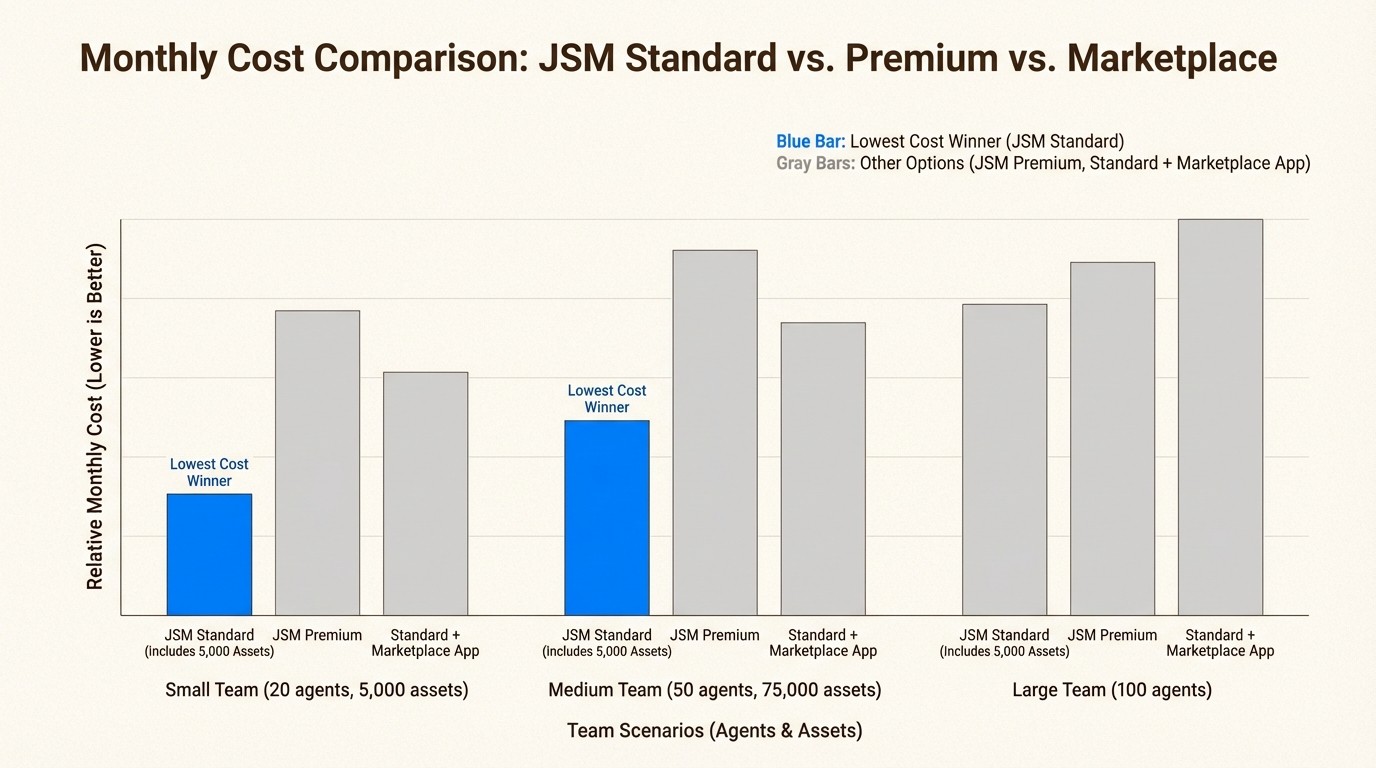
Scenario 1: 20-person IT team, 5,000 assets
JSM Standard: $17.65 × 20 = $353/month (5,000 assets included at no extra cost)
JSM Premium: $57.30 × 20 = $1,146/month (5,000 assets is under the 50,000 limit)
Standard + Asset Management for Jira: ($17.65 × 20) + ~$60 = ~$413/month
Winner: JSM Standard with native Assets
With 5,000 assets exactly at the Standard limit, native Assets on Standard is now the most cost-effective option. This is a significant change from before February 2026, when you needed Premium or a marketplace app.
Scenario 2: 50 agents, 75,000 assets
JSM Standard: $17.65 × 50 = $883/month base + $1,400 overage (70,000 extra objects × $0.02) = $2,283/month
JSM Premium: $57.30 × 50 = $2,865/month base + $1,250 overage (25,000 extra objects × $0.05) = $4,115/month
Standard + Asset Management for Jira: ($17.65 × 50) + ~$150 = ~$1,033/month
Winner: Standard + Asset Management for Jira, or JSM Standard depending on feature needs
At 75,000 assets, Standard with overages is cheaper than Premium, though a marketplace app may still be most cost-effective. The decision depends on whether you need the advanced ITSM features of Premium.
Scenario 3: 10 agents, 100 assets
JSM Standard: $17.65 × 10 = $177/month (100 assets is well under the 5,000 limit)
JSM Premium: $57.30 × 10 = $573/month
Standard + Asset Management for Jira: ($17.65 × 10) + $10 = ~$187/month
Winner: JSM Standard with native Assets
For small teams with modest asset tracking needs, Standard is now the clear winner. You get native Assets included at no extra cost, which is a game-changer from the previous pricing model.
How to start using Assets on Standard
If you're on Service Collection Standard, getting started is simple:
Open your workspace
Navigate to Assets via the app switcher
Start adding objects such as laptops, SaaS applications, facilities, or other key services
There's no add-on to install and no change to your billing. The 5,000 object allowance is included automatically.
Note for existing Premium and Enterprise customers: The Asset App color has changed from yellow to grey, and its location in the app switcher now aligns with Platform Apps. No changes have been made to your Assets App settings.
Making the right choice for your team
Start with your actual needs and asset count. With 5,000 objects now included on Standard, many teams no longer need to upgrade to Premium just for asset management.
Consider these factors:
Asset count: If you have fewer than 5,000 assets, Standard is likely sufficient. If you're approaching or exceeding that limit, compare the cost of Premium (with 50,000 included objects) versus Standard with overage fees.
Feature requirements: Do you need Data Manager's pre-built schemas and scheduled imports? If so, Premium is worth considering. If basic asset tracking is enough, Standard delivers.
Growth trajectory: If you're a 20-person team planning to scale to 100 with thousands more assets, Premium's higher included limit may save money long-term.
ITSM maturity: If you need incident, change, and problem management alongside asset tracking with 24/7 support, Premium delivers an integrated solution. If you just need asset tracking, Standard now has you covered.
For a deeper dive into the pricing models and feature comparisons, check out our complete guide to Jira asset management pricing. And if you're evaluating different approaches to asset management in Jira, our guide to choosing the right Jira asset management plugin walks through the key decision factors.
Frequently Asked Questions
Is Jira Assets included in the Free tier?
No. Assets is available with Jira Service Management Standard, Premium, or Enterprise plans. The Free tier includes basic ticketing and 2GB storage but no asset management capabilities. If you're on Free and need asset management, consider marketplace apps like Asset Management for Jira.
What's the difference between Jira Software Premium and Jira Service Management Standard?
Jira Software Premium ($14.54/user/month) is for software development teams and includes advanced roadmaps, unlimited storage, and 24/7 support. It does not include Assets. Jira Service Management Standard ($17.65/agent/month) now includes Assets with 5,000 objects, making it the more economical choice for teams who need asset management.
How many assets can I track with Jira Assets on Standard?
JSM Standard now includes 5,000 objects at no extra cost. If you exceed that limit, you pay overage fees starting at $0.02 per additional object per month (with volume discounts). This is a significant improvement from before February 2026, when Assets wasn't available on Standard at all.
When should I upgrade from Standard to Premium for Assets?
Consider upgrading to Premium if: (1) you have more than 5,000 assets and the overage fees on Standard would exceed the Premium price difference, (2) you need Assets Data Manager with pre-built schemas and scheduled imports, (3) you require 24/7 support and 99.9% SLA guarantees, or (4) you need the full ITSM suite with incident, change, and problem management.
What counts as an 'object' in Jira Assets?
An object is any single item you track: laptops, monitors, software licenses, keyboards, mobile phones, servers, network equipment, facilities, contracts, and more. System schemas (like Services) and objects in Data Manager do not count toward your limit.
Is it cheaper to use native Assets on Standard or a marketplace app?
For teams with fewer than 5,000 assets, native Assets on Standard is now the most cost-effective option since it's included at no extra cost. For teams with more assets or those on the Free tier, marketplace apps like Asset Management for Jira offer flat per-user pricing with unlimited assets, which may be more economical depending on your specific needs.



