Kandji MDM (now Iru): Complete guide for IT teams in 2026
Kandji evolved from an Apple-only MDM into Iru, a cross-platform IT and security platform. This guide covers what IT teams need to know about the rebrand, pricing, features, and limitations.

Colin Reed
IT Expert and Content Writer
Last Updated
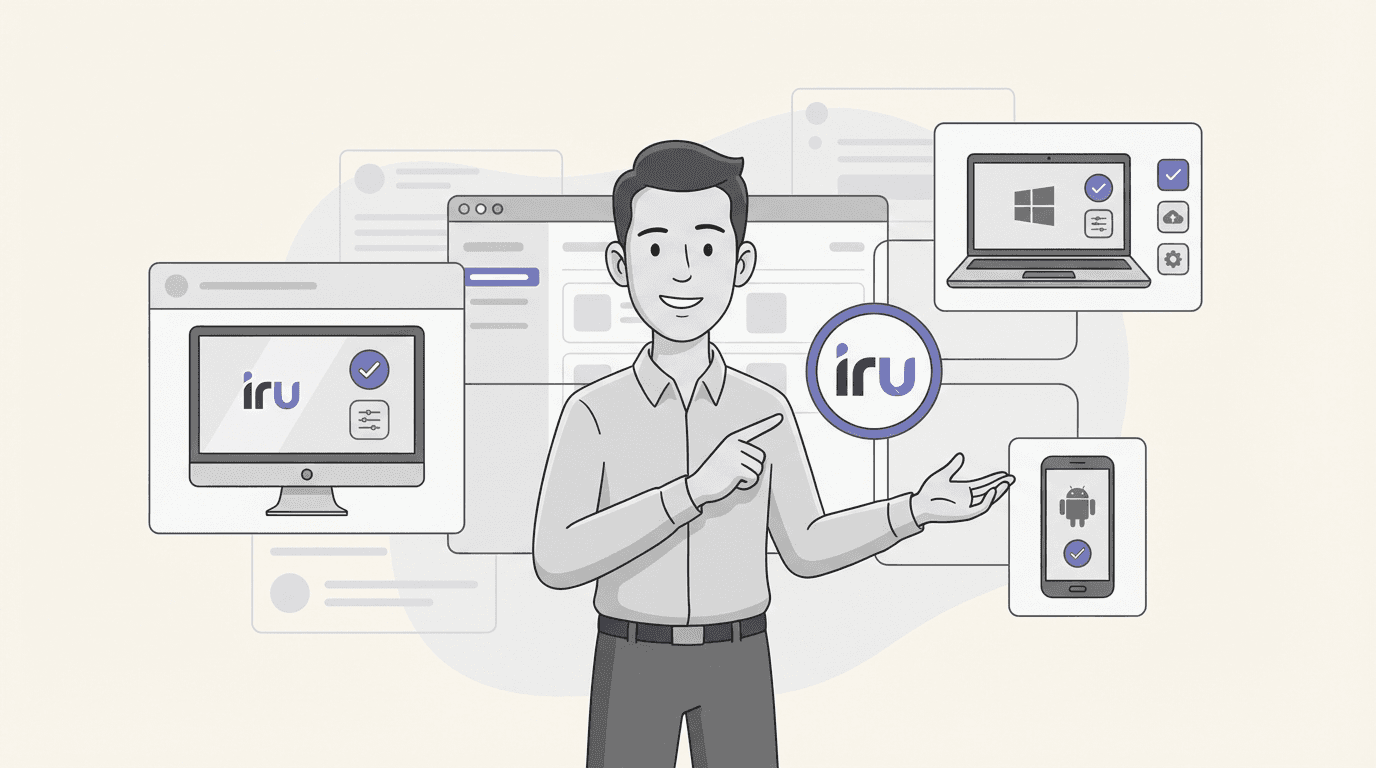
Kandji built its reputation as the Apple device management solution that just worked. In October 2025, the company rebranded as Iru and announced something significant: they were expanding beyond Apple to manage Windows and Android devices too.
For IT teams managing mixed fleets, this is big news. But it also raises questions. Does the platform that nailed Apple management translate well to other operating systems? Is the pricing still competitive? And what exactly changed with the rebrand?
Let's break down what Kandji MDM (now Iru) offers, where it excels, and where you might want to look elsewhere.
What is Kandji MDM?
Kandji started in 2019 as a mobile device management solution built exclusively for Apple devices. While competitors like Jamf had served the Apple enterprise market for years, Kandji differentiated itself with a modern interface and automation-first approach.
The platform uses two core components: Apple's native MDM framework for over-the-air enrollment and profile management, plus a proprietary Swift-built agent that extends functionality beyond what MDM alone can achieve. This combination let IT teams deploy devices, enforce compliance, and manage patches without the scripting-heavy workflows traditional Apple management often required.
In October 2025, Kandji became Iru. The rebrand wasn't just cosmetic. It signaled a fundamental expansion from Apple-only MDM to a cross-platform IT and security platform. Iru now offers endpoint management, endpoint detection and response (EDR), vulnerability management, workforce identity, and compliance automation, all unified under what they call the "Iru Context Model."
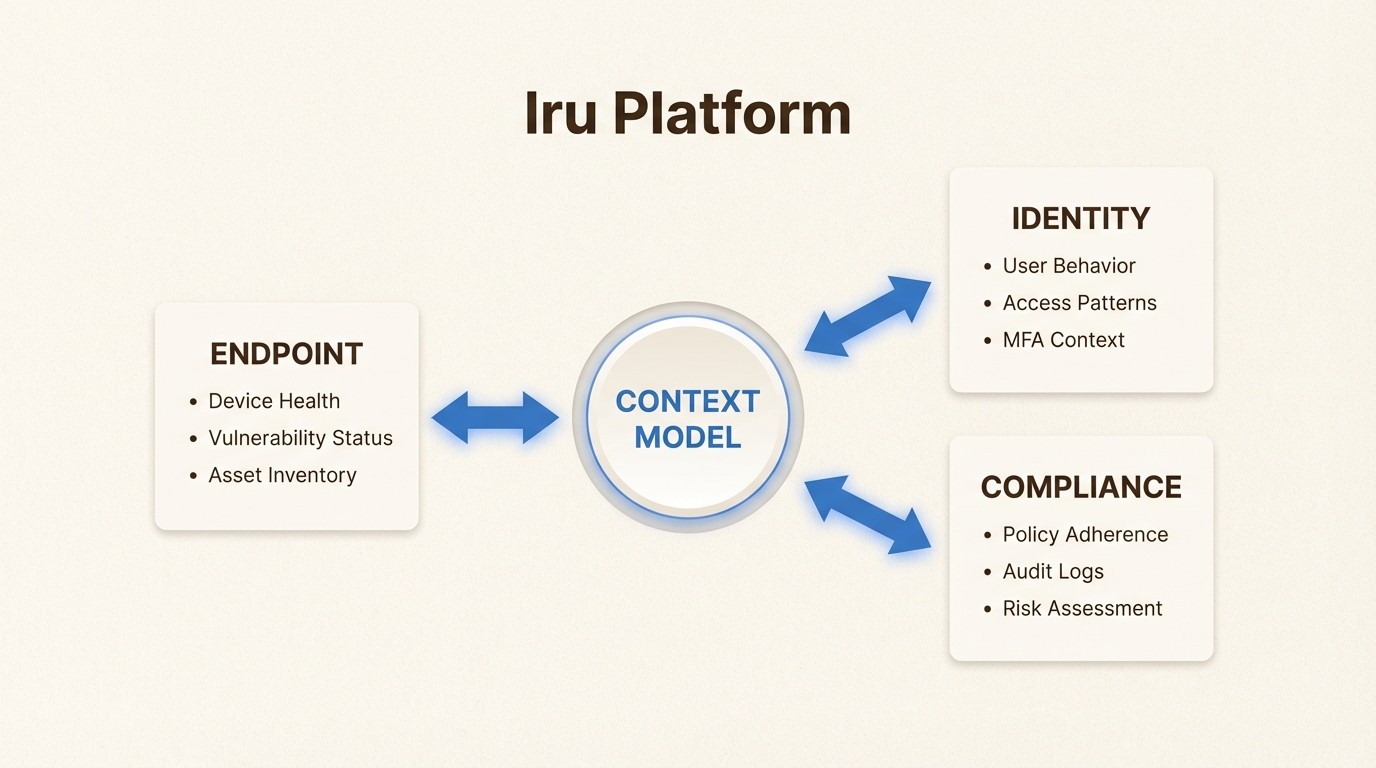
The Context Model is essentially a living map of your environment. It tracks users, apps, devices, security posture, policies, and events in real-time. Iru AI then uses this context to automate decisions, generate insights, and produce audit-ready evidence without manual work.
For existing Kandji customers, the transition has been gradual. Apple device management continues unchanged, with the same team and feature set. Over time, customer tenants are being upgraded to the Iru-branded experience, but the underlying functionality for macOS, iOS, and tvOS management remains intact.
Key features of Kandji MDM
Iru organizes its capabilities into three main product areas: Endpoint, Identity, and Compliance. Here's what each includes.
Endpoint Management
The core MDM functionality covers the full device lifecycle. Zero-touch deployment via Apple Business Manager lets devices transform into enterprise-ready endpoints the moment they're unboxed. IT teams can configure hundreds of security settings through toggle-based controls rather than custom scripts.
The platform handles app distribution through multiple channels: Auto Apps (Iru's curated library of 200+ business apps), in-house packages, Apple App Store, and Google Play for Android. Assignment Maps provide a visual interface for designing conflict-free configurations with conditional logic.
For Apple devices, Iru offers deep macOS-specific features: FileVault encryption management, firewall configuration, Self Service portal for end-users, and Managed OS for automating operating system updates.
Endpoint Detection and Response (EDR)
Iru EDR runs through the same lightweight agent as device management, eliminating the need for separate security software. It uses machine learning-enhanced detection with real-time behavioral analysis to identify threats before they spread.
The system gathers metadata on files, analyzes them for malicious activity, and can quarantine threats between a user clicking download and the download completing. For Mac and Windows devices, this provides integrated security without the performance overhead of traditional antivirus.
Vulnerability Management
This feature gives IT teams visibility into software risks across their fleet. Iru identifies vulnerable applications and can autonomously patch them, closing the gap between vulnerability discovery and remediation.
The Auto Apps library handles updates for common business applications on both Mac and Windows, scheduling quiet updates or prompting users proactively when needed.
Workforce Identity
Iru Identity provides passwordless single sign-on using hardware-backed passkeys. It integrates with existing identity providers and enforces device security policies at sign-in. The system maintains auditable records of authentication events and device posture.
Compliance Automation
Pre-built templates map to major security frameworks including CIS Benchmarks (Level 1 and 2), NIST, and STIG. These deploy across device fleets with one-click configuration. The Trust Center feature creates a public portal where organizations can share certifications, security reports, and real-time posture with customers and auditors.
Kandji MDM pricing explained
Here's where things get complicated. Iru does not publish pricing on its website. Unlike competitors with transparent per-device rates, Iru operates on a contact-sales model with custom quotes based on fleet size and required modules.
From AWS Marketplace listings, we can see some baseline figures. A 12-month contract breaks down as follows:
Module | Annual Cost |
|---|---|
Kandji MDM (Apple device management) | $25,000 |
Kandji EDR (Endpoint Detection and Response) | $25,000 |
Kandji Vulnerability Management | $25,000 |
These prices require the MDM module as a foundation. EDR and Vulnerability Management cannot be purchased standalone.
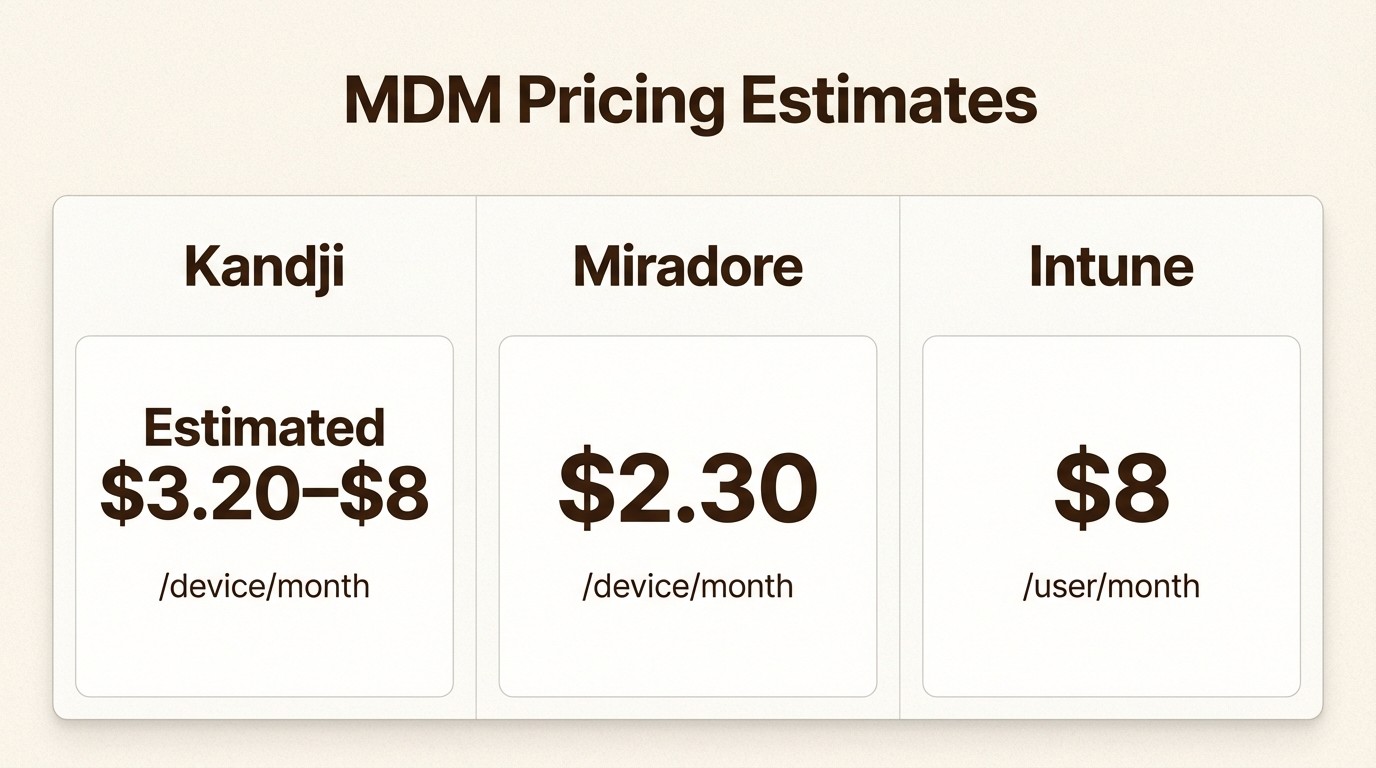
Buyer feedback from G2 and PeerSpot suggests macOS pricing typically ranges from $3.20 to $8 per device per month, depending on contract terms, volume, and add-ons. iOS and macOS are priced separately, which adds complexity for organizations managing both.
Windows and Android pricing remains unpublished. For organizations with mixed fleets, this opacity makes budgeting difficult. You won't know your total cost until speaking with sales and sharing your specific device mix and requirements.
Additional considerations:
API access requires 500+ devices or can be purchased separately
Volume discounts apply at scale, but thresholds aren't public
Annual contracts are standard; monthly options aren't advertised
For comparison, Microsoft Intune pricing starts at $8 per user per month with clear tiering. Miradore offers transparent per-device pricing from $2.30 monthly. Iru's model targets larger enterprises willing to negotiate custom packages rather than smaller teams wanting predictable costs.
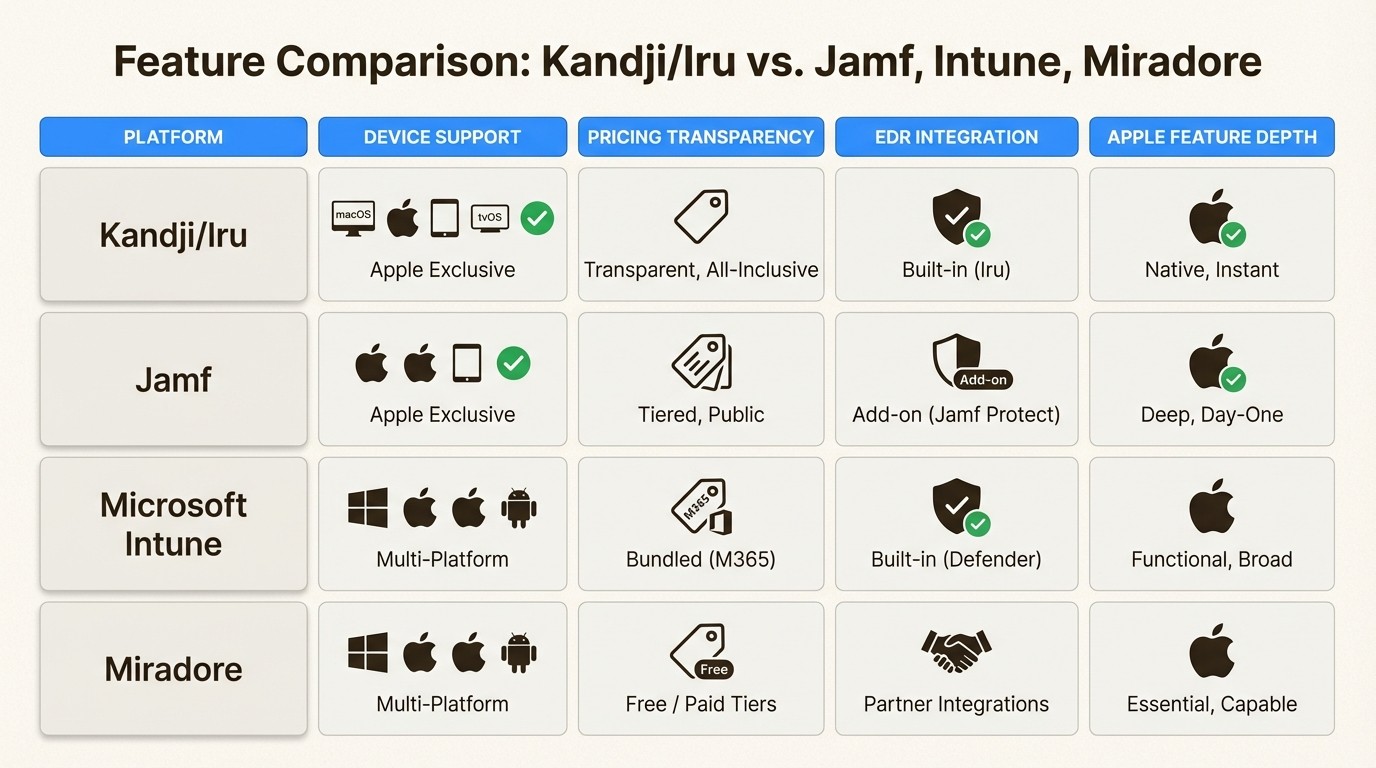
How Kandji MDM compares to alternatives
The MDM market has no shortage of options. Here's how Iru stacks up against the main competitors.
Kandji vs Jamf
Jamf is the established leader in Apple device management, serving enterprises for over two decades. Their feature depth for macOS and iOS is unmatched, with granular control over Apple-specific configurations.
Iru differentiates through user experience. The interface is more modern, setup is faster, and automation requires less scripting knowledge. For teams without dedicated Apple specialists, Iru lowers the barrier to effective management.
However, Jamf's ecosystem is larger. More third-party integrations, broader community support, and deeper documentation exist for edge cases. For pure Apple environments with complex requirements, Jamf remains the safe choice.
Kandji vs Microsoft Intune
Intune comes bundled with Microsoft 365 and offers solid Windows management at no additional cost for organizations already in the Microsoft ecosystem. Enrolling devices in Intune is straightforward for Windows shops.
Iru offers deeper Apple-native features. Intune manages Apple devices adequately but lacks the polish of purpose-built solutions. For Apple-first organizations, Iru provides better zero-touch deployment, more granular macOS controls, and superior user experience.
The decision typically comes down to device mix. Microsoft-heavy fleets should stick with Intune. Apple-heavy fleets will find Iru more capable.
Kandji vs Miradore
Miradore positions itself as the transparent, budget-friendly alternative. Their pricing is public ($2.30 per device monthly to start) and includes iOS, macOS, Windows, and Android without separate modules.
Iru targets larger enterprises with more sophisticated security requirements. The integrated EDR, vulnerability management, and compliance automation justify higher costs for organizations needing unified security and management.
For smaller teams or those prioritizing cost predictability, Miradore offers similar core MDM functionality at a fraction of the price.
Setting up Kandji MDM
Getting started with Iru follows a standard MDM deployment pattern with some Apple-specific optimizations.
First, you'll integrate with Apple Business Manager (or Apple School Manager for education). This connection enables zero-touch deployment. When you purchase devices through authorized resellers, they automatically appear in your Iru console and enroll during first setup without IT touching the hardware.
Next, you configure Blueprints. These are templates defining what apps, settings, and security controls apply to different device types. Iru provides pre-built templates aligned with compliance frameworks, or you can create custom configurations.
The Kandji Agent deploys automatically during enrollment. This Swift-built agent handles tasks beyond native MDM capabilities: application blocking, Auto Apps installation, custom script execution, vulnerability scans, and EDR monitoring.
For identity integration, Iru connects with major providers including Okta, Google Workspace, and Microsoft 365. This enables automatic Blueprint assignment based on user attributes and passwordless authentication using device-bound passkeys.
Migration from other MDMs is supported through a dedicated Migration Agent. Deployed from your current MDM, it transfers devices with minimal user interaction.
Limitations and considerations
Iru isn't the right fit for every organization. Here are the main limitations to consider.
Windows and Android maturity. While Iru now supports these platforms, the features are newer and less mature than the Apple capabilities. Windows management works, but lacks the depth of Microsoft Intune. Android support is functional but trails dedicated mobile device management solutions.
Pricing opacity. The lack of public pricing makes budgeting difficult, especially for growing teams. You can't quickly estimate costs without engaging sales and sharing your device count and requirements.
Learning curve for advanced features. Assignment Maps and conditional logic provide power but require time to master. New admins may need training to use these capabilities effectively.
API access restrictions. Smaller organizations under 500 devices must purchase API access separately if they want to build custom integrations or reporting.
Best fit for Apple-first organizations. If your fleet is primarily Windows or Android, Iru's advantages diminish. The platform excels when Apple devices are central to your environment.
Is Kandji MDM right for your organization?
Iru makes the most sense for specific use cases.
Choose Iru if:
Your fleet is Apple-first (50%+ Macs and iOS devices)
You need integrated security (EDR, vulnerability management) alongside device management
Compliance requirements demand audit-ready evidence and framework alignment
You want to reduce tool sprawl by consolidating endpoint, identity, and compliance functions
You have the budget for enterprise-grade pricing
Consider alternatives if:
You're budget-conscious and need predictable per-device pricing
Your environment is primarily Windows or Android
You already have separate security tools you plan to keep
Your MDM needs are basic (enrollment, app deployment, basic policies)
For organizations managing hardware assets alongside devices, Asset Management for Jira provides complementary IT asset tracking that integrates with your existing Jira workflows. While Iru handles device configuration and security, dedicated asset management tools track procurement, warranty, assignment, and lifecycle for a complete IT inventory picture.
The rebrand from Kandji to Iru represents genuine platform expansion, not just marketing. For Apple-heavy organizations wanting unified endpoint, identity, and compliance management, it's a compelling option. Just go in with eyes open about the pricing model and the relative newness of cross-platform features.
Frequently Asked Questions
Is Kandji MDM still available, or has it been completely replaced by Iru?
Kandji MDM continues as Iru Endpoint Management. Existing customers see no immediate changes to Apple device functionality. The rebrand reflects platform expansion to Windows and Android, not replacement of core capabilities.
What can my employer see through Kandji MDM?
Iru can monitor device compliance status, installed applications, security settings, and location (if enabled). The platform cannot read personal messages, emails, or browsing history on personal devices. For BYOD scenarios, Iru focuses on work profile data rather than personal content.
How does Kandji MDM pricing work for mixed Apple and Windows fleets?
Iru does not publish standard pricing for mixed fleets. Based on AWS Marketplace data, Apple MDM starts at $25,000 annually. Windows and Android pricing requires custom quotes. Organizations should expect to contact sales for accurate pricing based on their specific device mix.
Can Kandji MDM replace our existing antivirus and endpoint security tools?
Iru EDR provides endpoint detection and response capabilities that can replace traditional antivirus for Mac and Windows devices. However, organizations with complex security requirements or existing EDR investments should evaluate whether Iru's security features meet their specific needs before consolidating.
Is Kandji MDM difficult to migrate to from another MDM?
Iru provides migration tools and dedicated support for switching from legacy MDMs. The Migration Agent deploys from your current MDM and transfers devices with minimal user interaction. Most migrations complete without significant disruption to end users.
Does Kandji MDM work for small businesses, or is it only for enterprises?
While Iru serves organizations of all sizes, the pricing model and feature set target mid-market and enterprise customers. Small businesses with basic MDM needs may find more cost-effective solutions with transparent per-device pricing from competitors.
How does the Iru Context Model actually work in practice?
The Context Model continuously collects data about users, devices, apps, and security events across your environment. Iru AI analyzes this data to automate policy decisions, generate compliance evidence, and provide insights. For example, if a device falls out of compliance, the system can automatically restrict access to sensitive applications until remediation occurs.



