Choosing an Asset Management Tool: Snipe-IT vs Asset Panda
A practical comparison of Snipe-IT vs Asset Panda for IT asset management. We break down features, pricing, and integrations to help you decide.

Colin Reed
IT Expert and Content Writer
Last Updated

Managing IT assets with spreadsheets can become challenging as a business grows. When inventory accuracy drops, it is often a sign that a dedicated tool is needed.
As a business expands, an IT Asset Management (ITAM) tool becomes essential. The market has many options, and two common names are Snipe-IT and Asset Panda. They address the same problem from different perspectives. Snipe-IT is an open-source option often chosen by users with technical expertise, while Asset Panda is a flexible, cloud-based platform built for customization.
This post will compare their main features, integration capabilities, and pricing models, including the total cost of ownership. The goal is to provide the information you need to choose the right tool for your team.
The contenders in Snipe-IT vs Asset Panda: A quick primer
These two tools have different philosophies, and understanding them is key to determining which one fits your company.
What is Snipe-IT?

A screenshot of the Snipe-IT website homepage, a key contender in the Snipe-IT vs Asset Panda comparison.
At its core, Snipe-IT is a free and open-source ITAM system, which makes it transparent and flexible. This approach typically requires some technical skill to implement. It’s made specifically for IT asset management, letting teams track hardware like laptops, software licenses, accessories, components, and consumables.
You have two ways to deploy it. You can use the free, self-hosted version if your team can manage a LAMP stack. Or, if you prefer a managed solution with support, you can pay for their cloud-hosted plans. With a powerful REST API and a focus on developers, Snipe-IT is a good fit for tech-focused companies and small to mid-sized businesses that need a cost-effective system and have the personnel to manage its setup.
What is Asset Panda?
Asset Panda is a highly customizable cloud-based platform. Its main attribute is flexibility; you can configure it to track almost anything, from IT equipment to company vehicles, specialized tools, or contracts. It’s designed to cover the full asset lifecycle, from procurement to disposal. A significant component is its mobile app, which has built-in barcode and QR code scanning that works offline.
It's a pure SaaS (Software as a Service) tool, so it cannot be self-hosted. Everything is managed for you in the cloud on Amazon AWS. Because it’s so configurable, it’s a good choice for many industries, not just IT. Its pricing is based on the number of users and assets you track, which can increase costs as you grow.
Core asset tracking features
An ITAM tool's primary job is to track your assets accurately. Here’s how Snipe-IT and Asset Panda handle the basics.
Snipe-IT's approach: Open-source power and developer-centric focus
Snipe-IT provides all the essentials: asset tracking with check-in/check-out, software license management, and a full maintenance history. You can create custom status labels (like "Deployable," "Archived," or "Pending") to follow an asset through its lifecycle. It also lets you track smaller items like keyboards, mice, RAM, and hard drives, giving you a full view of your inventory.
Its main advantages are control and access. If you self-host, its open-source nature gives you total control over everything, from the database to the code itself. For teams with developers, its robust JSON REST API is a major plus, allowing for deep custom integrations and automation. It's common for teams to use PowerShell scripts to update assets directly.
This level of control requires custom development for many processes. Snipe-IT doesn't have many native, ready-to-go integrations with ITSM platforms. For instance, connecting it to a system like Jira means using a third-party Atlassian app, not a built-in solution. This leaves your team responsible for another vendor and ensuring that connection remains stable.
Asset Panda's approach: High configuration and mobile-first flexibility
Asset Panda is all about customization. You can set up your own workflows, create unique asset categories, and add as many custom data fields as you want. Its mobile app for iOS and Android is a core part of the experience, supporting barcode and QR code scanning, even offline, which makes physical audits and field updates easier. It also includes features for compliance tracking, maintenance scheduling, and depreciation calculations.
This flexibility is a major benefit, letting you adapt the platform to almost any situation. That's useful for organizations with unique tracking needs beyond typical IT hardware. The mobile-first design lets your team update asset information from anywhere.
This level of customization can involve a learning curve. For IT teams using Jira, integrating with external asset management tools like Snipe-IT or Asset Panda means asset data is stored in a separate system. This requires switching between applications to access asset details, which can add steps to the support workflow. An alternative approach is to use a tool that integrates natively within Jira, such as Asset Management for Jira. This places asset information directly into Jira issues, aiming to reduce the time spent gathering information.
Integration capabilities: Connecting to your tech stack
No tool works in isolation. An ITAM solution needs to connect with your other systems, especially your service desk and device management tools.
Snipe-IT's integration philosophy: API-first and community-driven
Snipe-IT’s integration strategy is built around its well-documented REST API. If you have developers, you can connect it to almost anything. The community has created helpful wrappers for PowerShell, .NET, and Python to make it faster. It also supports SAML, LDAP, and SCIM for user management, so you can link it to identity providers like Okta or Google Workspace.
For device management, Snipe-IT has some first-party connectors for popular MDM tools like Jamf and Kandji. However, integrating with other systems often means writing custom scripts. This approach places the maintenance responsibility on your team. If an API changes or your script fails, it's up to you to fix it.
Asset Panda's out-of-the-box connections
Asset Panda has more native integrations than Snipe-IT. Its integrations hub shows pre-built connections for tools like Zendesk, ServiceNow, Jamf Pro, and Microsoft Intune. The goal is to create a single source of truth for your assets by automatically pulling data from these other systems.
For Jira users, Asset Panda's Jira integration connects the two systems, often by adding a link within the Jira ticket that directs the user to the asset details in Asset Panda. This workflow requires navigating from Jira to Asset Panda to view complete asset information. A native Jira application like Asset Management for Jira offers a different approach by displaying asset data directly within Jira custom fields, making it accessible for JQL searches and automation rules.
Pricing breakdown: Snipe-IT vs Asset Panda
The initial price is just one piece of the puzzle; the total cost of ownership (TCO) also includes setup, maintenance, and other potential costs.
Snipe-IT's pricing model: Free or fixed-fee hosting
Snipe-IT’s pricing is straightforward.
Self-Hosted: This option is free. Your only costs are your own infrastructure (servers, staff time, and developer resources).
Hosted Plans: For teams that don't want to manage hosting, Snipe-IT offers several fixed-price plans that are not based on user or asset numbers.
Basic Hosting: $399.99 per year.
Small Business Hosting: $999.99 per year.
Dedicated Hosting: Starts at $2,499.99 per year.
Support Plans: If you self-host, you can buy optional support, including Basic Support for $449/year and Enterprise Support for $4,999/year.
Snipe-IT's pricing is predictable, making it a cost-effective choice, especially for teams that don't want costs to increase as their inventory grows.
Asset Panda's pricing model: Per-user and per-asset tiers
Asset Panda’s pricing is more complicated, based on both the number of users and the number of assets you track. This can be a consideration for organizations with a lot of equipment or growing teams.
Starter Plan: Starts at $50 per user/month (billed annually) with a 5-user minimum. This plan is capped at 1,000 assets.
Business+ Plan: Starts at $60 per user/month (billed annually) with a 10-user minimum and a 5,000 asset limit.
Enterprise Plan: This tier has custom pricing for unlimited assets and users.
What does this mean in practice? According to data from Vendr, the median buyer pays around $3,300 per year, but this can increase. The tiered plans and asset limits can make budgeting more complex, especially as your company expands. The pricing reflects a highly configurable cloud platform with a mobile application. Organizations should evaluate if this flexibility aligns with their budget and potential for growth.
Feature | Snipe-IT | Asset Panda | Asset Management for Jira |
|---|---|---|---|
Primary Model | Open-source (free self-hosted or paid cloud) | Cloud-based (SaaS) | Asset Management for Jira: Native Jira App |
Core Strength | Cost-effectiveness, control, API access | High customization, mobile-first design | Native integration with Jira tickets & workflows |
Ideal User | Tech-savvy teams on a tight budget | Orgs needing to track diverse, non-IT assets | IT and support teams who live in Jira |
Pricing Structure | Free or fixed annual fee (unlimited assets/users) | Per user and per asset tiers | Per Jira user (predictable, scales with your team) |
Jira Integration | Third-party app or custom API work | Pre-built connector | Native app (assets are Jira objects) |
Setup & Learning Curve | Moderate to high (technical setup required) | High (complex configuration) | Low (designed to be intuitive for Jira users) |
Which tool is right for your team?
It depends on your team's needs, technical skills, and budget. To help clarify the decision, this visual breaks down the key factors for each option.
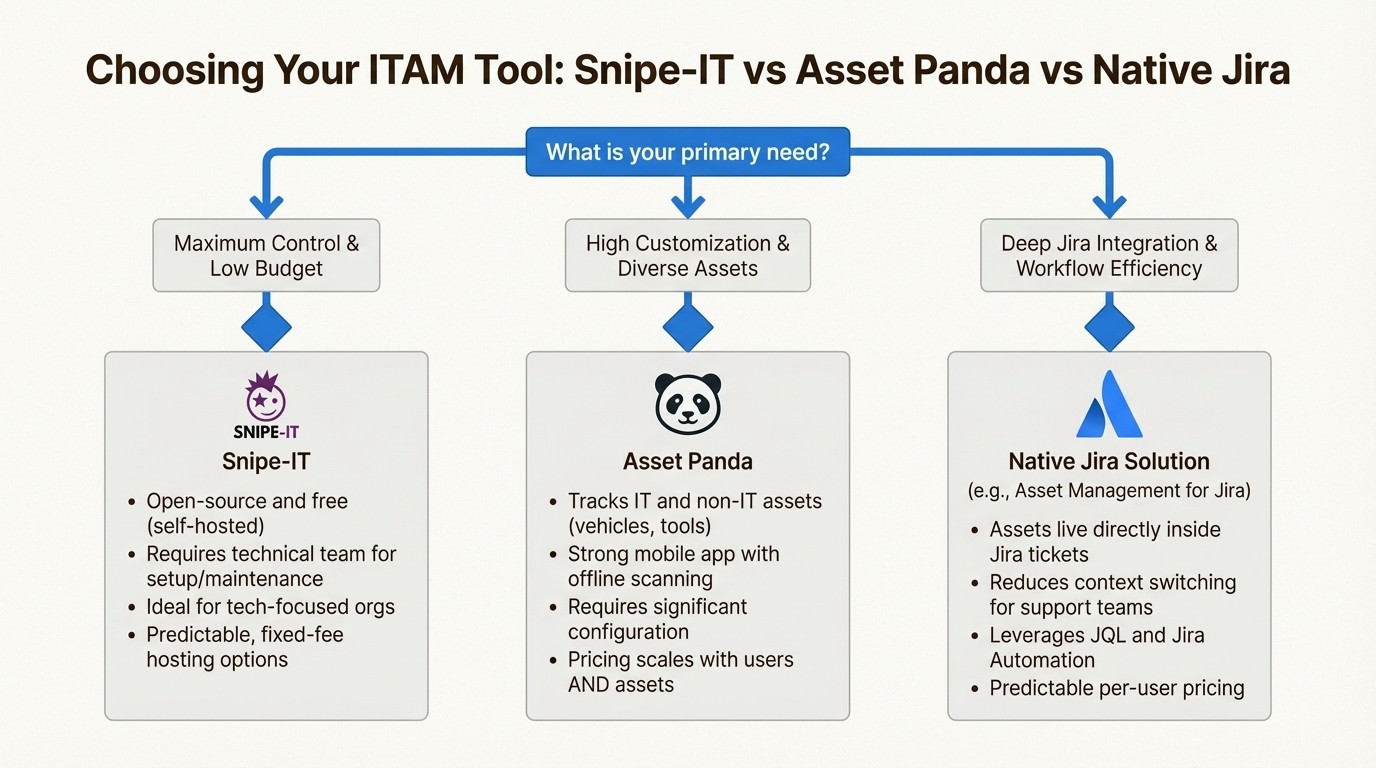
An infographic flowchart helping users decide between tools in the Snipe-IT vs Asset Panda debate, also including a native Jira alternative.
Choose Snipe-IT if: You have a technical team, you're on a tight budget, and you want the control that an open-source tool offers. It’s a great choice for organizing your IT assets without high costs, as long as you can manage the setup and API integrations.
Choose Asset Panda if: You need to track a wide variety of assets beyond just IT equipment, and you require a highly configurable system with a strong mobile app. It's important to consider the configuration process and the pricing model that scales with both users and assets.
The third option: A native Jira solution
For teams whose workflows are centered in Jira, using an external ITAM tool involves managing asset data in a separate system. This process can involve switching between applications to access and transfer asset information, which can impact workflow efficiency.
Asset Management for Jira offers an alternative by functioning as a native Jira application. Instead of connecting to Jira, it operates entirely within the Jira environment. Your assets, their history, and their licenses are available in the ticket view. This means:
Faster Ticket Resolution: This approach allows support agents to view a user's hardware and software profile directly in the ticket, which can reduce information-gathering time.
Lower TCO: This can reduce costs associated with managing a separate platform and its integration. Its predictable per-user pricing scales with your team, not your inventory.
Seamless Workflows: You can sync devices directly from MDM tools like Intune, Jamf, and Kandji and use Jira Automation to trigger asset updates, link hardware to problems, and build reports with JQL.
For teams looking to optimize their IT service desk within Jira, integrating asset management directly into their primary platform can be an effective strategy. Try Asset Management for Jira.
Frequently Asked Questions
What is the main difference in the Snipe-IT vs Asset Panda comparison?
The biggest difference is their core philosophy. Snipe-IT is an open-source, [developer-focused tool](https://snipe-it.readme.io/docs/internally-parsing-the-api) that's well-suited for tech-savvy teams on a budget. Asset Panda is a highly configurable, cloud-based platform designed for flexibility across various asset types, but its pricing can increase with scale.
For a small business, which is better in the Snipe-IT vs Asset Panda debate?
For a small business with technical skills, Snipe-IT's free self-hosted version is very cost-effective. If you need a managed solution that can track non-IT assets and has a strong mobile app, Asset Panda could be a fit, but it is important to be mindful of its per-user and per-asset pricing model.
How does pricing work when comparing Snipe-IT vs Asset Panda?
Snipe-IT offers a free self-hosted option or fixed-fee hosted plans that don't charge per user or asset. Asset Panda's pricing is more complex, charging per user and per asset, which means costs can increase as your company and inventory grow.
Can I integrate Jira with both tools in the Snipe-IT vs Asset Panda matchup?
Yes, but both integrate differently with Jira. Snipe-IT requires a third-party app or custom API work. Asset Panda has a pre-built connector, but it still operates as a separate system. For an experience where asset data lives inside Jira, a native app like Asset Management for Jira offers an alternative.
Which tool is easier to set up when considering Snipe-IT vs Asset Panda?
Both require a setup process. Snipe-IT requires technical knowledge for self-hosting and setup. Asset Panda's high level of customization means there's a learning curve to configure it correctly for your specific workflows.
In the Snipe-IT vs Asset Panda discussion, which has better mobile capabilities?
Asset Panda's features are centered around mobile use. Its mobile-first design with built-in [barcode/QR code scanning](https://prohelp.assetpanda.com/mobile-app/mobile-scanning-barcodes) (even offline) is a core part of its platform. Snipe-IT is primarily web-based, and while it's mobile-responsive, it does not have a dedicated mobile app with the same field-ready features.



