NinjaOne vs Jira-based asset management: which is right for your IT team in 2026?
Choosing between NinjaOne vs Jira-based asset management? Discover the key differences in platform approach, pricing, and integrations to see which is best for your IT team.

Colin Reed
IT Expert and Content Writer
Last Updated
Managing IT can feel like juggling competing priorities. You're trying to keep endpoints secure, tackle a constant stream of tickets, and somehow track every laptop, license, and dongle the company owns. It usually means you're jumping between disparate tools that don't communicate with each other.
When it comes to fixing this, there are two main approaches. One is the all-in-one approach: a unified platform like NinjaOne that promises to handle every IT task from a single command center. The other way is to stick with the tools you already use every day, like Jira, and enhance it with specialized apps.
So, which one should you choose? Let's break down the differences between these two strategies to help you figure out what actually makes sense for your team.
What is NinjaOne?
NinjaOne is what is considered a unified IT management platform. It's built to consolidate various functions into one place, often called a "single pane of glass." You can think of it as a Swiss Army knife for IT departments and Managed Service Providers (MSPs).
At its heart, it combines Remote Monitoring and Management (RMM), endpoint security, automated patch management, backups, and even its own help desk into a single cloud-based console. The idea is pretty straightforward: let IT teams handle all their devices and support tasks from one spot, so they're not constantly switching between apps. It’s made for teams who prefer to manage everything from one external system.
What is Jira-based asset management?
For the many teams who work primarily within Jira, adding another platform to the mix is often undesirable. This is where Jira-based asset management fits in. Instead of moving your work to an outside tool, you bring asset data right into the system you already use for everything else.
The benefit is that when you can link a laptop, software license, or phone directly to a support ticket in Jira Service Management, your team gets all the context they need instantly. This eliminates the need to hunt through spreadsheets or ask users for serial numbers. This direct link can save a significant amount of time.
There are usually two ways to do this:
Atlassian's built-in "Assets": This is a comprehensive Configuration Management Database (CMDB) included in the JSM Premium and Enterprise plans. It's powerful, but can have a steep learning curve and may offer more complexity than needed for simple asset tracking.
Marketplace Apps: These are specialized apps that plug directly into Jira, giving you asset management features without enterprise-level complexity. An example is Asset Management for Jira, which was built to be a simple and affordable way to track hardware, accessories, and software licenses right inside Jira.
Core functionality: NinjaOne vs. Jira-based asset management
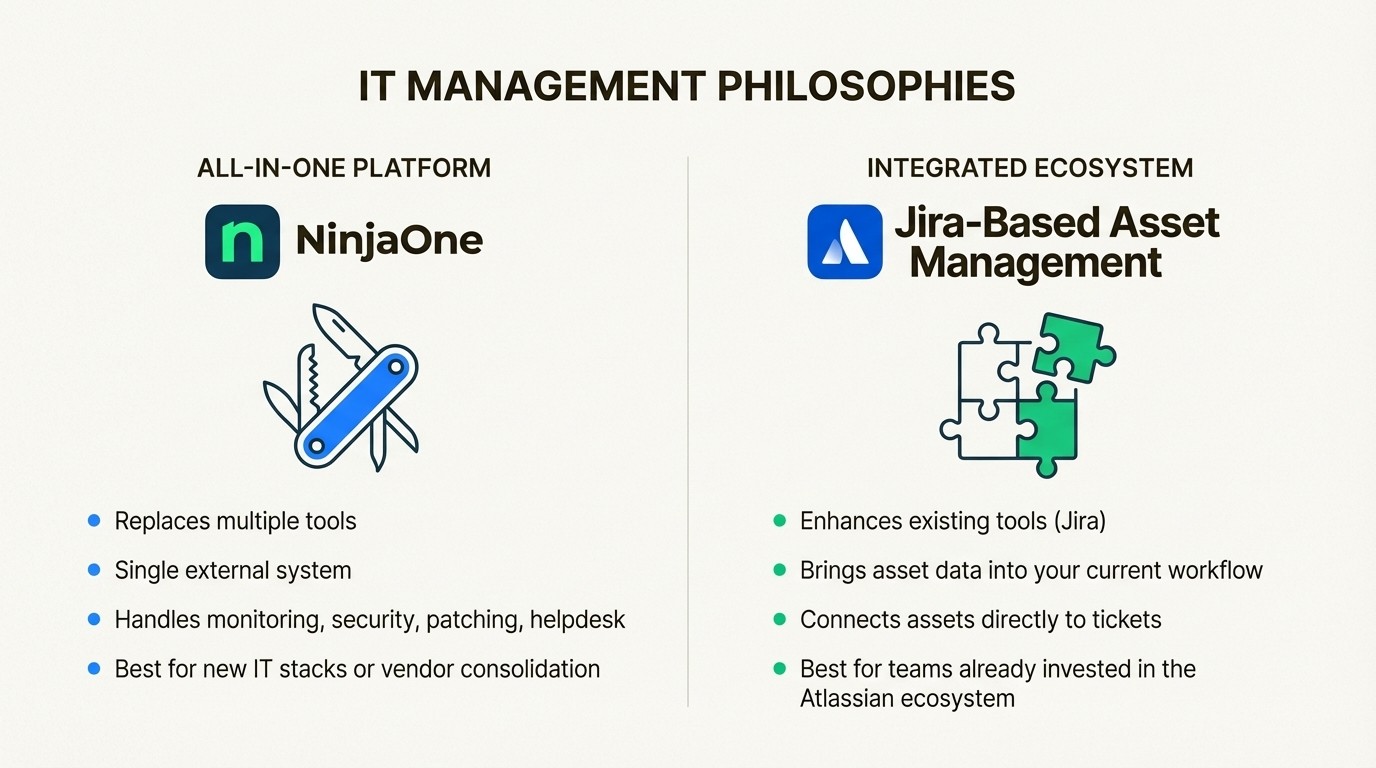
The main difference between NinjaOne and a Jira-based solution is about philosophy. The choice is between an all-in-one system that operates outside of your current workflow, or an integrated tool that enhances the platform you already use. The following graphic breaks down these two approaches.
NinjaOne’s all-in-one ecosystem
NinjaOne’s goal is to be the one-stop shop for IT management. It's a big platform that is designed to replace multiple separate tools. It handles everything from monitoring device health and pushing out automated security patches to managing support tickets with its own help desk. Asset management is just one part of this much bigger picture.
But there's a potential downside. If your team is already heavily invested in the Atlassian ecosystem, introducing a completely separate platform like NinjaOne can introduce friction. It requires technicians to switch between Jira for project tasks and NinjaOne for device info. This context switching can reduce efficiency and means you'll have to spend time getting everyone to adopt the new workflow.
Jira's ecosystem-centric approach with native asset management
The integrated approach is all about enhancing the tool your team already uses: Jira. Instead of replacing your existing systems, you can add features to strengthen your current workflow.
A native tool like Asset Management for Jira is designed for this purpose. When your assets live inside Jira, all your data is connected. This provides a complete history, not just a list of devices. For example, linking asset data directly to tickets can lead to 34% faster ticket resolution because support agents don't have to switch tools or chase down device information. It's all right there in the ticket.
AMFJ puts asset information right inside Jira issues, queues, and automation rules. This makes Jira the single source of truth for both the support request and the asset itself. For teams that run on Jira, this can significantly boost efficiency.
Asset tracking capabilities
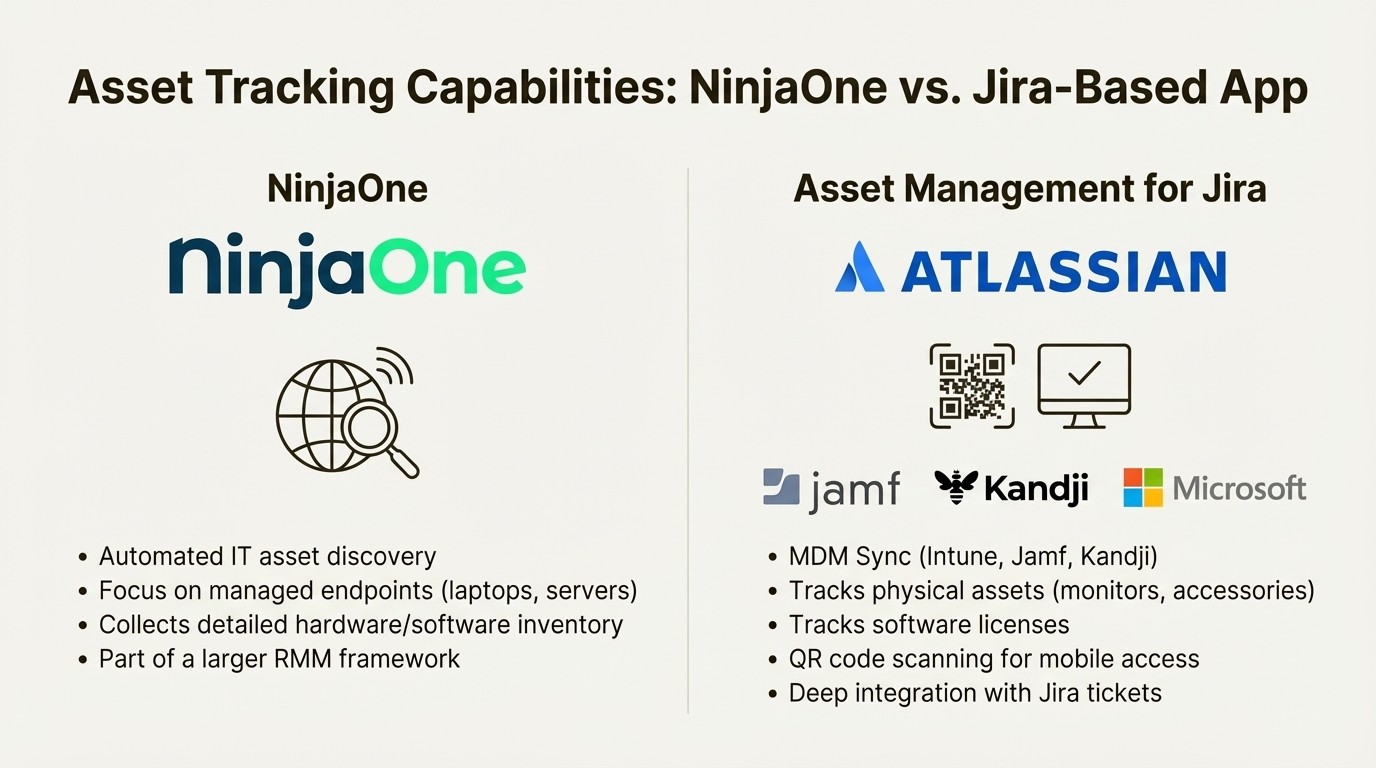
How does each platform actually handle the day-to-day work of IT asset management (ITAM)? Let's get into the details of their features and integrations, as visualized in the comparison below.
How NinjaOne handles asset tracking
NinjaOne's asset management is a key part of its larger RMM framework. It excels at automated IT asset discovery and collecting a detailed inventory of hardware and software from the devices it manages. You can easily check device health, automate maintenance, and keep a central list of your computers.
But its main focus is on those managed endpoints. While it has its own helpdesk, some users have pointed out that its ticketing system is considered basic. Additionally, integrations with common tools like Slack or Microsoft Teams can be limited. This can result in asset data being siloed within NinjaOne, separate from where your team is actually discussing problems.
Flexible asset tracking inside Jira
This is an area where a dedicated Jira app like Asset Management for Jira offers different capabilities, especially for teams who need to track more than just endpoints. It’s built to handle all aspects of asset management, right inside Jira.
Key features include:
MDM Integration: AMFJ automatically syncs devices, users, and their assignments from Mobile Device Management tools you're already using, like Microsoft Intune, Jamf Pro, and Kandji. This keeps your asset database up-to-date automatically, automating a previously manual process.
Physical Asset and License Tracking: While an RMM tool tracks laptops, AMFJ is designed to track other items like monitors, keyboards, docking stations, and software licenses that come with them. AMFJ is designed to track all of that stuff, from physical accessories to complicated software license agreements.
QR Code and Mobile Access: The app has built-in QR code features. You can put a QR sticker on a piece of hardware, and a tech can scan it with their phone to instantly see its entire history, warranty info, and who it's assigned to. It’s highly practical for on-site support.
Jira integration: An asset’s entire lifecycle, from purchase to retirement, is visible in one place, along with every support ticket ever linked to it. This provides the context needed within each Jira issue to help teams resolve problems faster.
Pricing and usability comparison
Features are only part of the story. The total cost, ease of use, and the quality of support are also important considerations.
Pricing models
NinjaOne's pricing isn't public. It’s based on a per-device model, so you have to get a custom quote. This can work for big deployments, but some users find the lack of transparency a point of frustration. You won't know the price until you've gone through their sales process.
On the other hand, Asset Management for Jira has a completely transparent, per-user pricing model. You know exactly what it costs from the start, and it scales with your number of Jira users.
Here’s a quick look at their pricing:
Team Size | Standard Edition | Advanced Edition |
|---|---|---|
Up to 10 users | $10.00/month | $20.00/month |
11–100 users | $2.85/user/month | $3.25/user/month |
101–250 users | $1.75/user/month | $2.25/user/month |
251–1000 users | $1.10/user/month | $1.15/user/month |
AMFJ's user-based pricing is predictable and can be more affordable, especially for companies where the IT team (the Jira users) is much smaller than the total number of devices they manage.
Usability
User reviews on sites like G2 and Capterra often praise NinjaOne's power, but some also say it can have a "steep learning curve" and that its dashboard can feel "unintuitive" if you're new to it. Since it does so much, it can take a while to get comfortable.
In contrast, one of the main goals of Asset Management for Jira is simplicity. It’s designed to be easy to set up and use right away. Jeff Rudacille, the IT Director at Drips, even praised it for its "lightweight nature... and fast time to value."
This simplicity is largely due to AMFJ's native integration with Jira. There’s no new interface for your team to learn. They manage assets in the same place they do all their other work, which cuts down on training time significantly.
Summary table
To make things even clearer, here’s a table that breaks down the key differences.
Factor | NinjaOne | Asset Management for Jira |
|---|---|---|
Core Approach | All-in-one RMM and IT management platform. | Native asset management app for the Jira ecosystem. |
Best For | Teams wanting to consolidate all IT tools into a new, external system. | Teams already using Jira who want to add powerful asset tracking to existing workflows. |
Jira Integration | Limited; functions as a separate ecosystem with some integrations. | Deep and native; assets are first-class citizens within Jira issues, JQL, and automation. |
Pricing Model | Opaque; per-device, requires a custom quote. | Transparent; per-user, with clear public pricing tiers. |
Primary Strength | Broad device management and automation (patching, monitoring, backup). | Simplicity, fast time-to-value, and seamless integration with Jira Service Management. |
Making the right choice for your team
So, which solution is the right fit? The choice between NinjaOne and Jira-based asset management depends on your team's current workflow.
NinjaOne is a powerful, wide-ranging solution for teams that want to centralize all of their IT operations—from endpoint security to backups—in a single, separate platform. It's a solid option if you're building your IT stack from the ground up or planning a complete refresh of your tools.
But for the many teams that have already made Jira the center of their IT and development work, Jira-based asset management can be a more practical choice. For these teams, these teams often prefer not to introduce a separate, external platform for asset tracking.
A native solution like Asset Management for Jira provides asset and license tracking without making your team leave the platform where they already do all their work.
At the end of the day, the best tool isn't just the one with the longest feature list; it's the one that fits right into how your team already works. For Jira users, that means bringing asset data to where the work is already getting done.
Bring asset management into Jira
See how Asset Management for Jira can give you complete visibility over your IT assets and help your team resolve tickets 34% faster.



