Jira Assets limitations: When the native tool isn't enough
Jira Assets is a capable tool for basic asset tracking, but it has real constraints that growing teams hit faster than expected. Object limits, consumption-based pricing, and schema complexity create friction that can slow down IT operations just when you need them to scale.

Colin Reed
IT Expert and Content Writer
Last Updated

Jira Assets is a capable tool for basic asset tracking, but it has real constraints that growing teams hit faster than expected. Object limits, consumption-based pricing, and schema complexity create friction that can slow down IT operations just when you need them to scale.
If you're evaluating Jira Assets or already hitting its boundaries, this guide breaks down where the native tool falls short and what alternatives make sense for teams that need more flexibility.
What is Jira Assets?
Jira Assets is Atlassian's native asset and configuration management feature, built into Jira Service Management (JSM). Originally developed as the Insight app by Riada, Atlassian acquired it and integrated it into JSM Premium and Enterprise plans. As of late 2025, Assets is also available for Standard plans.
At its core, Assets is a schema-based CMDB (Configuration Management Database). It lets you create object types (like laptops, servers, or software licenses), define attributes for each type, and establish relationships between objects. You can link assets to Jira issues, set up automation rules, and import data from various sources.
The tool works well for teams already invested in the Atlassian ecosystem who need basic asset visibility. But the schema-based approach that makes it flexible also creates complexity, and the consumption-based pricing model means costs scale in ways that can surprise growing organizations.
The object limit problem
Here's where Jira Assets limitations start to matter. Every asset, configuration item, and relationship you track counts as an "object" against your plan's limit:
Plan | Objects Included | Monthly Cost per Agent | Extra Objects Cost |
|---|---|---|---|
Standard | 5,000 | $20 | $0.02/object/month |
Premium | 50,000 | $51.42 | $0.02/object/month |
Enterprise | 500,000 | Custom pricing | $0.02/object/month |
Atlassian announced in November 2025 that Premium and Enterprise limits would increase to 10 million objects, which helps larger organizations. But the fundamental issue remains: you're counting objects and paying for overages.
Let's put this in perspective. A 500-person company might track:
500 laptops
500 monitors
1,000 software licenses
200 servers and network devices
2,000 historical asset records for depreciation
Relationships between users, assets, and locations
That easily hits 5,000+ objects. Add in configuration items, contracts, and vendor records, and Standard plan users hit the wall quickly.
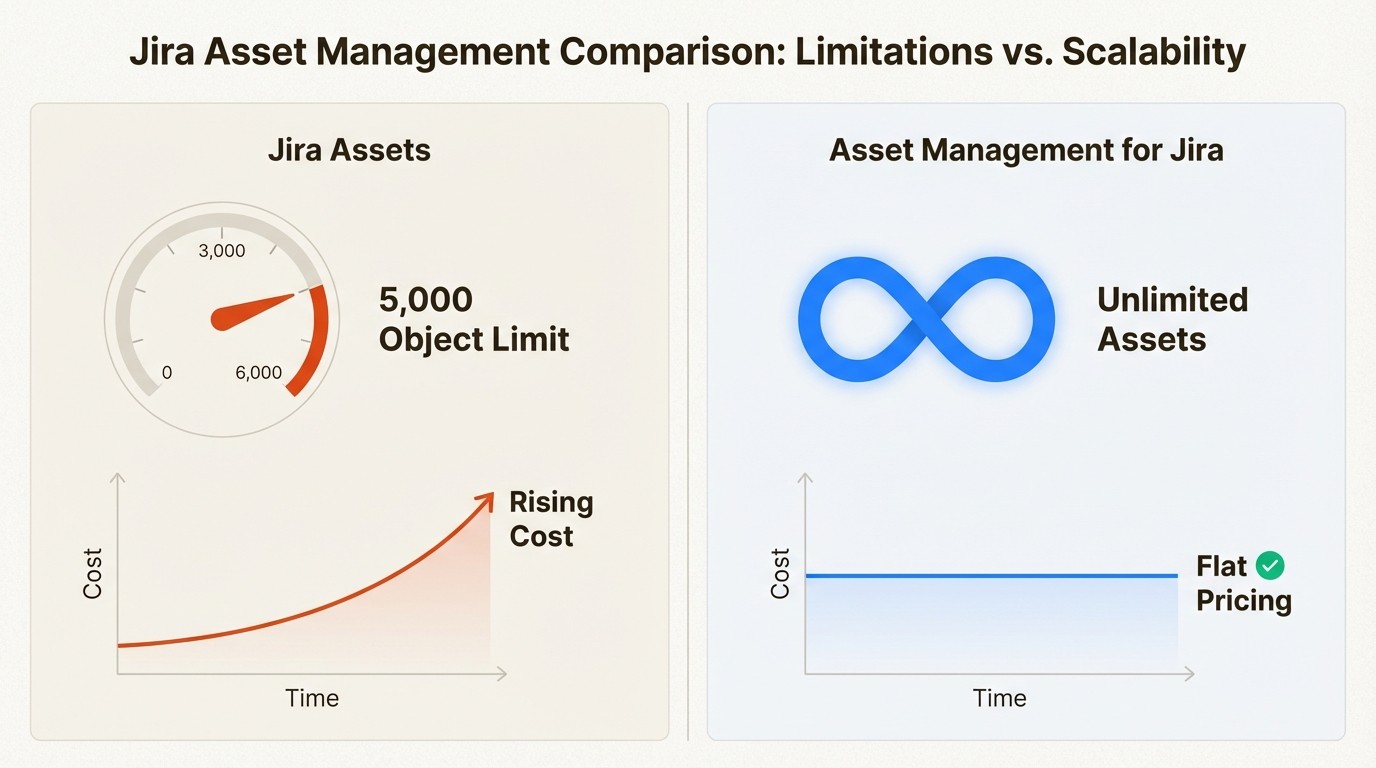
The math gets painful fast. If you're on Standard with 5,000 objects and need to track 6,000, that's 1,000 extra objects at $0.02 each, or $20 per month in overages. Scale to 8,000 objects and you're paying $60 monthly on top of your per-agent fees. These aren't one-time costs, they recur every month.
Premium buys you more headroom, but at $51.42 per agent monthly, you're paying significantly more for JSM features you may not need just to get higher object limits. A 50-agent team pays $2,571 monthly for Premium versus $1,000 for Standard, a difference of $18,852 annually. If you only need asset management, you're paying a premium for incident management, change management, and other JSM features you might not use.
The consumption-based model also makes budgeting unpredictable. Hire 50 people in a quarter and provision equipment? Your asset count jumps, and so does your bill. This is why teams start looking for alternatives with unlimited asset tracking and predictable per-user pricing.
Complexity that slows you down
Jira Assets uses a schema-based structure that requires significant setup before you can start tracking assets. You need to:
Define object types (laptop, monitor, license)
Create attributes for each type (serial number, purchase date, warranty expiration)
Set up relationships between objects (user assigned to laptop, laptop in location)
Configure reference data and validation rules
Build custom fields and screens
This isn't plug-and-play despite the "no-code" positioning. As one analysis noted, "Assets is essentially a no-code database layered onto Jira. It's incredibly customizable, but that also means there's a learning curve."
For teams without dedicated Jira administrators, this complexity becomes a barrier. Simple tasks like adding a new asset type or modifying an attribute require understanding the schema structure. The abstract data modeling has a steep learning curve, and setup time is significant for proper configuration.
Compare this to purpose-built asset management tools that come with pre-configured asset types, sensible defaults, and workflows designed specifically for IT asset management. You can start tracking assets in hours instead of days.
The hidden cost of this complexity is ongoing maintenance. Every time your asset tracking needs change, you need someone who understands the schema to make modifications. Add a new office location? Update the location object type and all its relationships. Start tracking a new equipment category? Build a new object type from scratch. For small IT teams wearing multiple hats, this administrative burden often means asset tracking falls behind reality.
Automation and integration constraints
Jira Assets automation has hard limits that become blockers at scale. The most significant is the "lookup objects" action, which is capped at 100 objects per query. If you need to automate workflows across your entire asset inventory, you'll hit this ceiling quickly.
Other automation constraints include:
Limit | Value |
|---|---|
Maximum schemas globally | 100 |
Maximum attributes per object type | 120 |
Maximum URL/email/select attributes per object | 50 |
Maximum unique constraints per object type | 2 |
Automation lookup limit | 100 objects per query |
There's also no native real-time sync with external systems. You can import data via CSV, JSON, or REST API, but keeping Assets synchronized with live data sources requires custom scripting or third-party tools. As one limitation analysis explains, Assets is "not designed for external, volatile, or live data."
For teams using Microsoft Intune, Jamf, or other MDM solutions, this means either manual data entry or building custom integrations. The alternative is using tools with native MDM sync that keeps asset data current automatically.
Performance at scale
Community discussions reveal concerns about maintaining large Jira Assets instances. Users report sluggish performance with thousands of assets, particularly when running complex queries or generating reports.
The schema structure that makes Assets flexible also creates performance overhead. As your data grows, you need to optimize schemas, implement archiving strategies, and manage object counts to keep the system responsive. This adds administrative overhead that smaller teams often can't afford.
Performance issues typically emerge when:
Object counts exceed 50,000
Complex relationship queries run frequently
Multiple users access Assets simultaneously
Large imports or exports execute
For growing organizations, these performance constraints mean planning for optimization work just as asset management should be scaling smoothly.
One IT manager described their experience managing a 40,000-object Assets instance: "Queries that took seconds with 5,000 objects now take 30-45 seconds. Reports time out. We've had to implement archiving strategies and split data across multiple schemas just to keep things usable." This kind of performance tuning requires expertise many teams don't have in-house.
When Asset Management for Jira makes more sense
If you're hitting Jira Assets limitations, there's a purpose-built alternative designed specifically for IT asset management workflows. Asset Management for Jira takes a different approach that eliminates the constraints that slow teams down.
Unlimited assets, predictable pricing
Unlike Jira Assets' consumption model, Asset Management for Jira uses simple per-user pricing with unlimited assets included. Track 500 assets or 50,000, the price stays the same. This makes budgeting predictable and eliminates the surprise bills that come with growth.
Native Jira integration
Asset Management for Jira is built inside Jira, not bolted on. Asset data is part of Jira itself, which means you can use it in JQL filters, dashboard gadgets, automation rules, and queues without workarounds. There's no external sync to manage or data lag to worry about.
Simpler setup, faster time to value
Instead of building schemas from scratch, you get pre-configured asset types for common IT equipment, software licenses, and accessories. Most teams are tracking assets within hours of installation, not days of configuration.
Native MDM integrations
Real-time sync with Microsoft Intune, Jamf Pro, and Kandji keeps your inventory accurate without manual updates. When someone gets a new laptop in Intune, it appears in your asset inventory automatically.
Here's how the two approaches compare:
Aspect | Jira Assets | Asset Management for Jira |
|---|---|---|
Object limits | 5K-500K (up to 10M on Premium/Enterprise) | Unlimited |
Pricing model | Per-agent + consumption-based | Per-user only |
Setup complexity | High (schema-based) | Low (purpose-built) |
Native Jira integration | Yes | Yes (more deeply integrated) |
Real-time MDM sync | Via Data Manager | Native (Intune, Jamf, Kandji) |
Learning curve | Steep | Minimal |
For IT teams that want asset management to just work without becoming a full-time administration job, the purpose-built approach removes the friction that slows down operations.
We built Asset Management for Jira specifically for teams frustrated by these constraints. With 2,000+ installs and 500+ companies using it globally, we've seen the patterns that cause teams to outgrow basic asset tracking. Our customers report resolving tickets 34% faster because technicians have complete device context without hunting through multiple systems.
Real-world impact
A 400-employee technology company switched from Jira Assets after hitting the 5,000-object limit within eight months. Their IT director explained: "We were spending more time managing our asset management tool than managing our assets. The schema updates, object counting, and performance issues were consuming hours every week." After migrating to Asset Management for Jira, they tracked 12,000 assets with zero administrative overhead related to limits or performance.
Another customer, a healthcare organization with 800 employees, needed real-time sync with Microsoft Intune to maintain compliance. Jira Assets required manual CSV exports and imports twice weekly. With native Intune integration, their inventory now updates automatically, and they've eliminated the 4-6 hours weekly they spent on manual data synchronization.
Choosing the right approach for your team
The decision between Jira Assets and alternatives comes down to your organization's size, growth trajectory, and operational priorities.
Jira Assets works well when:
You're already on JSM Premium or Enterprise for other features
Your asset count stays under 5,000 objects
You have dedicated Jira administrators who can manage schema complexity
You need CMDB capabilities beyond IT asset management
Your team can handle the learning curve
Consider alternatives when:
You're tracking more than 5,000 assets or expect rapid growth
You want predictable pricing without consumption-based surprises
You need real-time MDM sync without custom integration work
Your team lacks dedicated Jira admin resources
You want faster time to value with less configuration
Migration considerations
If you're already using Jira Assets and considering a switch, plan for:
Data export from Assets (CSV or API)
Asset relationship mapping
Historical record preservation
User training on the new interface
Integration updates for connected systems
Most migrations take 1-2 weeks for mid-sized organizations, with the bulk of time spent on data cleanup and validation rather than technical transfer.
The actual data export from Jira Assets is straightforward. Assets supports CSV export for all object types, and you can use the REST API for more complex extractions. The real work is auditing what you have, removing duplicates and outdated records, and mapping your existing schema to the new system's structure.
If you're considering a migration, start with a pilot. Export a subset of your assets, import them into the new system, and validate that your key workflows still function. This approach lets you identify issues early and build confidence before committing to a full migration.
Frequently Asked Questions
What are the main Jira Assets limitations that affect growing teams?
The biggest limitations are object count caps (5,000 on Standard, 50,000 on Premium), consumption-based pricing that scales unpredictably, and schema complexity that requires significant setup and ongoing administration. Teams also hit automation limits like the 100-object lookup cap and lack native real-time sync with external systems.
How do Jira Assets limitations impact IT budgeting?
The consumption-based pricing model means your costs increase as you track more assets, making it hard to predict spending. Adding 1,000 new assets costs an extra $20/month on top of per-agent fees. For growing organizations, this creates budget variance that finance teams struggle to forecast.
Can you work around Jira Assets limitations with custom development?
Some limitations have workarounds. The 100-object automation lookup limit can be bypassed using GET web requests and advanced branching. External data sync requires custom scripting or third-party tools. However, these workarounds add technical debt and maintenance overhead that many teams want to avoid.
When should teams look beyond Jira Assets limitations for alternatives?
Teams should evaluate alternatives when they consistently approach object limits, spend significant time on schema administration, need real-time MDM sync, or want predictable per-user pricing. Organizations with 500+ employees or rapid growth trajectories typically outgrow Assets' constraints within 12-18 months.
How does Asset Management for Jira handle the Jira Assets limitations around object counting?
Asset Management for Jira eliminates object counting entirely. The pricing is per-user with unlimited assets included, so you can track 500 assets or 50,000 without worrying about limits or overage fees. This removes the administrative overhead of monitoring object counts and planning for capacity increases.
What Jira Assets limitations exist for automation and integrations?
Key automation limits include the 100-object lookup cap per query, maximum 100 schemas globally, 120 attributes per object type, and 50 URL/email/select attributes per object. For integrations, there's no native real-time sync with external systems. CMDB or SQL database integration requires REST API work and custom scripting.
Are Jira Assets limitations different between Cloud and Data Center versions?
Yes, feature availability varies between Cloud, Data Center, and the standalone Assets app. Cloud has the most current features but also the strictest object limits on lower-tier plans. Data Center may have different performance characteristics and administrative requirements.



