InvGate Asset Management vs Jira-Based ITAM Solutions: A Comparison
Comparing InvGate Asset Management vs. Jira-based ITAM? See a fact-based breakdown of external tools, Atlassian Assets, and native apps to find your fit.

Colin Reed
IT Expert and Content Writer
Last Updated
If your team uses Jira for its service desk, you probably spend most of your day in it. But when it's time to manage your IT assets, things can get a bit chaotic. You might be wrestling with a spreadsheet that’s always out of date, which isn't just a hassle—it's a risk and a budget drain.
So, you've decided it's time to take IT Asset Management (ITAM) seriously. The real question is, how do you integrate proper ITAM into your Jira workflow without disrupting your team, overcomplicating your processes, or getting an unexpected bill?
You have a few paths you can take. There are standalone platforms like InvGate Asset Management that connect to Jira. Then you have solutions that live right inside Jira, like Atlassian's own enterprise-level Assets feature or the many apps available on the Marketplace.
Our goal here is to cut through the marketing fluff. We're going to lay out a straightforward, fact-based comparison to help you decide which option makes the most sense for how your team actually works.
What is InvGate Asset Management?
InvGate Asset Management is a comprehensive, standalone ITAM platform. It’s designed to give you a complete picture of your entire tech environment.
Its main strengths include a powerful discovery engine that uses a combination of agent-based scanning and network monitoring to map out everything connected to your system. It’s built for full lifecycle management, allowing you to track a device from purchase to retirement. It also includes capabilities like a visual CMDB that automatically maps relationships between assets, software license management, and some AI-driven insights.
InvGate connects to your service desk through an API, pushing asset data into Jira tickets. As it operates as a separate system, agents may need to switch between the InvGate and Jira interfaces to access complete information. The asset data displayed in a ticket is synced from the external platform rather than being stored natively in Jira.
The landscape of Jira-based ITAM solutions
When you decide your ITAM solution needs to work well with Jira, you're looking at two very different options. This choice isn't just about features; it’s about the underlying architecture, how your team will use the tool daily, and what it will ultimately cost.
The built-in route: Atlassian Assets
First, let's look at Atlassian Assets, the native, enterprise-grade CMDB and asset management tool that comes with higher-tier Jira Service Management plans.
Here's a quick breakdown:
Functionality: This is a powerful and flexible platform. As Atlassian’s own Assets onboarding guide demonstrates, it’s a full-fledged Configuration Management Database (CMDB). You can build complex data models, map intricate dependencies, and create sophisticated automation.
Cost and Complexity: Assets is included in Jira Service Management Premium and Enterprise plans. On top of that, Atlassian introduced consumption-based pricing in late 2024. Your premium plan includes 50,000 "objects" (assets), but you're billed monthly for every object over that limit. This introduces a variable component to the software cost.
Implementation Overhead: Assets often requires significant upfront configuration, a dedicated administrator, and a clear data strategy. For most companies, rolling it out is a project that takes several months.
For teams with basic asset tracking needs, the extensive capabilities of Atlassian Assets may represent more functionality than is required.
The integrated route: Considerations for external tools
This brings us to the other option: external ITAM tools like InvGate that integrate with Jira but don't live inside it. This approach has its own set of considerations.
Context Switching: When asset data is in an external system, support teams may need to switch between applications to get a complete view, which can interrupt their workflow.
Data Sync Delays: The timeliness of asset information in Jira depends on the sync frequency between the two systems. Delays in synchronization can mean the data is not always real-time.
Limited Jira Functionality: Since the asset data is not stored natively in Jira, it cannot be used directly in features like JQL queries, automation rules, or dashboard gadgets. The data is displayed for informational purposes but is not fully integrated into Jira's data structure.
An alternative approach: Native Jira apps
There’s a third option: a purpose-built app from the Atlassian Marketplace that operates natively within Jira.
An example of this approach is Asset Management for Jira. These apps are often designed to address the need for a more integrated workflow than external tools and a more focused feature set compared to enterprise-level solutions like Atlassian Assets.
Here are some characteristics of the native app approach:
Unified Interface: All your asset management tasks, from importing devices to linking them to tickets, happen right inside the Jira interface. Your team never has to leave the environment they already know and use all day.
Deep Jira Integration: Because the asset data is native to Jira, it is available for use in JQL filters, automation rules, and custom service desk queues.
Simplified Implementation: Native apps are often designed for a quicker setup process. As one IT director noted, the tool is "lightweight" and lets teams "quickly get up and running." You can import your existing assets with a simple CSV or sync directly with modern MDM tools like Microsoft Intune, Jamf, and Kandji. You can have a functional asset register in days, not months.
Predictable Cost: Native apps typically use a clear pricing model, such as one based on the number of Jira users, which can be more straightforward to budget for than plan upgrades or consumption-based fees.
At a glance: Comparing the approaches
Here’s how the three approaches stack up side-by-side.
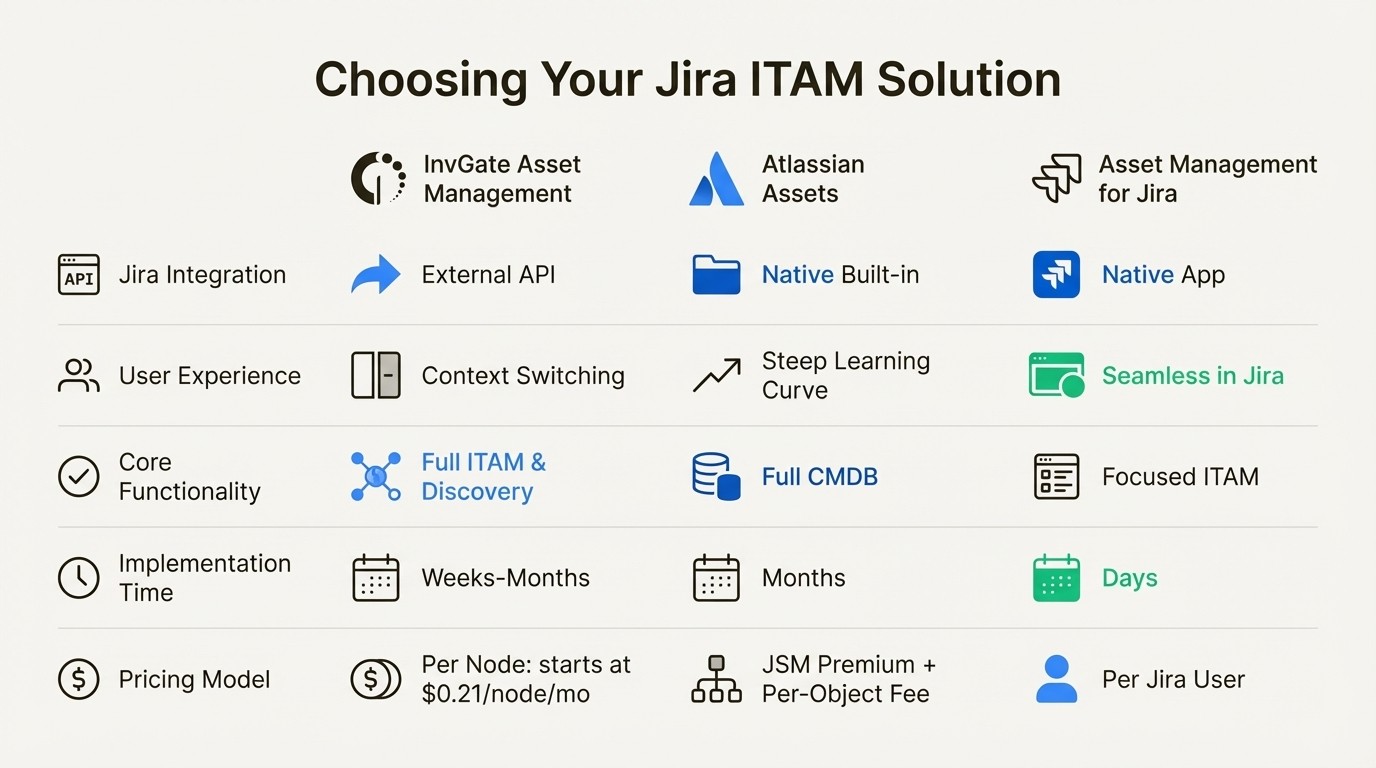
Feature / Aspect | InvGate Asset Management | Atlassian Assets (JSM Premium) | Asset Management for Jira (AMFJ) |
|---|---|---|---|
Jira Integration | External (via API) | Native (Built-in) | Native (Marketplace App) |
User Experience | Requires context switching | Steep learning curve | Lives inside Jira, intuitive UI |
Core Functionality | Full ITAM & Network Discovery | Full CMDB & Asset Mgmt | Focused ITAM & License Mgmt |
Implementation Time | Weeks to Months | Months | Days |
Pricing Model | Per Node (starts at $0.21/node/mo) | JSM Premium Upgrade + Per-Object Fee | Per Jira User (Transparent Tiers) |
Best For | Companies needing a powerful, standalone ITAM platform with network discovery. | Large enterprises needing a complex, highly-customizable CMDB. | Teams wanting a simple, cost-effective ITAM solution that works seamlessly inside Jira. |
How different ITAM solutions impact daily operations
Let’s look at how these different approaches can affect a team's day-to-day work.
Asset-driven support tickets
The Goal: When a user submits a ticket, the support agent needs to see all relevant device information instantly, without having to ask a bunch of questions.
InvGate: The agent sees a panel in Jira showing data synced from InvGate. It provides context from the external system.
Atlassian Assets: It’s very powerful for linking related objects, but getting it right requires a lot of upfront configuration of your object schemas and custom fields to make sure the right data appears.
Asset Management for Jira: Native solutions add a "Linked Assets" field directly to the Jira ticket. Agents can search for and link assets in seconds, and you can even set up automation to link a user's known assets to their tickets automatically. This direct linkage can help streamline the process of associating assets with tickets.
Inventory accuracy
The Goal: You need a single source of truth for all your IT assets that doesn't rely on someone remembering to update a spreadsheet.
InvGate: Its agentless network discovery automatically scans the network to identify devices, which is useful for environments with unmanaged hardware like switches and printers.
Atlassian Assets: It can use its own discovery tool, Assets Discovery, which is a component that is set up, configured, and maintained to perform discovery.
Asset Management for Jira: It can sync directly with the Mobile Device Management (MDM) tools you already use, like Microsoft Intune, Jamf, and Kandji. For teams that manage endpoints through MDM, this provides a direct way to keep asset data current.
Total cost of ownership (TCO)
The Goal: The goal is to find a solution that provides the necessary functionality within a predictable and manageable budget.
InvGate: Its pricing is based on the number of assets, or "nodes," starting around $0.21 per node per month. This involves managing a separate vendor contract and invoice.
Atlassian Assets: The cost includes the upgrade to Jira Service Management Premium. There are also consumption fees for objects stored beyond the plan's limit, which can make budgeting for this expense more complex.
Asset Management for Jira: It typically offers pricing tiers based on the number of Jira users. It provides core ITAM functions designed to improve efficiency and maintain accurate records.
To see one of these standalone solutions in action, the following video provides a concise demonstration of InvGate Asset Management, covering its interface and core capabilities.
This video provides a concise demonstration of InvGate Asset Management, covering its interface and core capabilities.
Choosing the right ITAM solution for Jira
Each approach to ITAM offers different benefits and trade-offs. Standalone tools like InvGate provide powerful, dedicated platforms with extensive features like network discovery, though they operate separately from Jira. Atlassian Assets is a deeply integrated, enterprise-grade CMDB suitable for organizations with complex requirements and a Jira Service Management Premium or Enterprise plan.
Native Jira apps from the Marketplace offer a third path, providing essential ITAM capabilities directly within the familiar Jira interface. These apps aim to offer a streamlined user experience and straightforward integration with core Jira functions. The best choice depends on your organization's specific needs, existing infrastructure, budget, and how your team works within Jira.



