Free Jira asset management options in 2026: 5 choices compared
This guide breaks down five ways to manage assets in Jira without paying, what "free" actually means for each option, and when it makes sense to upgrade.

Colin Reed
IT Expert and Content Writer
Last Updated

Most IT teams start their asset management journey with a simple question: "Can't we just track this in Jira for free?" The answer is complicated. While Jira itself offers a free tier, truly free asset management options within the Jira ecosystem are more limited than you might expect.
Understanding what "free" means in Jira asset management
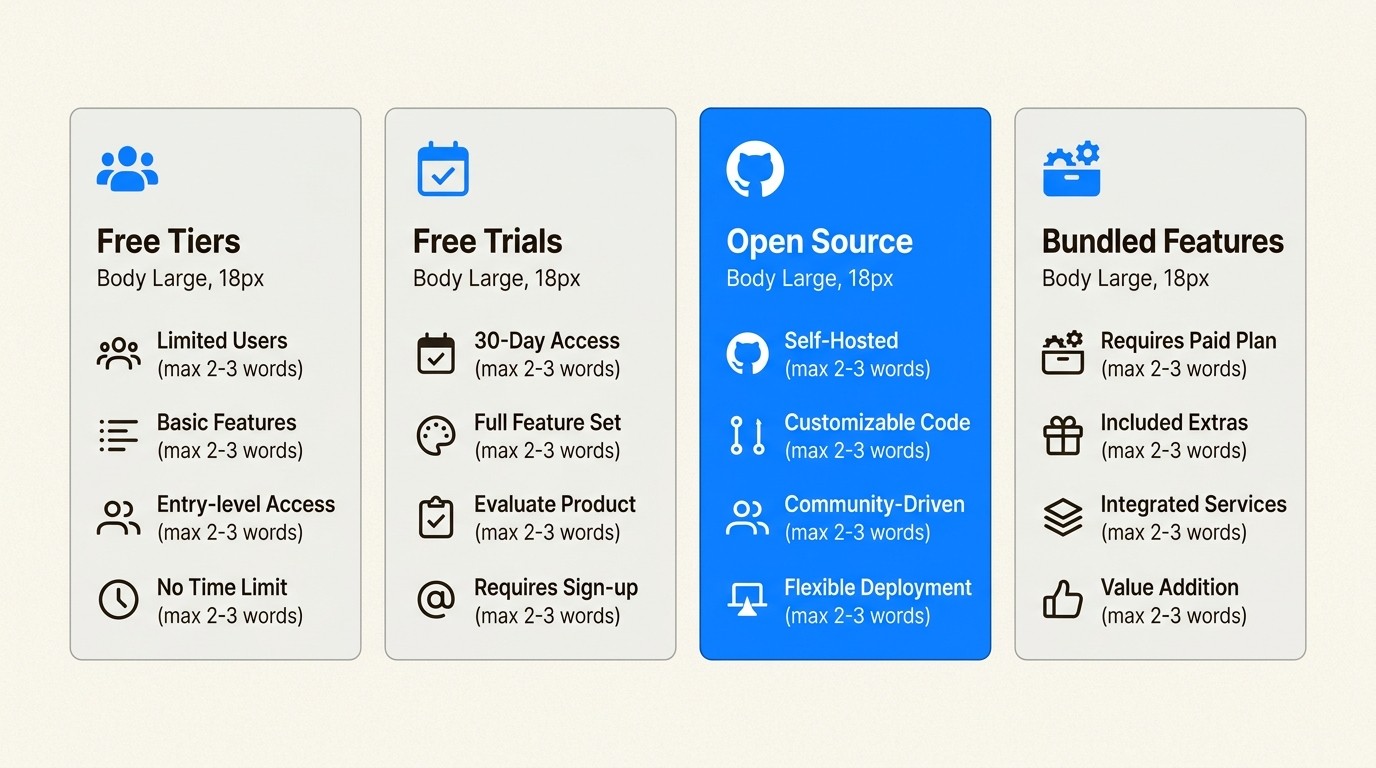
Before diving into the options, let us clarify the different flavors of "free" you will encounter:
Free tiers - Limited users or features, but genuinely no cost (like AssetIT's 10-user tier)
Free trials - Full access for 30 days, then you pay (most Marketplace apps)
Open-source - Free to self-host, but you pay with time and server costs
Bundled features - "Free" only if you already pay for a higher-tier plan
The reality: only one option on this list offers truly free asset management with full features and no hidden costs. The others require tradeoffs in time, technical expertise, or eventual upgrades.
Here's the breakdown of your five options.
The 5 free Jira asset management options
1. AssetIT
AssetIT is the only Jira asset management app that offers a genuinely free tier with full functionality. Built by DevSamurai, an Atlassian Gold Marketplace Partner, it provides complete IT asset management for teams up to 10 users at no cost.
What you get for free:
Up to 10 users with access to ALL features
Unlimited assets (hardware, software, licenses, consumables)
QR code generation and scanning
Asset booking and reservation system
Custom reports with Excel, CSV, and PDF export
Jira issue linking
Pricing after free tier:
Users | Monthly Price |
|---|---|
Up to 10 | Free |
11-100 | $2.00/user |
101-250 | $1.25/user |
251-1000 | $0.75/user |
Best for: Small teams, startups, and any organization with 10 or fewer people who need asset management.
Pros:
Only truly free option with full features
No asset limits on free tier
SOC 2 Type II certified
Cloud Fortified status
Cons:
Must upgrade at 11 users
MDM integration (Intune, Jamf) requires separate Asset Importer add-on
Some advanced reporting features still in development
Source: AssetIT Pricing
2. Atlassian Assets (Jira Service Management)
Let us address the elephant in the room. Atlassian's native Assets feature (formerly Insight) is often mentioned as a "free" option because it comes bundled with Jira Service Management. But here is the catch: it is not available in the free JSM plan.
The reality check:
JSM Free: 3 agents, NO asset management
JSM Standard: $20/agent/month, includes 5,000 asset objects
JSM Premium: $51.42/agent/month, includes 50,000 asset objects
Overage fees: $0.02 per object per month when you exceed limits
What is Assets?
Atlassian Assets is a full CMDB (Configuration Management Database) designed for enterprises. It offers service dependency mapping, automated discovery, and deep integration with JSM workflows.
Best for: Understanding what "free" does not include. If you are already paying for JSM Standard or higher, Assets is a useful included feature. But you cannot access it without upgrading from the free plan.
Pros:
Native integration if you are already on JSM Standard+
Full CMDB capabilities
Service dependency mapping
Cons:
NOT free (requires paid JSM plan)
Consumption-based fees make budgeting unpredictable
Steep learning curve
Requires third-party apps for MDM integration
Source: Atlassian JSM Pricing
3. Snipe-IT for Jira
Snipe-IT is a free, open-source IT asset management system written in PHP. It's been around for 13+ years with over 330 contributors and manages more than 20 million assets worldwide.
What you get for free (self-hosted):
Unlimited users
Unlimited assets
Full feature set including license management
REST API access
LDAP/Active Directory integration
Community support via GitHub and Discord
The Jira connector:
SnipeIT for Jira is available on the Atlassian Marketplace. It connects your self-hosted Snipe-IT instance to Jira, allowing you to link assets with Jira issues. Note: this requires a publicly accessible Snipe-IT instance and has a 10,000 asset limit.
Hosting costs (if you do not self-host):
Plan | Monthly Price |
|---|---|
Basic Hosting | $39.99 |
Small Business | $99.99 |
Dedicated | $249.99 |
Best for: Technical teams comfortable with self-hosting, organizations wanting complete data control, and teams with PHP/LAMP expertise.
Pros:
Completely free if self-hosted
No user or asset limits
Established open-source community
13+ years of development
Cons:
Requires technical setup and server maintenance
Jira connector limited to 10,000 assets
No native MDM integrations
Self-hosting means you are responsible for backups and security
Source: Snipe-IT Pricing
4. GLPI for Jira
GLPI is an open-source ITSM (IT Service Management) solution popular in Europe. It combines helpdesk, asset management, and CMDB functionality in one platform.
What you get for free (self-hosted):
Complete ITSM suite
Asset management with network discovery
Service desk and ticketing
CMDB functionality
Financial management (budgets, licenses, suppliers)
Mobile device management
Jira integration:
GLPI offers a Jira connector on the Atlassian Marketplace, allowing you to link GLPI assets with Jira issues. This is useful if you are running GLPI for ITSM and want to connect it to your Jira workflows.
Best for: European organizations (GLPI has strong EU presence), teams wanting a full ITSM suite rather than just asset management, and organizations with dedicated IT infrastructure teams.
Pros:
Completely free, no user limits
Comprehensive ITSM features beyond just assets
Strong European community and support
Active development with regular updates
Cons:
Complex setup and configuration
Requires server infrastructure
Steeper learning curve than dedicated asset management tools
Limited Jira integration compared to native apps
Source: GLPI Project
5. Manual asset tracking in Jira
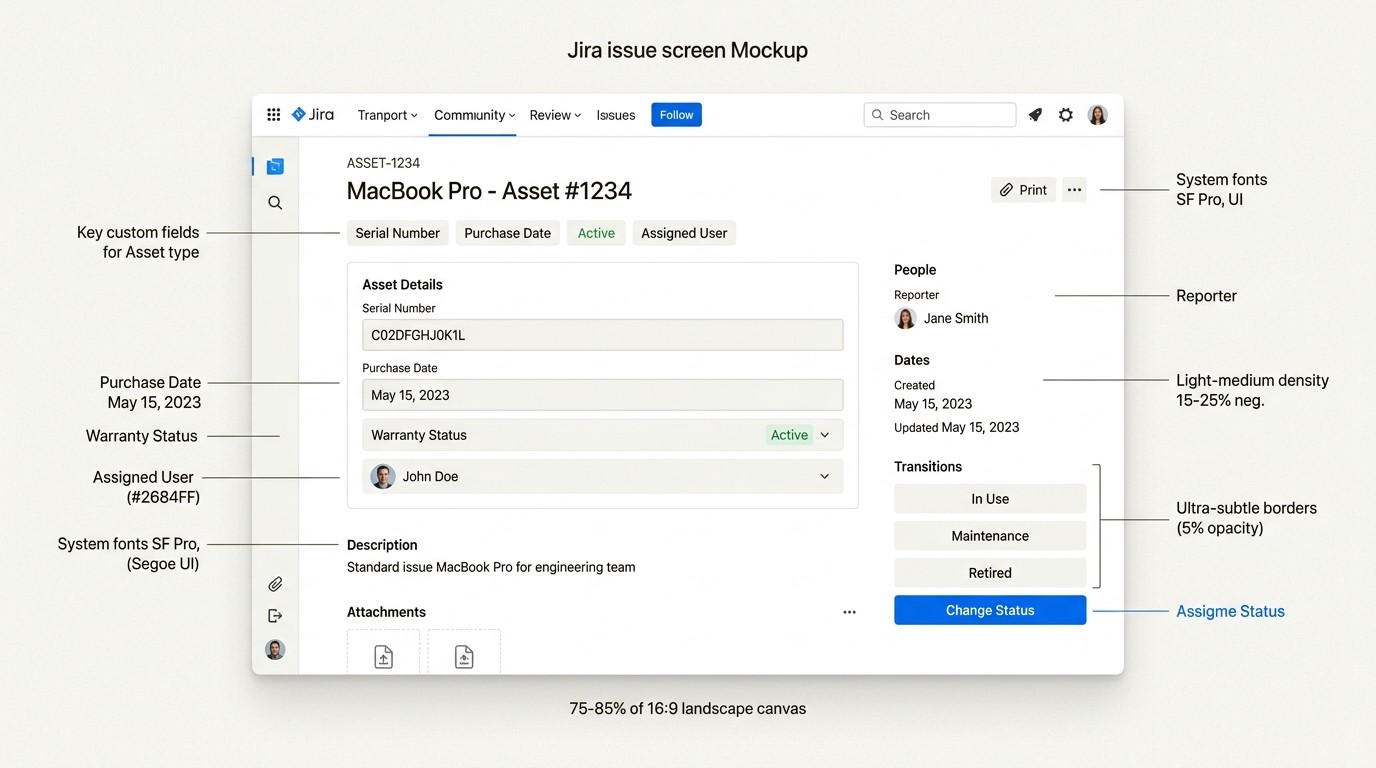
The simplest "free" option is to use Jira itself as your asset database. No apps, no integrations, just creative use of Jira's native features.
How it works:
Create a custom issue type called "Asset"
Add custom fields for asset details (serial number, purchase date, warranty status, assigned user)
Use Jira workflows to track asset status (available, assigned, in repair, retired)
Link asset issues to support tickets
Best for: Very small teams with simple needs, organizations just starting with asset tracking, and teams that want to test asset management processes before investing in a dedicated tool.
Pros:
No additional cost beyond Jira
Uses tools your team already knows
Full Jira automation and reporting capabilities
Cons:
No QR code scanning
No MDM integrations
Manual data entry for everything
Limited asset relationship tracking
Does not scale well beyond 50-100 assets
Comparison table: all options side-by-side
Solution | Free Tier | User Limit | Asset Limit | Key Features | Upgrade Cost |
|---|---|---|---|---|---|
AssetIT | Full features | 10 users | Unlimited | QR codes, booking, reports | $2/user/month |
Atlassian Assets | Not available | N/A | N/A | Requires paid JSM | $20/agent/month+ |
Snipe-IT (self-hosted) | Full features | Unlimited | Unlimited | API, LDAP, licenses | Server costs |
GLPI (self-hosted) | Full features | Unlimited | Unlimited | ITSM suite, CMDB | Server costs |
Manual Jira | Limited | 10 (Jira free) | Unlimited | Basic tracking | Jira upgrade |
When to upgrade from free options
Free tiers work until they stop working. Here are the signs you've outgrown them:
Team size limits
AssetIT's free tier caps at 10 users. If your team is growing, you will need to budget for the upgrade. At $2/user/month for 11-100 users, it is still affordable compared to enterprise alternatives.
Integration needs
Free options typically don't include MDM integrations like Microsoft Intune or Jamf. If you need automatic device syncing, you will need to upgrade to a paid solution like Asset Management for Jira or add Snipe-IT's paid hosting.
Compliance and audit requirements
Manual tracking and open-source solutions may not meet your compliance needs. SOC 2 certification, audit trails, and data residency controls become important as you scale.
Advanced reporting
When you need more than basic lists (trend analysis, depreciation tracking, compliance reporting), free tools often fall short.
Cost comparison:
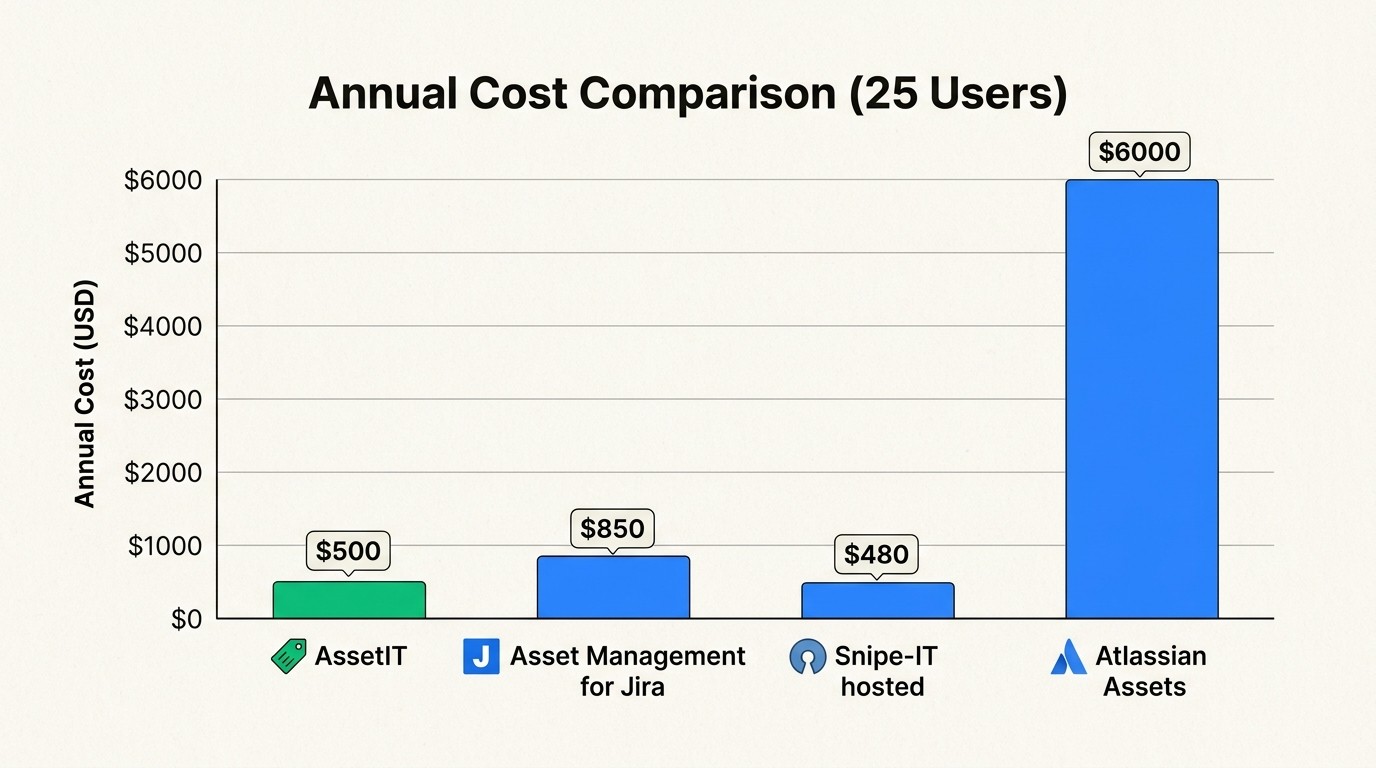
At 25 users, AssetIT costs $500/year. Atlassian Assets (via JSM Standard) costs $6,000/year for the same user count. The math is clear: if you need more than 10 users but are not a large enterprise, Marketplace apps offer better value than JSM Premium.
Choosing the right free option for your team
Your decision comes down to three factors: team size, technical expertise, and growth plans.
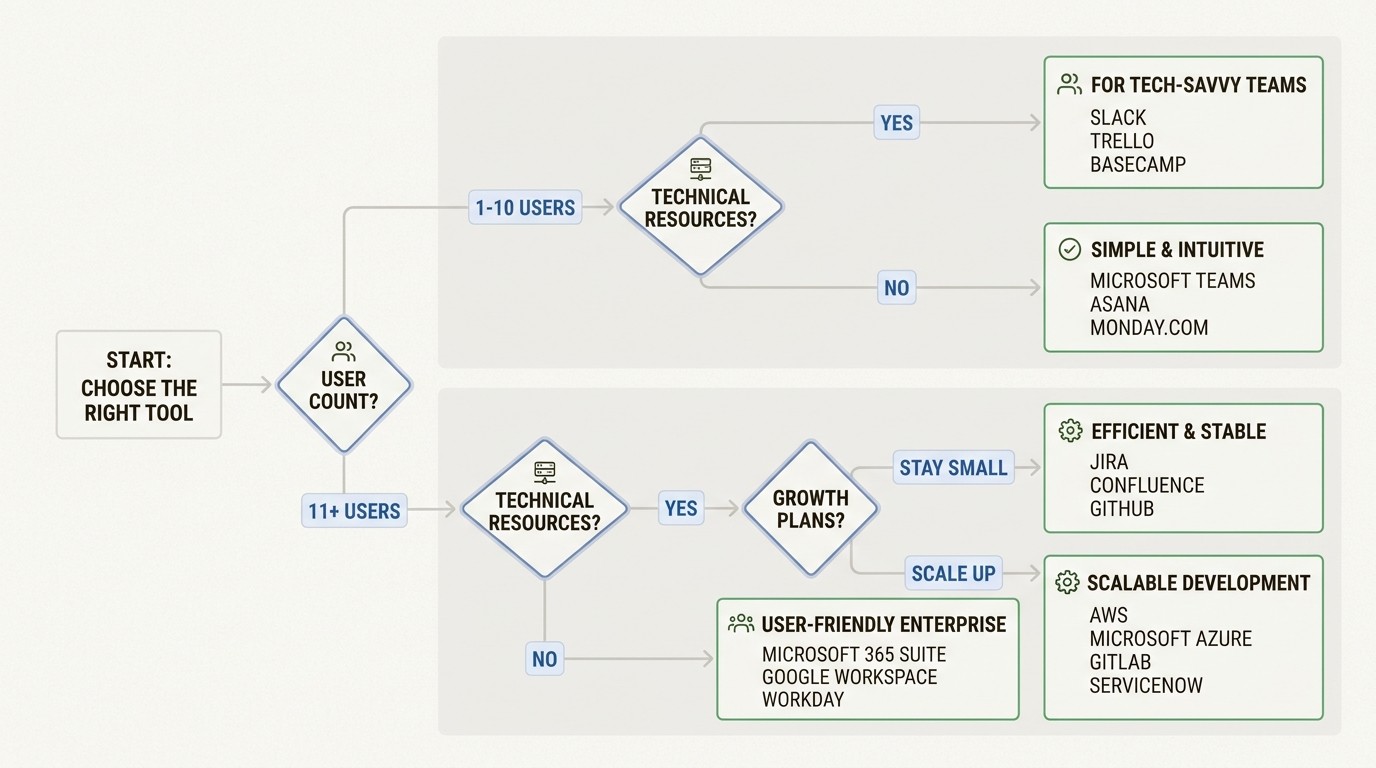
1-10 users, no technical team: Use AssetIT. It is the only option that gives you full features without technical overhead.
11+ users, growing team: Start with AssetIT's free tier to validate your process, then upgrade to their paid plan or consider Asset Management for Jira. Both cost significantly less than JSM Premium.
Technical team, infrastructure available: Snipe-IT or GLPI give you unlimited everything for the cost of server time. Just factor in maintenance time.
Already on JSM Standard or higher: Use the included Assets feature. You have already paid for it.
Testing the waters: Start with manual tracking in Jira. It will help you understand your requirements before you invest in a dedicated tool.
The bottom line: "Free" in Jira asset management usually means "free for small teams" or "free if you have technical resources." Be realistic about your needs, plan for growth, and choose an option that will not force a painful migration when you outgrow it.
Frequently Asked Questions
Can I use Jira asset management options in 2026 for free with unlimited users?
Only if you choose open-source options like Snipe-IT or GLPI and self-host them. Cloud-based solutions with unlimited users require payment. AssetIT offers the most generous free tier at 10 users with full features.
What is the best free Jira asset management option in 2026 for a startup?
AssetIT is the best choice for startups. You get full features for up to 10 users at no cost, and the upgrade path is affordable at $2/user/month. It's also SOC 2 certified, which helps with early compliance needs.
Do any free Jira asset management options in 2026 include QR code scanning?
Yes, AssetIT includes QR code generation and scanning in its free tier. Open-source options like Snipe-IT also include this feature. Atlassian Assets requires JSM Standard or higher and does not include native QR scanning.
How do free Jira asset management options in 2026 compare to paid alternatives?
Free options work well for small teams (under 10 users) or technical teams who can self-host. Paid alternatives like Asset Management for Jira offer MDM integrations, advanced reporting, and better scalability starting at around $2.85/user/month, which is significantly less than Atlassian's native Assets ($20/agent/month minimum).
Can I migrate from a free Jira asset management option to a paid one later?
Yes, most apps support CSV export/import for migration. AssetIT and Asset Management for Jira both offer import tools. Open-source solutions like Snipe-IT and GLPI also support standard export formats. Plan your data structure early to make future migration easier.
Are there any truly unlimited free Jira asset management options in 2026?
Only self-hosted open-source solutions like Snipe-IT and GLPI offer truly unlimited users and assets. However, you're trading license fees for server costs and maintenance time. For most teams, AssetIT's free tier (10 users, unlimited assets) provides the best balance of features and zero cost.



