BlueTally vs Snipe-IT: A 2026 ITAM Comparison
An in-depth comparison of BlueTally vs Snipe-IT on features, automation, pricing, and scalability to help you choose the best ITAM solution for 2026.

Colin Reed
IT Expert and Content Writer
Last Updated
Sooner or later, every growing IT team realizes their trusty spreadsheet is no longer sufficient for asset tracking. That simple sheet for tracking laptops and licenses can become difficult to manage and prone to errors. When that happens, teams start looking for a dedicated IT asset management (ITAM) tool. Two common options are BlueTally and Snipe-IT.
They are both popular, but they approach the same problem from different angles. You have BlueTally, a modern, cloud-native tool designed around automation, and then you have Snipe-IT, a powerful, open-source system that gives you total control.
The one you pick can impact how your team works day-to-day. This post will break down BlueTally vs Snipe-IT. We will look at features, pricing, and what they are actually like to use, so you can figure out which is the right fit for your team.
A closer look at BlueTally
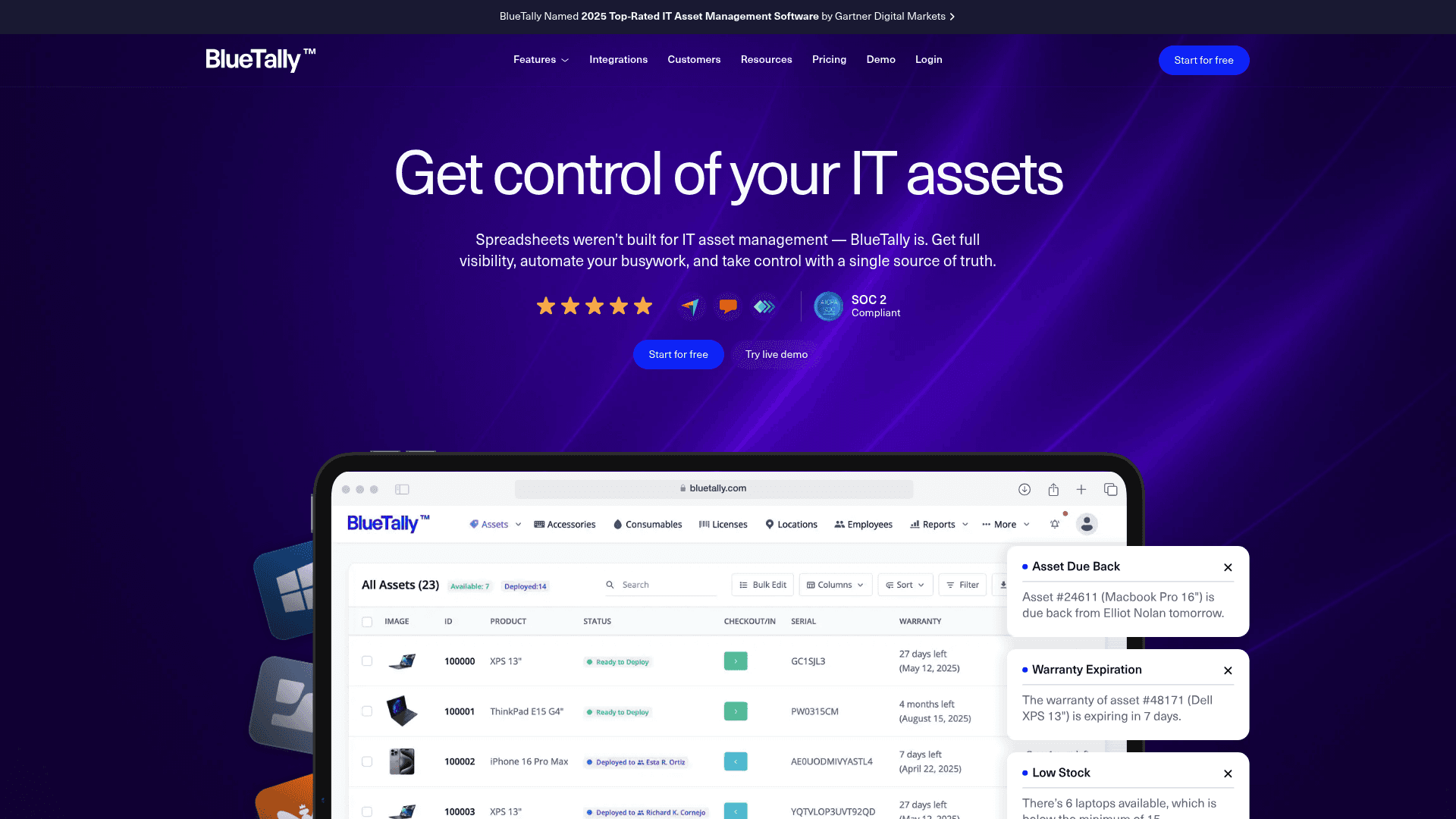
BlueTally is a cloud-based ITAM software built to make asset tracking simple and automated. It is for teams who want one place to see all their hardware, software, and accessories, without the headache of managing servers or dealing with a complicated setup. The platform is designed to allow users to get set up within a few hours. It is also SOC 2 Type II certified, so it meets high security standards.
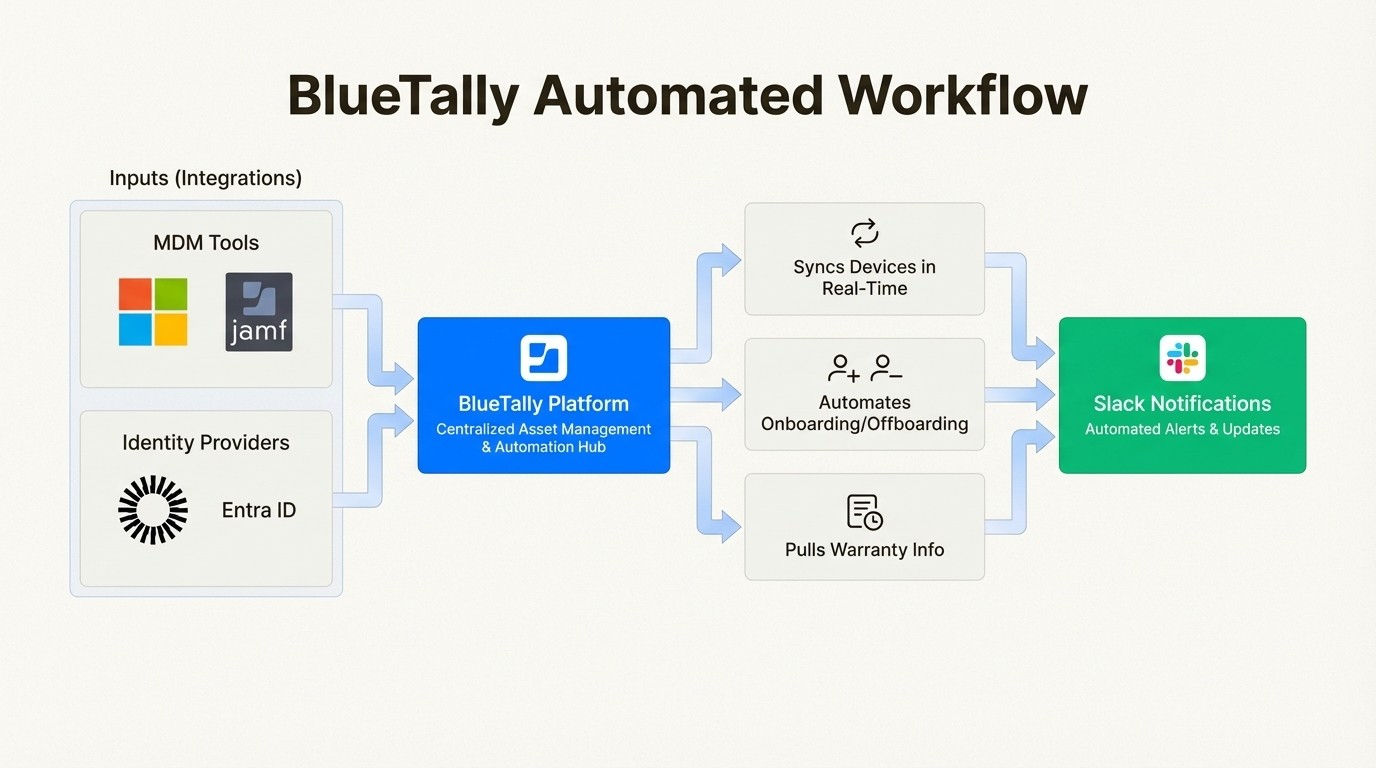
Its main advantage is its list of ready-to-go integrations. It connects directly with common MDM tools like Microsoft Intune, Jamf, and Kandji, so it automatically syncs your devices in real-time, reducing the need for manual data entry. It also has automations, like looking up warranty info from Dell and Lenovo, integrating with your identity provider for employee onboarding and offboarding, and alerting you when inventory is low.
BlueTally is suited for IT teams that want a managed solution. If you value automation that works right away and prefer a service where maintenance and security are handled for you, it is a considerable option.
A closer look at Snipe-IT

The Snipe-IT website homepage, an important factor in the BlueTally vs Snipe-IT choice.
Snipe-IT is a free, open-source IT asset management system that puts you in complete control. Since you host it yourself, you have full command over your data and infrastructure. It comes in two versions: a free one you can download and install on your own servers, or a paid cloud-hosted option that includes a 99.99% uptime guarantee.
Being open-source, Snipe-IT’s biggest strengths are its flexibility and customizability. You can modify it to fit your exact needs. It also has security features built-in, like two-factor authentication and one-way password hashing. While it lacks the pre-built integrations of a tool like BlueTally, it does have a robust JSON REST API that lets you build your own custom workflows and connect to other tools.
Snipe-IT is an option for organizations on a tight budget, especially those with in-house IT professionals with server management experience. If you have the technical knowledge and are willing to put in the time for setup and maintenance, you get a capable, enterprise-grade tool for free.
BlueTally vs Snipe-IT: A feature comparison
Choosing between a modern SaaS tool and a powerful open-source platform comes down to a few key areas. To help clarify the differences, this chart breaks down how BlueTally and Snipe-IT measure up on the features that matter most to IT teams.
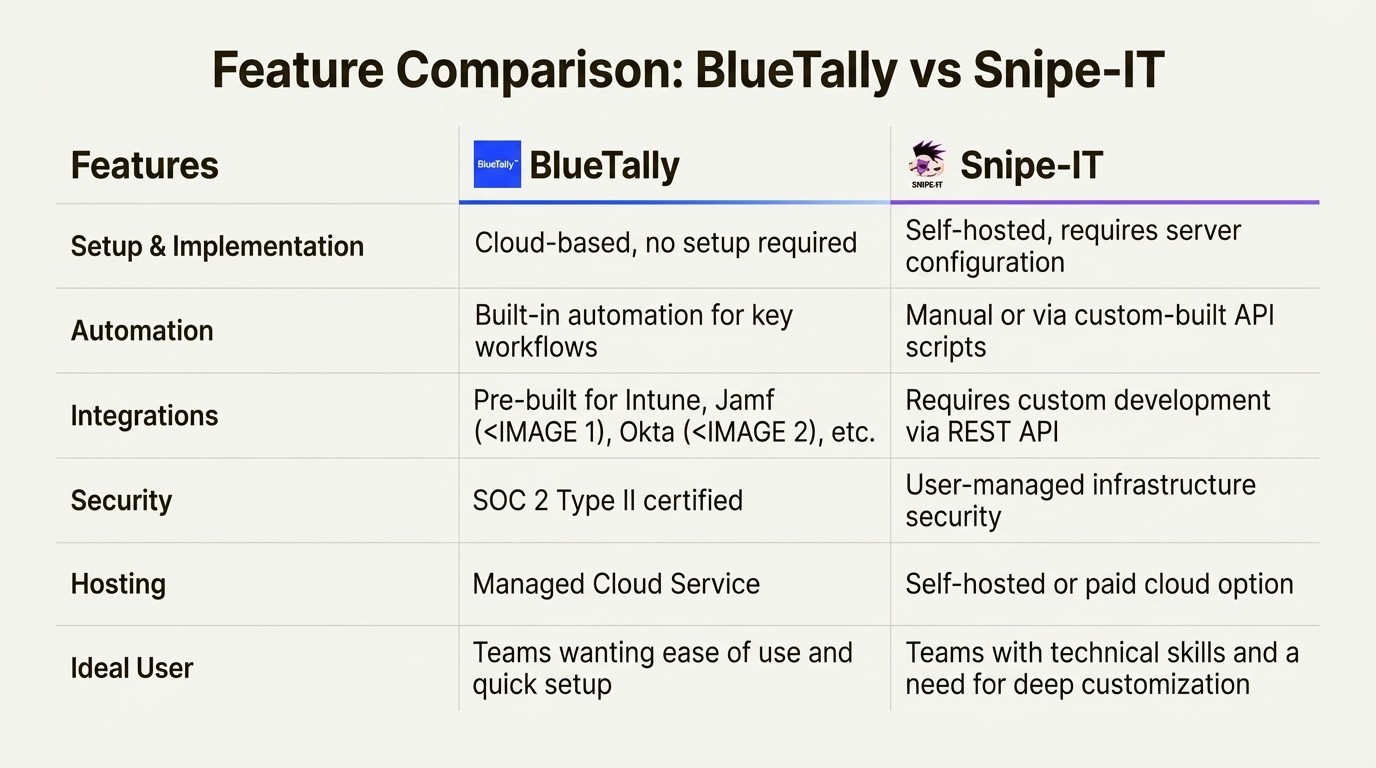
Let's dig into what matters most to IT teams and see how BlueTally and Snipe-IT measure up.
Ease of use and implementation
BlueTally:
As a cloud-native tool, there are no servers to set up or software to install. You just sign up and can begin. The interface is clean and easy to navigate, so your team can get started without extensive training. The platform includes features like one-click import from spreadsheets, which means you can get your existing data in and be up and running in hours, not days.
Snipe-IT:
The self-hosted version of Snipe-IT has different requirements. It is web-based software, but you have to run it on your own web server (Linux, Windows, or Mac). That means you are responsible for setting up the server, configuring the database, and handling the installation. This requires someone with server management experience. The paid hosted version handles the server side of things, but it still takes more initial setup than a typical SaaS tool.
Asset management within Jira
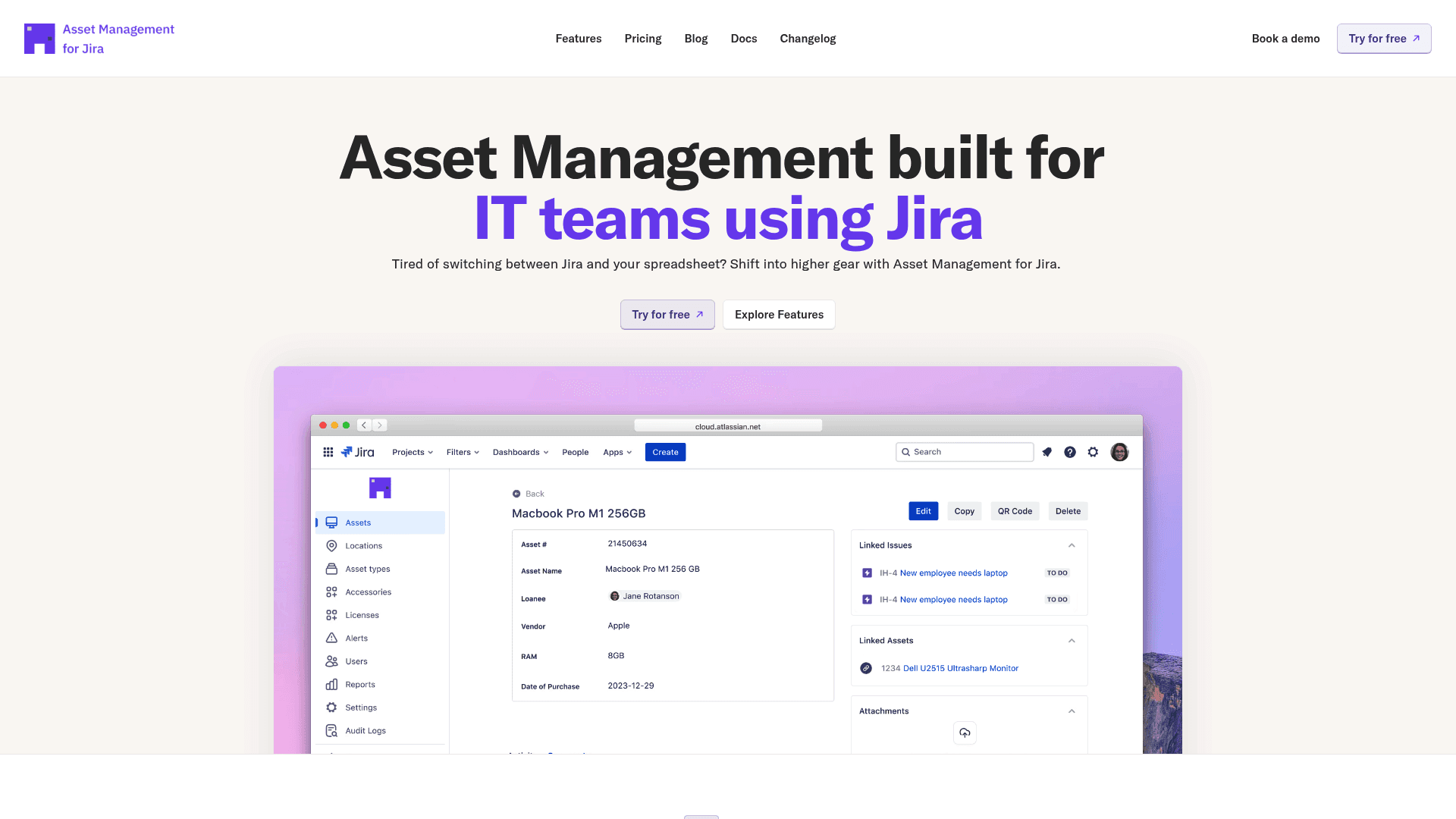
For teams that use Jira, the simplest tool can be one that is integrated into your existing platform. An embedded app like Asset Management for Jira brings your entire inventory right into your Jira instance. There is no need to learn a new platform because all your asset tracking happens next to your support tickets, which unifies your workflow.
Automation and integrations
BlueTally:
Automation is a core feature of BlueTally. It comes with a long list of native integrations that handle parts of asset management. It syncs devices from Intune, Jamf, and Kandji, provisions users from Okta or Entra ID for onboarding and offboarding, and can send notifications to Slack. It also automatically pulls warranty information for Dell and Lenovo devices. This built-in automation can be a time-saver.
Snipe-IT:
Snipe-IT does not include native, pre-built integrations for automatically syncing devices from major MDM providers. If you want that kind of automation, you have to build it yourself using their powerful REST API. You might find some community-built scripts online, but this route requires developer resources to build and maintain over time.
Integrating asset data with Jira workflows
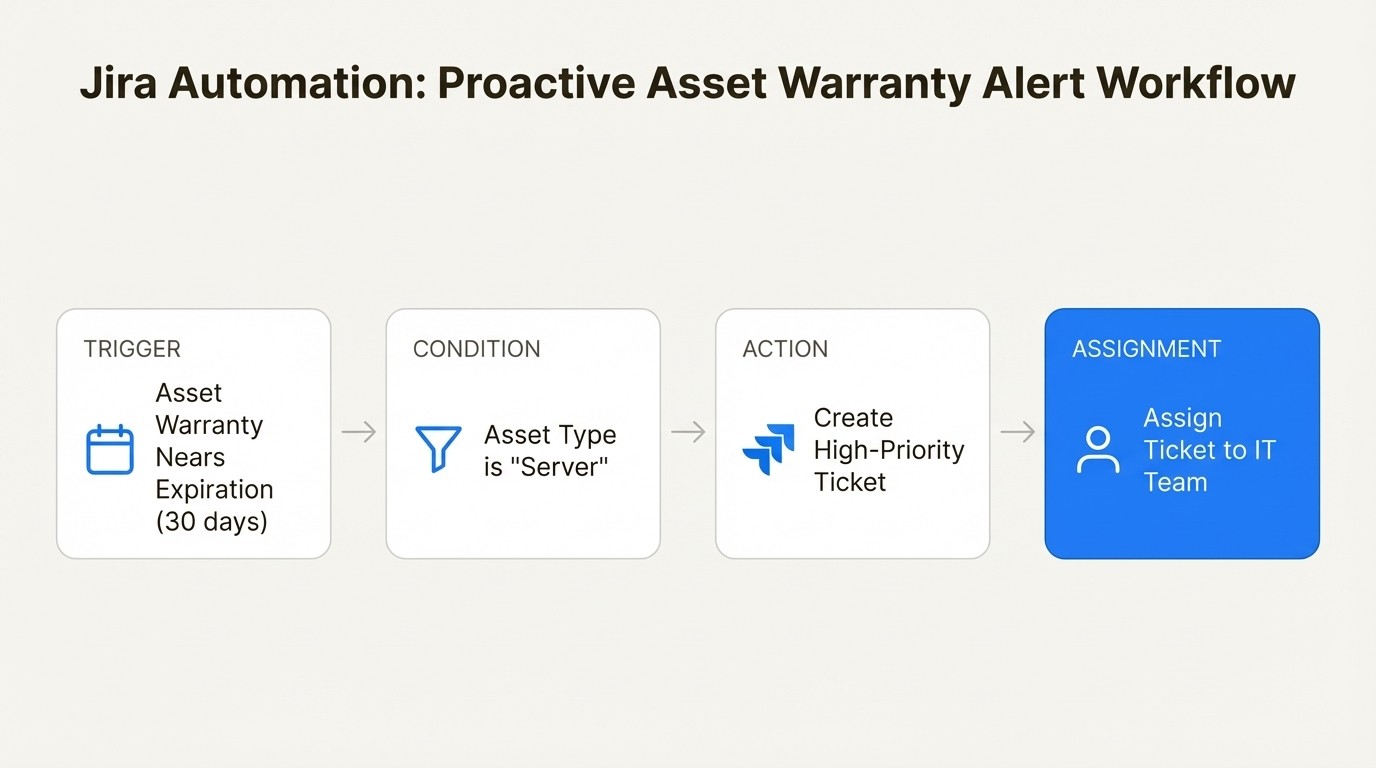
A tool like Asset Management for Jira takes this a step further by connecting your asset data directly into Jira's own automation engine. This opens up many possibilities. For instance, you could create a rule that automatically assigns a high-priority ticket to your IT team whenever a server's warranty is 30 days from expiring. That is the kind of proactive, workflow-based automation that can help prevent future issues.
Security and compliance
BlueTally:
BlueTally holds SOC 2 Type II certification, a standard for companies that need to meet specific compliance rules. Their data is hosted on AWS servers in Germany, making it fully GDPR compliant, and all data is protected with 256-bit SSL encryption in transit and AES-256 at rest.
Snipe-IT:
Snipe-IT has application-level security, including two-factor authentication, CSRF protection, and AES-256 encryption for certain fields. But if you are using the self-hosted version, you are responsible for securing the infrastructure. This means you have to manage SSL certificates, server patching, and backups on your own. The paid hosted version takes care of this for you and gives each customer their own dedicated database, so your data is not mixed with others.
The Atlassian security ecosystem
A native Jira app like Asset Management for Jira benefits from the security of the Atlassian ecosystem. It has earned Cloud Fortified status, which is Atlassian’s top seal of approval for security, reliability, and support. It means the app has gone through security testing and is backed by a bug bounty program.
Pricing: A breakdown of total cost
When comparing a subscription tool to an open-source one, it is helpful to look at the Total Cost of Ownership (TCO), not just the price tag.
BlueTally pricing:
BlueTally has simple, transparent pricing based on features.
Plan | Price (Billed Annually) | Key Features |
|---|---|---|
Free | $0 | Up to 50 assets |
Starter | $99 / month | Unlimited Assets & Users, API Access |
Business | $299 / month | All Starter features + SCIM, SSO, Jira Integration |
Corporate | $499 / month | All Business features + Multi-Tenancy |
Snipe-IT pricing:
Snipe-IT’s pricing is structured differently.
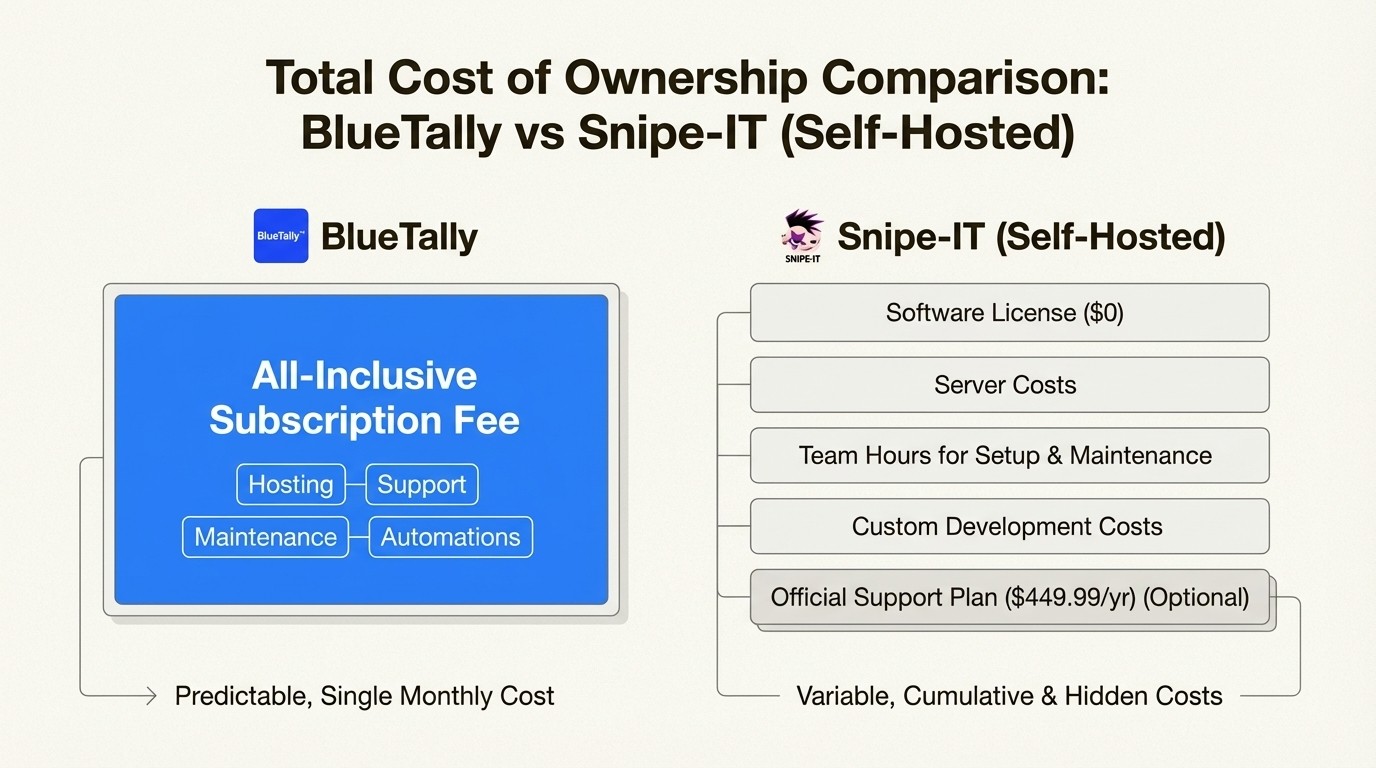
Self-Hosted: The software is free ($0). But the TCO includes the cost of your server, your team's time for setup and ongoing maintenance, and any custom development. If you want official support, plans like Basic Support start at $449.99 per year.
Cloud-Hosted: Their managed hosting starts at $39.99 per month for the Basic plan, which covers upgrades and server maintenance.
While Snipe-IT's self-hosted option has no upfront software cost, its TCO can increase once you factor in the hours your team will spend on setup, maintenance, and building custom integrations. BlueTally's subscription fee is all-inclusive, covering hosting, support, and all its pre-built automations.
Native Jira integration as an alternative
Both BlueTally and Snipe-IT are external systems. If your support team spends all day in Jira Service Management, using a separate asset tool means switching between apps. This process can involve copying and pasting serial numbers and trying to piece together an asset's history, which can impact ticket resolution time.
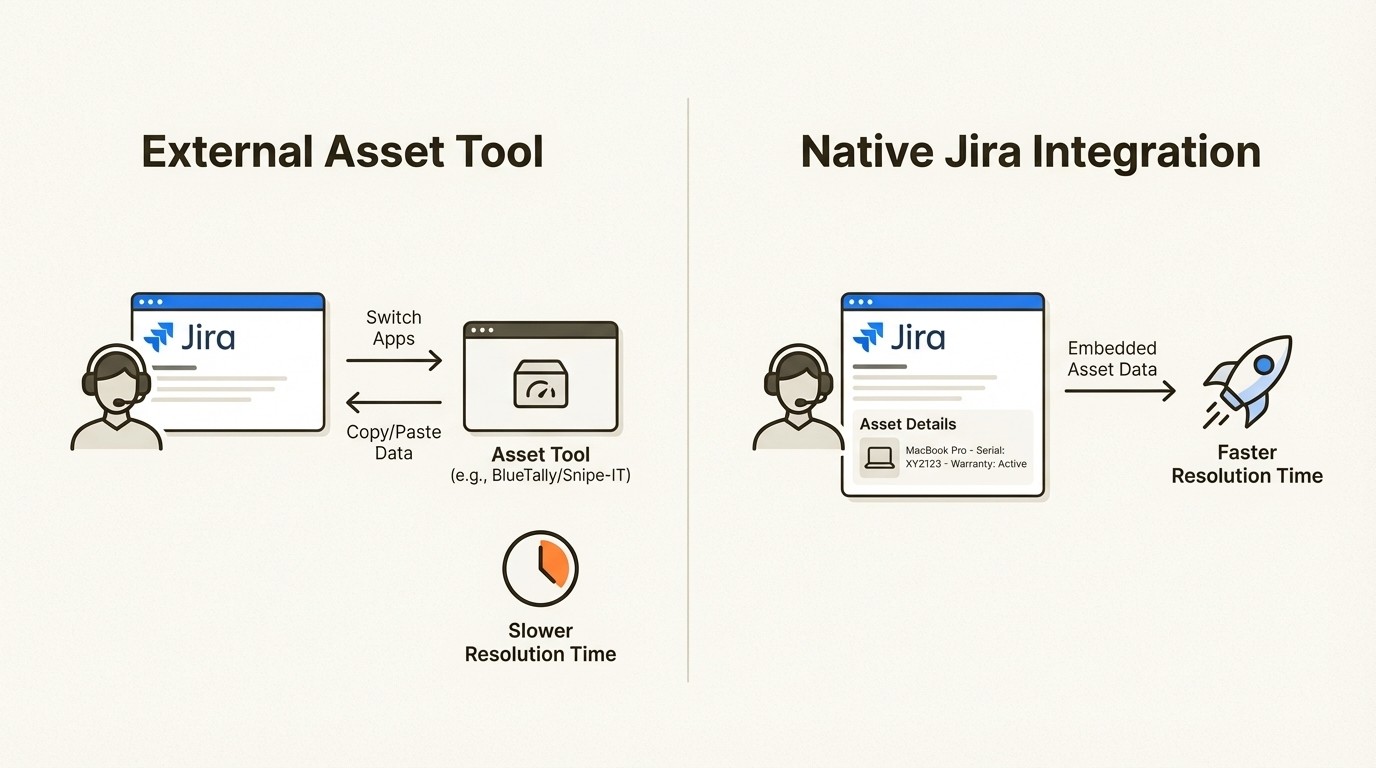
This is where a native solution can make a difference. Asset Management for Jira was built specifically to solve this problem by bringing your entire asset inventory inside Jira.
This native integration can provide tangible benefits. For example, some teams report faster ticket resolution times because agents do not have to leave a Jira issue to see an asset's full history, warranty status, and past support tickets.
Agents can link assets directly to tickets, run detailed reports using the JQL they already know, and set up powerful automations. It creates a single source of truth for both your support process and your asset data, all inside the tool your team already uses every day.
Making the right choice
Which tool should you choose? It boils down to your team's priorities and resources.
Choose Snipe-IT if: You have strong in-house technical skills, a very tight budget for software licenses, and need a highly customizable solution where you control every part of the infrastructure.
Choose BlueTally if: Your top priority is ease of use, you want powerful automation right out of the box, and you prefer a managed cloud service that delivers value quickly with minimal setup.
To see a modern ITAM solution in action, you can watch this short video from BlueTally that walks through its core features.
This video from BlueTally provides a walkthrough of its core features for a modern ITAM solution.
For teams that resolve support requests in Jira, a native tool can help close the gap between the service desk and asset data by providing context directly within the Jira interface. You can explore Asset Management for Jira on the Atlassian Marketplace to see how a native solution integrates with IT support workflows.
Frequently Asked Questions
What is the main difference between BlueTally and Snipe-IT?
The biggest difference is their approach. BlueTally is a cloud-based, ["plug-and-play" SaaS tool](https://www.capterra.ca/compare/150016/1022846/snipe-it/vs/bluetally) focused on out-of-the-box automation. Snipe-IT is a free, open-source platform that you host yourself, offering maximum control and customization if you have the technical resources.
How do BlueTally and Snipe-IT handle automation?
BlueTally provides out-of-the-box automation with pre-built integrations for MDM tools, identity providers, and warranty information. With Snipe-IT, similar automations can be built and maintained using its REST API.
Is the free version of Snipe-IT always the lower-cost option?
Not necessarily. While the Snipe-IT software is free, you have to account for the "Total Cost of Ownership." This includes server costs, your IT team's time for setup and ongoing maintenance, and any development needed for custom integrations. BlueTally's subscription fee includes all of that.
How does the setup process differ for BlueTally vs Snipe-IT?
BlueTally is a SaaS product where users sign up to begin. The self-hosted version of Snipe-IT requires users to [set up their own web server](https://snipe-it.readme.io/docs/overview), configure a database, and handle the installation.
How do BlueTally and Snipe-IT compare on security and compliance?
Both platforms have security features. BlueTally provides SOC 2 Type II certification and is GDPR compliant. With self-hosted Snipe-IT, the user is responsible for securing the underlying server infrastructure.



